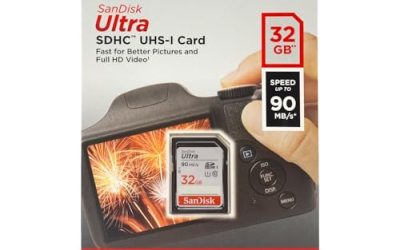
Our Short List of 3

- Brand and model: Samsung PRO Endurance, MB-MJ128KA/AM
- Format: microSDXC with full-size SD adapter
- Capacity: 128GB
- Speed ratings: Class 10, U3, V30

- Brand and model: SanDisk High Endurance Video microSDXC, SDSQQNR-128G-GN6IA
- Format: microSDXC with adapter
- Capacity: 128GB
- Speed ratings: Class 10, U3, V30

- Brand and model: SanDisk MAX Endurance microSDXC, SDSQQVR-128G-GN6IA
- Format: microSDXC with adapter
- Capacity: 128GB
- Speed ratings: Class 10, U3, V30
All 4 Picks at a Glance
| Product | Specs | Action |
|---|---|---|
| 1. Samsung PRO Endurance 128GB microSDXC — The Endurance Benchmark |
| Check price on Amazon |
| 2. SanDisk High Endurance 128GB microSDXC — The Monitoring Specialist |
| Check price on Amazon |
| 3. SanDisk MAX Endurance 128GB microSDXC — The Longest SanDisk Rating |
| Check price on Amazon |
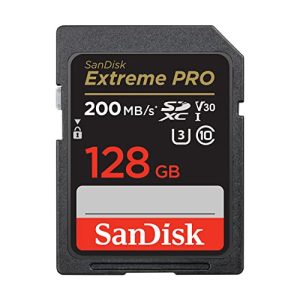
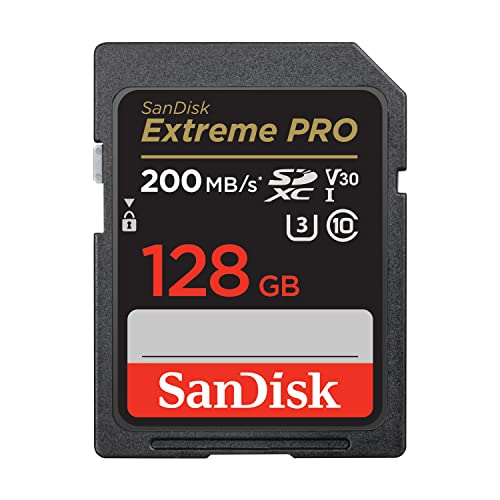 4. SanDisk Extreme PRO 128GB SDXC — The Full-Size Slot Option |
| Check price on Amazon |
Key takeaways
- Compare endurance SD and microSD cards for cellular trail cameras by capacity, speed class, write life and slot fit, with formatting and rotation tips.
As an Amazon Associate we earn from qualifying purchases.
A cellular trail camera works its memory card harder than almost any other camera you own. Every trigger writes a burst of stills or a video clip to the card, the camera then reads that file back to transmit a thumbnail or a full image over the mobile network, and the cycle repeats day and night, in heat, frost, and damp, for months between visits. A card that is perfectly happy in a phone or a holiday camera can slow down, corrupt files, or simply wear out under that constant write load. Choosing the best SD card for a cellular trail camera is therefore less about headline read speed and more about endurance rating, sustained write performance, capacity matched to your transmission plan, and, before anything else, fitting the physical slot your camera actually has.
This guide covers four cards sold on Amazon US that suit that workload in different ways. Three are endurance-rated microSDXC cards built for continuous recording devices, in the format most current cellular models accept, often with a full-size adapter in the pack for card readers and older slots. The fourth is a rugged full-size SDXC card for cellular models that take a standard SD card rather than a microSD card. None of them is a camera, and none of them changes what your camera can do; each one is simply storage that is better matched to repeated writing than a general-purpose card.
Disclosure: This article contains affiliate links. If you buy through these links, we may earn a commission at no additional cost to you.
How to Choose an SD Card for a Cellular Trail Camera
Start with the slot: microSD or full-size SD
Cellular trail cameras are not consistent about card format. Many recent models use a microSD card, sometimes with a stated maximum capacity, while others still use a full-size SD card. Check the manual or the moulded markings beside the slot before ordering. A microSD card in its adapter can work in a full-size slot, and many trail camera makers accept that arrangement, but a full-size card can never fit a microSD slot. If your camera maker specifies one format only, follow that specification rather than improvising, because a poorly seated adapter is a common cause of intermittent card errors in the field.
Respect the camera’s maximum capacity
Bigger is not automatically better. Many trail cameras state a maximum supported capacity, commonly at 32GB, 64GB, 128GB, or 256GB depending on the model and its firmware. A card larger than the supported maximum may not be recognised at all, or may be recognised unreliably. Match the card to the stated limit. Within that limit, choose capacity based on how the camera is set up: a camera sending a thumbnail for every trigger and storing full-resolution files on the card fills space far more slowly than one recording long videos at every trigger with transmission of clips enabled.
Endurance rating matters more than read speed
Trail cameras write constantly and read occasionally, which is the opposite of most consumer card use. Endurance lines from Samsung and SanDisk are built and rated for continuous recording in monitoring devices, with stated recording-hour ratings that rise with capacity. That rating is the clearest published signal that a card is designed for write-heavy work. A fast general-purpose card can post higher read numbers yet carry no endurance rating at all, which makes it a poorer match for a camera that may overwrite its oldest files for an entire season. For a cellular camera left out for months, endurance is the first specification to compare and speed class is the second.
Speed class: Class 10, U3, and V30 explained
The cards below carry Class 10 ratings with U3 and V30 marks, which describe sustained minimum write performance suited to Full HD and 4K video capture. A cellular trail camera writing high-resolution stills and short clips does not need exotic speed, but it does need the card to keep up during a rapid burst on a busy trail, when several triggers can arrive close together. A card that falls behind can delay the camera’s recovery time and, in the worst case, cost you the second animal in a sequence. U3 and V30 cards clear that bar comfortably for trail camera workloads, and there is little benefit in paying attention to higher video classes designed for cinema cameras.
Formatting and file system habits
Format a new card in the camera itself before first use, not only on a computer, so the camera lays down the file system and folder structure it expects. Most cameras at these capacities use exFAT for SDXC cards, and an in-camera format removes any doubt about compatibility. Reformat the card in the camera whenever you swap it into a different camera model, and after you have copied off everything you want to keep. If a camera ever reports a card error, stop, copy what you can, and retire or reformat the card rather than trusting it for another deployment, because card faults rarely heal themselves outdoors.
Plan a two-card rotation
The simplest reliability upgrade costs one extra card. Carry a second formatted card on every visit, swap it for the card in the camera, and review the removed card at home at your leisure. Rotation halves the write load on each card across a season, gives you a spare if a card fails in the field, and means the camera is never left cardless while you check images.
The Best SD Cards for Cellular Trail Cameras
1. Samsung PRO Endurance 128GB microSDXC — The Endurance Benchmark
- Brand and model: Samsung PRO Endurance, MB-MJ128KA/AM
- Format: microSDXC with full-size SD adapter
- Capacity: 128GB
- Speed ratings: Class 10, U3, V30
The Samsung PRO Endurance is the card in this group most directly built for the job. Its Amazon US listing describes it as a microSDXC memory card with adapter for dash cams, body cams, and security cameras, which is the same continuous-recording workload a cellular trail camera imposes. Samsung rates the line for long recording life that rises with capacity, stating up to 70,080 hours of recording for the 128GB model, with the larger 256GB model rated higher still. The listing gives read speeds up to 100 MB/s and write speeds up to 40 MB/s, with Class 10, U3, and V30 ratings, so burst stills and video clips write without the card becoming the bottleneck.
The listing also states a five-year manufacturer warranty for the 128GB model and resistance to water, drops, magnets, X-rays, and temperature extremes, which reads like a checklist written for a camera strapped to a tree. The model number is MB-MJ128KA/AM, and the card ships with a full-size SD adapter, useful for reading files in a laptop slot or card reader back home. Capacity is the main decision here: 128GB suits a camera transmitting thumbnails and storing full files for a season on a moderately busy site, while very active feed sites with video enabled will fill it faster than quiet woodland placements.
Choose the PRO Endurance if your cellular camera takes microSD and you want the strongest published endurance rating in this group. Check your camera’s maximum supported capacity first, because the rating advantage is worthless if the camera cannot address the card.
2. SanDisk High Endurance 128GB microSDXC — The Monitoring Specialist
- Brand and model: SanDisk High Endurance Video microSDXC, SDSQQNR-128G-GN6IA
- Format: microSDXC with adapter
- Capacity: 128GB
- Speed ratings: Class 10, U3, V30
SanDisk’s High Endurance line is the company’s card family for dash cams and home monitoring systems, and its Amazon US listing for the 128GB card carries Class 10, U3, and V30 ratings with 4K UHD support. The model number is SDSQQNR-128G-GN6IA, and the card includes an adapter, which keeps it flexible between a microSD camera slot and full-size readers. SanDisk positions this line for long-lasting performance in devices that record for extended periods, which is precisely the duty cycle of a cellular camera sending images from a remote property or a hunting lease.
In practical terms, this is the straightforward middle choice of the group: a recognised endurance line, a useful capacity, and speed ratings comfortably above what a trail camera can demand. The 128GB size holds a long run of high-resolution stills even when the camera is set to multi-shot bursts, and it gives video mode enough headroom that the camera’s overwrite cycle turns over slowly, which spreads wear across the card rather than concentrating it. Owners running several cameras often standardise on one card model so that spares, formatting, and rotation stay simple, and this card suits that approach well.
Choose the High Endurance if you want an endurance-rated microSD card from the other major monitoring-card line and your camera supports 128GB. If your camera’s stated maximum is 32GB or 64GB, buy this same line in the smaller capacity rather than forcing the larger card.
3. SanDisk MAX Endurance 128GB microSDXC — The Longest SanDisk Rating
- Brand and model: SanDisk MAX Endurance microSDXC, SDSQQVR-128G-GN6IA
- Format: microSDXC with adapter
- Capacity: 128GB
- Speed ratings: Class 10, U3, V30
The MAX Endurance is SanDisk’s step up from the High Endurance line, listed on Amazon US for home security cameras and dash cams with Class 10, U3, and V30 ratings and 4K UHD support. The model number is SDSQQVR-128G-GN6IA, and like the other microSD cards here it includes an adapter. SanDisk builds this line for the longest recording life in its consumer range, aimed at devices that record continuously rather than occasionally, so it is the natural SanDisk choice for a cellular camera deployed for a full season with minimal visits.
That positioning matters most for cameras on sites you rarely reach, where a worn-out card can mean a silent camera that still transmits a healthy battery reading. The MAX Endurance also makes sense as the second card in a rotation pair with the High Endurance above, since both share format and speed class.
Choose the MAX Endurance if your visits are infrequent and you want SanDisk’s longest-rated endurance line in a microSD format. As with every card here, confirm the capacity against your camera manual before ordering.
4. SanDisk Extreme PRO 128GB SDXC — The Full-Size Slot Option
- Brand and model: SanDisk Extreme PRO SDXC UHS-I, SDSDXXD-128G-GN4IN
- Format: full-size SDXC
- Capacity: 128GB
- Speed ratings: Class 10, U3, V30
Some cellular trail cameras still take a full-size SD card, and for those models the SanDisk Extreme PRO SDXC is the card to consider. Its Amazon US listing describes a full-size SDXC card, model SDSDXXD-128G-GN4IN, with Class 10, U3, and V30 ratings, read speeds up to 200 MB/s, and write speeds up to 90 MB/s. The listing states temperature-proof, waterproof, shock-proof, and X-ray-proof construction, which suits a card living outdoors, and those write speeds are far beyond trail camera needs, which means the card will never be the reason a burst sequence stalls.
Be clear about the trade-off, because it is the honest one in this guide: the Extreme PRO is a speed-focused card, not an endurance-rated monitoring card, so it does not carry the published recording-hour ratings of the three microSD cards above. For a full-size slot it remains a sensible choice because of its rugged stated construction and its sustained V30 write rating, but it rewards a stricter rotation habit. Swap it more often, keep a formatted spare in the camera bag, and treat it as a consumable on a busy site rather than a fit-and-forget component. If your camera takes microSD, choose one of the endurance cards above instead of using this card’s format as a reason to change your setup.
Choose the Extreme PRO if your cellular camera has a full-size SD slot and you want a rugged, fast card from a current line. Do not choose it for a microSD camera, and do not expect an endurance rating it does not claim.
Comparison Table
| Product | Format | Capacity | Speed class | Endurance positioning | Best for |
|---|---|---|---|---|---|
| Samsung PRO Endurance | microSDXC with adapter | 128GB | Class 10, U3, V30 | Rated up to 70,080 recording hours at this capacity | microSD cellular cameras on long deployments |
| SanDisk High Endurance | microSDXC with adapter | 128GB | Class 10, U3, V30 | Endurance line for monitoring devices | Everyday cellular trail camera use |
| SanDisk MAX Endurance | microSDXC with adapter | 128GB | Class 10, U3, V30 | Longest-rated SanDisk endurance line | Remote sites with infrequent visits |
| SanDisk Extreme PRO | Full-size SDXC | 128GB | Class 10, U3, V30 | Speed line with rugged construction, no endurance rating | Cellular cameras with a full-size SD slot |
Frequently Asked Questions
Can I use a regular phone microSD card in a cellular trail camera?
You can, and it will usually work at first, but it is a poor long-term match. General-purpose cards carry no endurance rating for continuous writing, and a cellular camera writes far more than a phone does. An endurance-rated card costs little extra effort to choose and is built for exactly this workload, so it is the sensible default for any camera left outdoors for months.
What capacity should I buy?
Stay within your camera’s stated maximum first. Within that limit, 128GB suits most cellular setups that transmit thumbnails and store full-resolution files, while busy feed sites with video at every trigger fill cards faster and benefit from the largest supported capacity. A camera set to send full videos will also use far more data, so card size and transmission settings should be planned together.
Should I format the card in the camera or on a computer?
Format in the camera. An in-camera format creates the file system and folder structure that model expects, and it clears the card completely before a deployment. Formatting on a computer can work, but it introduces variables that are hard to diagnose from a tree stand or a fence line, so keep the habit simple and always format where the card will be used.
Why did my camera stop sending images but still show battery life?
A failing or full card is a common cause. The camera can stay powered and connected while being unable to write new files or read files for transmission. Swap in a known-good formatted card before assuming a network or camera fault, and check the removed card on a computer as soon as you can.
How often should I replace a trail camera card?
There is no fixed interval, because write load varies enormously with trigger volume and video settings. A practical approach is to rotate two cards per camera, inspect the removed card each visit, and retire any card that produces an error, a corrupted file, or a camera complaint. Endurance ratings give the ceiling; your own rotation and inspection habit decides how close to it you get.
Conclusion
The best SD card for a cellular trail camera is the one that fits your camera’s slot, respects its capacity limit, and carries an endurance rating matched to months of writing. For most microSD cellular cameras, the Samsung PRO Endurance 128GB is the strongest all-round choice, with the SanDisk High Endurance as the alternative monitoring line and the MAX Endurance for remote sites you visit rarely. Cameras with a full-size slot are served by the SanDisk Extreme PRO, provided you rotate it diligently and remember it carries no endurance rating. Whichever card you choose, format it in the camera, carry a spare, and swap on every visit; those habits protect more images than any single specification on the pack.
More from Amazon
Programs that pair well with the guide above. Offers and eligibility are set by Amazon and may change.
Free shipping on eligible items, Prime Video and more. Eligible new members can start with a free trial.
Start a Prime free trialAudiobooks and podcasts to listen to on the go. Eligible new members can start with a free trial.
Try Audible freeAd-free music streaming. Eligible new subscribers can start with a free trial.
Try Music Unlimited freeA free business account with business pricing and bulk-buying tools for work, shop or home office.
Create a business accountAs an Amazon Associate we earn from qualifying purchases.