Our Short List of 3

- Best for: Browning owners whose manual lists a 32GB maximum, and anyone standardising on one card per camera.
- Capacity: 32GB
- Card type: SDHC, full-size SD
- Interface: UHS-I
- Speed class: Class 10, U1
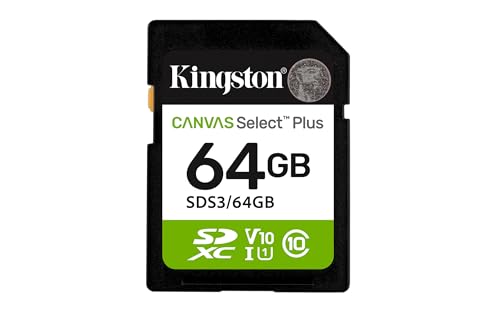
- Best for: SDXC-ready Browning cameras left out for several weeks between checks.
- Capacity: 64GB
- Card type: SDXC, full-size SD
- Interface: UHS-I
- Speed class: Class 10, U1, V10

- Best for: Video-first setups on Browning models that list SDXC and V30-class support.
- Capacity: 64GB
- Card type: SDXC, full-size SD
- Interface: UHS-I
- Speed class: Class 10, U3, V30
All 3 Picks at a Glance
| Product | Specs | Action |
|---|---|---|
| SanDisk Ultra 32GB SDHC UHS-I Memory Card |
| Check price on Amazon |
| Kingston Canvas Select Plus 64GB SDXC Card |
| Check price on Amazon |
| SanDisk Extreme PRO 64GB SDXC UHS-I Card |
| Check price on Amazon |
Key takeaways
- Compare the best SD cards for a Browning trail camera: full-size SDHC and SDXC picks matched on capacity, speed class and outdoor durability.
Choosing an SD card for a Browning trail camera is less about chasing the fastest card on the shelf and more about matching three things: the full-size SD format the camera’s slot takes, a capacity your specific model actually supports, and a speed class that keeps up with the photo bursts and video clips the camera writes in the field. A card that is too large for an older model, or a microSD rattling around in an adapter, can cost you a whole season of images.
This guide is for hunters running one camera over a scrape, landowners watching gates and feeders, and anyone checking several cameras on a rotation who wants cards they can format, swap and trust. Every pick below is a full-size SD, SDHC or SDXC card chosen from the capacity, speed class and durability details stated in its Amazon product page name and specifications.
Quick Picks
As an Amazon Associate we earn from qualifying purchases.
| Product | Best for | Key spec from title |
|---|---|---|
| SanDisk Ultra 32GB SDHC UHS-I | Older Browning models capped at 32GB | 32GB SDHC, Class 10, U1, up to 90MB/s read |
| Kingston Canvas Select Plus 64GB SDXC | Everyday photo and video checks | 64GB SDXC, Class 10, U1, V10, up to 100MB/s read |
| SanDisk Extreme PRO 64GB SDXC UHS-I | Video-heavy setups on SDXC-ready models | 64GB SDXC, Class 10, U3, V30, up to 200MB/s read |
| Lexar Professional SILVER 64GB SDXC | Fast card pulls and quick offloads | 64GB SDXC, Class 10, U3, V30, up to 205MB/s read |
How to Choose
Capacity and your model’s card limit
Capacity is the first filter, because a trail camera can only use a card it recognises. The 32GB SanDisk Ultra in this guide is an SDHC card, the format older Browning models were built around, while the three 64GB picks are SDXC cards that suit models whose manuals list SDXC support. Bigger is not automatically better: an unsupported 64GB card in a camera that stops at 32GB may not record at all. Check the memory card line in your model’s manual, match SDHC or SDXC to what it states, and only then think about how many weeks of images the card needs to hold between visits.
Speed class and video class marks
Trail cameras write in short, intense bursts: a trigger fires, several stills land in a row, and a video clip follows. The Class 10 baseline, shared by every card here, is the floor worth accepting. U1 and V10 cards, like the Kingston Canvas Select Plus, are rated for steady Full HD video writing, which covers the way most trail cameras record. U3 and V30 cards, like the SanDisk Extreme PRO and the Lexar SILVER, carry a higher minimum write guarantee and suit models set to longer or higher-resolution video. Match the rating to the heaviest recording mode you actually enable, rather than paying for headroom the camera never uses.
Full-size SD, not microSD in an adapter
Browning trail cameras take a full-size SD card, and that is the format to buy. A microSD card in an adapter adds a second set of contacts between the camera and the memory, and adapters are a common point of failure outdoors, where moisture, grit and repeated swaps work connections loose. Every card in this guide is a native full-size SD card with no adapter in the chain. If you already own microSD cards for other gear, keep them there. For a camera that may sit untouched for weeks, one solid card body with one set of contacts is the simpler, more reliable arrangement.
Durability for months outdoors
A trail camera card lives in a damp box on a tree, through frost, summer heat and the occasional driving rain that gets past a latch. The SanDisk Ultra’s listing states waterproof, temperature-proof, shockproof and X-ray proof construction, which is the kind of protection worth looking for across any brand. Beyond the card itself, handling matters: keep a small case for spares so contacts stay clean, avoid touching the gold contacts when swapping cards in the field, and retire any card that a camera repeatedly fails to format. A card is cheap insurance compared with losing a month of deer movement.
The 4 Best Options
SanDisk Ultra 32GB SDHC UHS-I Memory Card
- Best for: Browning owners whose manual lists a 32GB maximum, and anyone standardising on one card per camera.
- Capacity: 32GB
- Card type: SDHC, full-size SD
- Interface: UHS-I
- Speed class: Class 10, U1
Browning owners whose manual lists a 32GB maximum, and anyone standardising on one card per camera.
The listing’s technical table and description disagree on write speed, so judge it on its U1 class rather than a headline write figure.
The safe starting point for most Browning owners, this 32GB SDHC card matches the format and capacity ceiling that many trail cameras were designed around, so it drops into older and current models alike without a compatibility gamble. Its U1 rating and Full HD support suit the stills and standard video clips a trail camera writes, and the listing’s stated waterproof, temperature-proof, shockproof and X-ray proof build fits a card that lives outdoors. Pick it when you want one dependable card per camera and check your images often enough that 32GB never becomes a squeeze.
Kingston Canvas Select Plus 64GB SDXC Card
- Best for: SDXC-ready Browning cameras left out for several weeks between checks.
- Capacity: 64GB
- Card type: SDXC, full-size SD
- Interface: UHS-I
- Speed class: Class 10, U1, V10
SDXC-ready Browning cameras left out for several weeks between checks.
Confirm your model supports SDXC before ordering, and ignore the higher speed figure in the listing’s description text; the title and spec table state up to 100MB/s read.
For Browning models whose manuals accept SDXC cards, this Kingston steps capacity up to 64GB while keeping a trail-camera-friendly Class 10, U1 and V10 profile. That combination covers photo bursts and Full HD video without the higher cost tier of V30 media, and the stated read speed of up to 100MB/s keeps card pulls at the truck or kitchen table reasonably quick. It is the natural middle pick: twice the room of a 32GB card for longer sits over food plots or feeders, in a mainstream line built for cameras rather than phones or app storage.
SanDisk Extreme PRO 64GB SDXC UHS-I Card
- Best for: Video-first setups on Browning models that list SDXC and V30-class support.
- Capacity: 64GB
- Card type: SDXC, full-size SD
- Interface: UHS-I
- Speed class: Class 10, U3, V30
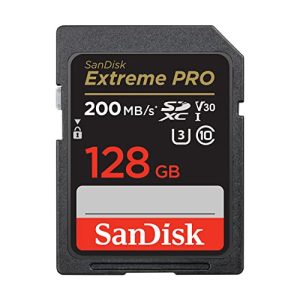
Video-first setups on Browning models that list SDXC and V30-class support.
Sources disagree on this card’s write speed, so rely on the U3 and V30 classes, which guarantee the minimum sustained write, rather than any peak figure.
This is the pick for hunters who lean on video mode, setting longer clips or higher-resolution recording on an SDXC-ready Browning and wanting the stronger write guarantee that U3 and V30 markings carry. The listing rates read speeds up to 200MB/s, which shortens the job of emptying a full card after a pull, while the 64GB capacity holds extended video without demanding weekly visits. It is more card than a stills-only setup needs, but for a camera guarding a gate or recording activity around a blind, the extra headroom in both class and capacity earns its place.
Lexar Professional SILVER 64GB SDXC UHS-I Card
Lexar’s SILVER series card pairs the same U3 and V30 video ratings as the Extreme PRO with the fastest stated transfers in this group, up to 205MB/s read and up to 90MB/s write, which suits users who rotate cards across several cameras and offload everything in one sitting. The 64GB SDXC format fits Browning models that accept SDXC media, and the Professional line is aimed at camera work rather than phone storage. Choose it when your routine involves multiple cameras, a card reader on a laptop, and little patience for slow copies at the end of a long day in the field.
Specs
- Capacity: 64GB
- Card type: SDXC, full-size SD
- Interface: UHS-I
- Speed class: Class 10, U3, V30
- Read speed: up to 205MB/s
- Write speed: up to 90MB/s
- Model: LSDSILV064G-BNNAA
Best for: Multi-camera rotations where fast offloading matters as much as in-camera performance.
Watch out for: It is still an SDXC card, so a Browning model limited to 32GB SDHC cannot use it; keep the SanDisk Ultra on hand for those cameras.
ASIN: B0D12PM7M5
Which One Fits Your Situation
Your Browning is an older model
Start with the SanDisk Ultra 32GB. SDHC is the format these cameras were built around, and a 32GB ceiling is common on models from earlier Browning lines. The card’s U1 class handles stills and standard video, its stated environmental protections suit a camera that stays out all season, and you avoid the dead-card frustration of inserting SDXC media the camera was never designed to read.
One camera, long sits between checks
Take the Kingston Canvas Select Plus 64GB if your manual confirms SDXC support. Doubling capacity stretches the interval between visits over a feeder or plot, and the U1 and V10 ratings cover the photo-and-video mix most hunters run. It is the straightforward upgrade when 32GB cards keep filling before you get back, without stepping up to V30 pricing for recording modes you do not use.
You run video mode heavily
Choose between the SanDisk Extreme PRO and the Lexar SILVER, both 64GB SDXC cards in the U3 and V30 classes for sustained video writing. The Extreme PRO suits a single hard-working camera, while the Lexar’s faster stated read speed helps when you are emptying several cards in one session. Either way, confirm SDXC support first, because the strongest video card is useless in a camera that cannot read its format.
You swap cards across several cameras
Standardise on one format per camera age: SanDisk Ultra 32GB cards for the older units and Lexar SILVER 64GB cards for the SDXC-ready ones. Label each card with its camera’s name, format cards in the camera they will serve, and rotate two cards per site so one is always in the tree while the other is with you. Consistent labelling prevents the classic mix-up of looking through the wrong property’s images.
Common Mistakes
- Buying a microSD card with an adapter instead of a native full-size SD card, adding a failure point the camera does not need.
- Assuming a 64GB SDXC card works in every Browning model, when older cameras may only accept SDHC cards up to 32GB.
- Formatting a card on a computer and skipping the in-camera format, which is the format the camera itself prefers for its file structure.
- Pulling a card while the camera is powered on and writing, risking corrupted files or a damaged card.
- Running one card with no spare, so a lost or failed card takes the camera out of service until the next trip to the property.
Frequently Asked Questions
Does a Browning trail camera need a special SD card?
No proprietary card is required. Browning trail cameras use standard full-size SD cards, and the SanDisk, Kingston and Lexar cards in this guide are ordinary retail media. What matters is matching the format and capacity in your model’s manual, choosing at least a Class 10 card, and formatting the card in the camera before use.
Is 32GB or 64GB better for a trail camera?
It depends on your model’s card limit and your check interval. A 32GB SDHC card suits older models and cameras you visit often, while a 64GB SDXC card holds far more video for cameras left out for weeks. If your manual lists a 32GB maximum, the larger card is not an upgrade; it simply will not work.
Can I use a microSD card with an adapter in my Browning?
The camera would read it through the adapter, but it is a poor long-term choice. Adapters add a loose connection that moisture, grit and repeated swaps can disturb, and a failed adapter looks exactly like a failed card. A native full-size SD card removes that weak link, which is why every pick in this guide is full-size.
How often should I format the card?
Format the card in the camera each time you return it after copying images off, rather than deleting files one by one. In-camera formatting rebuilds the file structure the way the camera expects, clears leftover fragments from deleted clips, and gives you a quick confirmation that the camera recognises the card before you walk away from the tree.
More from Amazon
Programs that pair well with the guide above. Offers and eligibility are set by Amazon and may change.
Free shipping on eligible items, Prime Video and more. Eligible new members can start with a free trial.
Start a Prime free trialAudiobooks and podcasts to listen to on the go. Eligible new members can start with a free trial.
Try Audible freeAd-free music streaming. Eligible new subscribers can start with a free trial.
Try Music Unlimited freeA free business account with business pricing and bulk-buying tools for work, shop or home office.
Create a business accountAs an Amazon Associate we earn from qualifying purchases.