Our Top Picks


A four-bay NAS changes a photography archive from a drive attached to one computer into a library the whole household or studio can reach. The decision that matters is not the badge on the front but the hardware inside: processor, memory, network speed and cache slots decide how smoothly large RAW folders browse, how fast a shoot ingests, and whether the box still feels capable in five years.
This guide is for photographers sharing an archive across several machines, small studios where an assistant and an editor open the same folders, and solo shooters who want automated backup and remote access. The five models below were selected from their Amazon product names and specifications, spanning sensible value units through to a model with an eight-core processor and a large memory allocation.
Quick Picks
As an Amazon Associate we earn from qualifying purchases
| Product | Best for | Key spec from title |
|---|---|---|
| Synology DS923+ | Photographers who may expand beyond four bays later | 4 bays, expandable to 9 via DX517 |
| QNAP TS-464 | Balanced power with a PCIe slot for future upgrades | 4 bays, 2x 2.5GbE, PCIe Gen3 x2 slot |
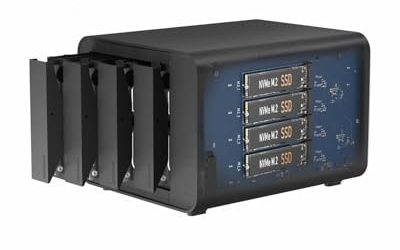
| Asustor AS5404T | Four NVMe cache slots in a compact four-bay body | 4 bays, 4x M.2 NVMe slots |
| TERRAMASTER F4-424 Pro | The strongest processor and memory in this group | Intel Core i3-N305 8-core, 32 GB DDR5 |
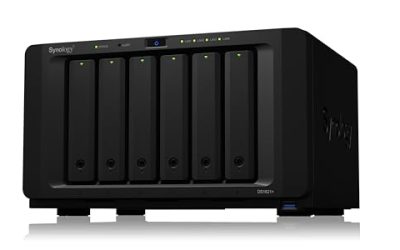
| Synology DS423 | A straightforward four-bay archive without extras | 4 bays, 2x 1GbE, 2 GB DDR4 |
How to Choose
Start With Network Speed, Because It Caps Everything
A NAS feeds your archive over the network, so the Ethernet ports set the ceiling for every transfer. Units with 2.5GbE ports, like the QNAP, Asustor and TerraMaster here, move large photo folders noticeably faster than 1GbE models when your switch and computer also support the higher speed. The two Synology units in this guide use 1GbE ports, which remain adequate for browsing and steady backup but slow down full-library copies. Before paying for a faster NAS, check the rest of your network chain, because one old switch can hold the whole system at the slower rate.
Match the Processor and Memory to How You Use the Archive
A basic archive that stores files and runs scheduled backups asks little of its processor. Indexing tens of thousands of photos, generating thumbnails, serving several users at once and running extra apps asks much more. The TerraMaster F4-424 Pro’s eight-core Intel Core i3-N305 and 32 GB of DDR5 memory sit at the strong end of this group, while the Synology DS423’s Realtek processor and 2 GB of memory target simple storage duties. Memory ceilings matter too: models that accept 16 GB or 32 GB give the archive room to take on more tasks later.
Understand What NVMe Slots Do for a Photo Library
Most four-bay NAS units here include M.2 NVMe slots, from two on the Synology DS923+ and QNAP TS-464 to four on the Asustor AS5404T. Fitted with SSDs, these slots typically act as cache, speeding up repeated access to folders you open often, such as the current season’s shoots. They do not replace the main drive bays for capacity. For a photography archive, cache helps browsing and thumbnail-heavy work feel snappier, but it should rank below network speed and basic capacity in your decision, because the originals still live on the hard drives.
Plan Capacity, RAID and Expansion Before You Buy Drives
Four bays running RAID 5 give you the capacity of three drives with protection against one failure, which is the standard archive layout. The Synology DS923+ adds a growth path the others lack, expanding to nine bays with a DX517 expansion unit when the archive outgrows the main chassis. Whichever model you choose, buy drives with that layout in mind, keep one spare on hand for a fast rebuild, and remember the NAS is one copy of the archive, so an off-site or cloud backup still belongs in the plan.
The 5 Best Options
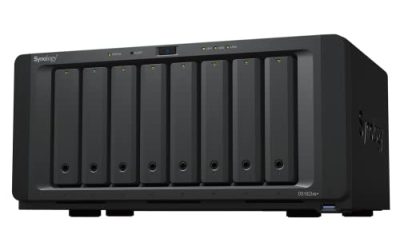
Synology DS923+

The DS923+ is the expansion-minded choice: four bays now, and the option to reach nine bays later by adding a DX517 expansion unit. Inside, an AMD Ryzen R1600 dual-core processor and 4 GB of DDR4 memory, upgradeable to a maximum of 32 GB, run the system, while two M.2 NVMe slots accept cache SSDs. The compromise is at the back panel, where the two network ports are 1GbE rather than the faster 2.5GbE found on rivals here. For an archive that grows steadily and values a long upgrade path, that trade may be acceptable.
Specs
- Bays: 4 drive bays, expandable to 9 with a DX517 expansion unit
- Processor: AMD Ryzen R1600 dual-core
- Memory: 4 GB DDR4, up to a maximum of 32 GB
- Network: 2x 1GbE ports
- Cache: 2x M.2 NVMe slots
Best for: Photographers whose archive will outgrow four bays and who want an expansion route.
Watch out for: The 1GbE networking is slower than the 2.5GbE ports on the QNAP, Asustor and TerraMaster models.
ASIN: B0BM7KDN6R
QNAP TS-464

The TS-464 is the well-rounded option in this group. Its Intel Celeron N5095 or N5105 quad-core processor and 8 GB of DDR4 memory, expandable to 16 GB, handle multi-user archive work comfortably. Two 2.5GbE ports speed up transfers across a modern network, two M.2 2280 PCIe Gen3 x1 slots take cache SSDs, and a PCIe Gen3 x2 expansion slot leaves a door open for later upgrades such as faster networking. For a small studio where the NAS must serve an editor and an assistant while also running backups, that combination of ports and expandability is hard to fault.
Specs
- Bays: 4 drive bays for 3.5-inch SATA drives
- Processor: Intel Celeron N5095 or N5105 quad-core
- Memory: 8 GB DDR4, up to a maximum of 16 GB
- Network: 2x 2.5GbE ports
- Cache: 2x M.2 2280 PCIe Gen3 x1 slots
- Expansion: 1x PCIe Gen3 x2 slot
Best for: Small studios wanting balanced performance, fast networking and a PCIe upgrade path.
Watch out for: The exact Celeron variant differs between listings, so confirm which processor the unit you receive carries.
ASIN: B0BQ5TWCL8
Asustor AS5404T
The AS5404T leans into cache capacity, fitting four M.2 NVMe slots into a four-bay chassis, more than any other model here. That suits photographers whose work repeatedly opens the same recent folders, because a larger cache tier can hold more of the working set. The Intel Celeron N5105 quad-core processor runs at 2.0 GHz, memory starts at 4 GB of DDR4 and can reach 16 GB, and two 2.5GbE ports keep network transfers moving. An HDMI 2.0b output adds a media-display option that the other units in this guide do not offer.
Specs
- Bays: 4 drive bays
- Processor: Intel Celeron N5105 quad-core at 2.0 GHz
- Memory: 4 GB DDR4, up to a maximum of 16 GB
- Network: 2x 2.5GbE ports
- Cache: 4x M.2 NVMe slots
- Video output: HDMI 2.0b
Best for: Photographers who re-open recent shoots often and can use a large NVMe cache tier.
Watch out for: The starting 4 GB of memory is modest, so heavy multi-app use may call for an upgrade toward the 16 GB ceiling.
ASIN: B0C5M8RMMM
TERRAMASTER F4-424 Pro

The F4-424 Pro is the performance outlier: an Intel Core i3-N305 processor with eight cores and 32 GB of DDR5 memory give it more computing headroom than any other unit in this guide. Two 2.5GbE ports, two M.2 slots and two USB 3.2 ports at 10Gbps cover connectivity, and an HDMI output is included as well. For a photography archive that doubles as a busy file server for a whole studio, with indexing, sharing and backup jobs running together, that hardware margin translates into a box that stays responsive under load and ages more slowly.
Specs
- Bays: 4 drive bays
- Processor: Intel Core i3-N305, 8 cores
- Memory: 32 GB DDR5
- Network: 2x 2.5GbE ports
- Cache: 2x M.2 slots
- USB: 2x USB 3.2 ports at 10Gbps
- Video output: HDMI
Best for: Studios that push their NAS hard with several users and background jobs at once.
Watch out for: Its processing power exceeds what a simple store-and-backup archive will ever use, so solo shooters may not feel the benefit.
ASIN: B0CPPD51B9
Synology DS423
The DS423 keeps things deliberately simple. A Realtek RTD1619B quad-core processor and 2 GB of DDR4 memory run a four-bay enclosure with two 1GbE ports and two USB 3.2 ports, and that is the whole proposition: dependable shared storage without cache slots or expansion ambitions. For a home photography archive that mainly needs one safe place for the library, accessible from the editing computer and a laptop, those specifications cover the job. It is the model to choose when the archive’s duties are clear and limited, rather than a platform you intend to build upon.
Specs
- Bays: 4 drive bays
- Processor: Realtek RTD1619B quad-core
- Memory: 2 GB DDR4
- Network: 2x 1GbE ports
- USB: 2x USB 3.2 ports
Best for: A home archive that needs straightforward shared storage for the photo library.
Watch out for: There are no M.2 cache slots and memory is fixed at 2 GB, so there is little room to grow into heavier tasks. Note this is the standard DS423, not the DS423+.
ASIN: B0BY7LGMNP
Which One Fits Your Situation
Your Archive Keeps Growing Year After Year
Choose the DS923+. It is the only model here with a documented path beyond four bays, reaching nine with the expansion unit, and its memory ceiling of 32 GB leaves room for more demanding tasks later. Accept the slower 1GbE networking as the price of that expandability, and make sure your backup plan grows alongside the archive it protects.
Two or Three People Share the Studio Archive
The TS-464 fits a working studio best. The quad-core processor, 8 GB of memory and twin 2.5GbE ports keep shared folders responsive when several people browse the same library, and the PCIe slot means a future network upgrade does not require replacing the whole NAS. It is the balanced choice rather than the extreme one in either direction.
The NAS Is Also Your Busiest Office Server
Take the F4-424 Pro. With eight processor cores and 32 GB of DDR5 memory, it absorbs indexing, sharing, synchronisation and backup jobs running simultaneously without the archive feeling sluggish. That headroom is wasted on a quiet home library, but in a studio where the NAS never really rests, it is the specification that keeps everything else moving.
You Just Need the Library Off Your Computer
The DS423 is enough. It stores the archive centrally, serves it to your machines over the network and asks nothing more of you. Photographers whose workflow is one editor, one library and a separate backup routine will not miss the cache slots and faster ports that the other models charge their complexity for.
Common Mistakes
- Buying a NAS with 2.5GbE ports while the switch and computers on the network only run at 1GbE.
- Filling all four bays with small drives and leaving no economical way to grow the archive.
- Assuming NVMe cache slots add storage capacity, when they accelerate access instead.
- Running the NAS as the only copy of the archive with no off-site or cloud backup.
- Choosing the strongest processor for a library that only stores files and runs a nightly backup.
Frequently Asked Questions
Is a 4-bay NAS better for a photo archive than a direct-attached enclosure?
It serves a different purpose. A NAS puts the archive on the network so several computers can reach it, and it can run its own backup and sharing tasks around the clock. A direct-attached enclosure connects to one computer and is simpler and often faster per session. Studios sharing a library usually gain more from the NAS approach.
Do I need 2.5GbE networking for photo work?
Only if the rest of your network supports it. With a 2.5GbE switch and a computer port to match, large ingests and full-folder copies finish far sooner than on 1GbE. If any link in the chain is 1GbE, transfers fall back to that speed, so upgrade the chain together or accept the slower rate and prioritise capacity instead.
What do the M.2 NVMe slots actually improve?
They hold SSDs used as cache, which speeds up repeated access to frequently opened data such as recent shoots and thumbnail-heavy folders. They do not increase the archive’s storage capacity, and they do not make a slow network faster. For a mostly cold archive that is opened rarely, cache brings little benefit compared with spending on larger drives.
Can I start with two drives and add more later?
In most cases yes, beginning with a mirrored pair and expanding the volume as the archive grows, though the exact migration path depends on the system and the RAID level chosen at the start. Planning the final layout first is still wiser, because some changes require copying data off and rebuilding the volume from scratch.
More from Amazon
Programs that pair well with the guide above. Offers and eligibility are set by Amazon and may change.
Free shipping on eligible items, Prime Video and more. Eligible new members can start with a free trial.
Start a Prime free trialAudiobooks and podcasts to listen to on the go. Eligible new members can start with a free trial.
Try Audible freeAd-free music streaming. Eligible new subscribers can start with a free trial.
Try Music Unlimited freeA free business account with business pricing and bulk-buying tools for work, shop or home office.
Create a business accountAs an Amazon Associate we earn from qualifying purchases.