Our Top Picks
 OWC ThunderBay 4 Thunderbolt 40Gb/s Four-Bay SATA Enclosure0TB - Enclosure w/ SoftRAID13.1 x 10.3 x 8.5 inches8.6 poundsCheck on Amazon

A photography archive grows in a way few other files do: every shoot adds hundreds of large RAW files, and the library quickly becomes too big for a laptop drive yet too valuable to sit on a single disk. The real decision is how much protected, fast, direct-attached capacity you need beside your editing machine, and how the array should rebuild your working library after a drive failure without slowing down culling and exports.
This guide is written for photographers who edit from a local workstation, studios that keep client archives on one desk, and archivists consolidating years of shoots. The three enclosures below were chosen from their Amazon product names and specifications, covering a compact four-bay unit, a large eight-bay box, and an eight-bay model with a true hardware RAID controller inside the enclosure.
Quick Picks
As an Amazon Associate we earn from qualifying purchases
| Product | Best for | Key spec from title |
|---|---|---|
| OWC ThunderBay 4 | Four-bay desktop archives next to an editing Mac or PC | 4 bays, 2x Thunderbolt 40Gb/s ports |
| OWC ThunderBay 8 | Large photo libraries that need eight bays and daisy-chaining | 8 bays, up to 2586MB/s per listing |
| TERRAMASTER D8-332 | Photographers who want hardware RAID inside the enclosure | 8 bays, hardware RAID 0/1/5/10/JBOD |
How to Choose
Decide Whether the RAID Engine Lives in Software or Hardware
Thunderbolt enclosures split into two camps. Some ship with software RAID tools, such as the SoftRAID package bundled with the OWC units here, where your computer manages the array. Others, like the TERRAMASTER D8-332, carry a dedicated hardware RAID controller that builds and maintains the array itself. Software RAID is flexible and easy to reconfigure from the desktop. Hardware RAID keeps array management off your editing machine and keeps working the same way on any host you plug it into. For a photography archive, either approach protects files; the difference is where the management happens and which computer settings travel with the box.
Match Bay Count to Your Archive Growth
Four bays suit a working archive that grows by a few terabytes a year, especially when you mirror or run RAID 5 and keep one bay pattern simple. Eight bays change the maths: the same RAID level wastes a smaller share of total capacity, and you can add drives as the library grows instead of migrating to a new enclosure. Think about your last three years of shoots and how many terabytes they added. If a four-bay box would be full within two years at that pace, stepping straight to eight bays avoids a disruptive migration later, when the archive is even larger.
Check the Port Layout, Not Just the Headline Speed
Every model here uses Thunderbolt connections rated at 40Gb/s, but the second port matters as much as the first. A spare Thunderbolt port lets you daisy-chain another enclosure or a dock without unplugging the archive, and a DisplayPort output lets the enclosure drive a monitor in the same chain. The OWC ThunderBay 8 supports daisy-chaining up to six devices, which suits a desk where the archive, a backup enclosure and a display all hang off one laptop port. Also confirm your computer has the matching Thunderbolt generation, because older ports can cap the transfer speeds these enclosures advertise.
Plan the RAID Level Around Rebuilds and Working Space
RAID 0 is fast but offers no protection, so it fits scratch space rather than an archive. RAID 1 mirroring is simple and suits two-drive working sets. RAID 5 spreads data plus parity across the bays and is the common archive choice, giving usable capacity with single-drive failure protection. RAID 1+0, often written as RAID 10, trades more capacity for simpler rebuilds. Remember that a photography archive also needs a separate backup, ideally off-site or in cloud storage, because RAID protects against drive failure, not deletion, theft or a failed enclosure controller.
The 3 Best Options
OWC ThunderBay 4
The ThunderBay 4 is the measured starting point for a desk-based archive: four bays for 2.5-inch or 3.5-inch SATA drives, sold diskless so you choose the drives yourself. Its array is managed by the included SoftRAID software, which supports RAID 0, 1, 4, 5, 1+0 and JBOD from the host computer. OWC lists speeds up to about 1527MB/s, far beyond what culling RAW files or exporting a wedding set demands. Locking, hot-swap trays make a failed drive change straightforward, and the second Thunderbolt port plus DisplayPort 1.2 output keep the desk chain tidy.
Specs
- Bays: 4 drive bays for 2.5-inch and 3.5-inch SATA drives
- Configuration: diskless enclosure, drives installed by the user
- Host connections: 2x Thunderbolt ports rated at 40Gb/s
- Display output: DisplayPort 1.2
- RAID modes: RAID 0, 1, 4, 5, 1+0 and JBOD via included SoftRAID software
- Transfer speed: up to about 1527MB/s
- Drive handling: hot-swap trays with locking design
Best for: Photographers who want a four-bay Thunderbolt archive beside one editing workstation.
Watch out for: The RAID is software-based, so the array depends on the SoftRAID software running on your computer.
ASIN: B079KR2JVM
OWC ThunderBay 8
The ThunderBay 8 doubles the bay count for libraries that have outgrown four drives, holding eight SATA drives in a diskless chassis. SoftRAID again provides RAID 0, 1, 4, 5, 1+0 and JBOD, and the listing quotes speeds up to 2586MB/s, which helps when a full archive verification or a multi-terabyte ingest is running. Two Thunderbolt 3 ports and a DisplayPort 1.2 output anchor the desk setup, and the enclosure can daisy-chain up to six devices, so a second enclosure for backup can sit in the same chain rather than competing for laptop ports.
Specs
- Bays: 8 drive bays for SATA drives
- Configuration: diskless enclosure, drives installed by the user
- Host connections: 2x Thunderbolt 3 ports rated at 40Gb/s
- Display output: DisplayPort 1.2
- RAID modes: RAID 0, 1, 4, 5, 1+0 and JBOD via included SoftRAID software
- Transfer speed: up to 2586MB/s per the product listing
- Expansion: daisy-chaining supported for up to 6 devices
Best for: Studios and archivists whose photo libraries need eight bays and room to keep growing.
Watch out for: Eight bays of drives is a large, heavy desktop unit, and the software RAID still relies on the host computer.
ASIN: B084S3S8JC
TERRAMASTER D8-332
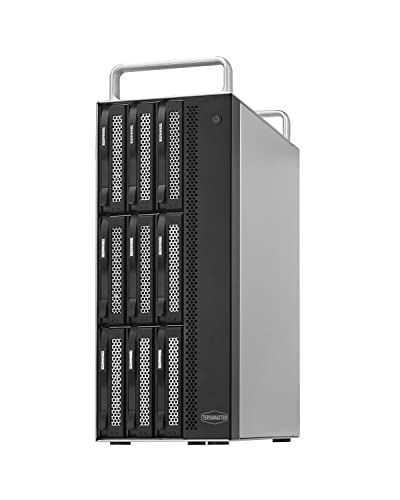
The D8-332 is the pick for photographers who specifically want the array handled by the enclosure itself. Its built-in hardware RAID controller supports RAID 0, 1, 5, 10 and JBOD across eight SATA bays, so the volume behaves the same whichever computer you attach. Amazon’s specifications field lists a transfer speed of 1600MB/s. Two Thunderbolt 3 ports allow daisy-chaining further devices, and the DisplayPort 1.4 output is a step newer than the 1.2 outputs on the OWC models, which matters if the enclosure also feeds a high-resolution editing monitor in the chain.
Specs
- Bays: 8 drive bays for SATA drives
- Configuration: diskless enclosure, drives installed by the user
- Host connections: Thunderbolt 3, 2 ports, with daisy-chain support
- Display output: DisplayPort 1.4
- RAID modes: hardware RAID 0, 1, 5, 10 and JBOD
- Transfer speed: 1600MB/s per the Amazon specifications field
Best for: Photographers who want hardware RAID that stays with the enclosure, not the computer.
Watch out for: It lacks the RAID 4 and 1+0 modes of the SoftRAID models, and hardware RAID ties the array format to this controller family.
ASIN: B0B25RHVKF
Which One Fits Your Situation
You Edit on One Desk and Your Archive Fits Four Bays
Choose the ThunderBay 4. A mirrored pair or a four-drive RAID 5 set covers most single-photographer libraries, the locking trays make drive swaps calm rather than fiddly, and SoftRAID’s desktop tools are easy to check before a shoot. Add a separate backup drive outside the enclosure, because four bays of RAID still count as one copy of your work.
Your Library Already Spans Many Terabytes
The ThunderBay 8 fits better. Eight bays let RAID 5 keep a larger share of capacity usable, and the daisy-chain support means a backup enclosure can join the same Thunderbolt chain later. The higher listed transfer speed also shortens the long ingest and verification jobs that become routine once an archive passes a certain size and age.
You Move the Archive Between Computers
Take the D8-332. Because its RAID is handled by hardware inside the box, the array does not depend on one machine’s software setup, which suits an archive that alternates between a studio desktop and a laptop. The DisplayPort 1.4 output also helps if the second machine drives a newer, higher-resolution monitor through the same connection chain.
You Are Replacing a Failed Single External Drive
Any of the three is a structural upgrade, but pick based on growth rather than relief. If the failed drive held a library that was nearly full, the eight-bay models prevent a repeat migration next year. If it held a modest working archive, the ThunderBay 4 plus a disciplined backup routine solves the actual problem that caused the data scare.
Common Mistakes
- Treating RAID as a backup and keeping no second copy of the archive outside the enclosure.
- Buying a diskless enclosure and forgetting that no drives are included in the box.
- Mixing very old, worn drives into a new array and then blaming the enclosure for rebuild problems.
- Choosing RAID 0 for an archive because the speed figure looked attractive in the listing.
- Ignoring the second Thunderbolt port and display output, then struggling with a desk full of adapters later.
Frequently Asked Questions
Does a Thunderbolt RAID enclosure include the hard drives?
Usually not. All three enclosures in this guide are sold diskless, which means the chassis, trays and RAID tools are included but the SATA drives are bought separately. This is normal for archive-grade enclosures, because photographers often already own drives or want a specific capacity and model matched across every bay in the array.
What is the difference between hardware RAID and SoftRAID here?
Hardware RAID, as in the TERRAMASTER D8-332, uses a controller chip inside the enclosure to build and manage the array independently of the computer. SoftRAID, bundled with the OWC models, is software running on your computer that performs the same organisational job. Both can protect a photography archive; the practical difference is portability and where management happens.
Which RAID level suits a photography archive?
RAID 5 is the common choice because it balances usable capacity with protection against a single drive failure across four or eight bays. RAID 1 mirroring suits smaller two-drive working sets where simplicity matters more than capacity. RAID 0 should be reserved for temporary scratch space, since one failed drive loses the whole volume.
Can I daisy-chain a second enclosure for backups later?
Yes, with the models that provide a second Thunderbolt port. The ThunderBay 8 supports daisy-chaining up to six devices, and the D8-332 also supports daisy-chaining through its two Thunderbolt 3 ports. That lets a backup enclosure join the same chain as your archive, although the archive and its backup should still not be your only two copies.
More from Amazon
Programs that pair well with the guide above. Offers and eligibility are set by Amazon and may change.
Free shipping on eligible items, Prime Video and more. Eligible new members can start with a free trial.
Start a Prime free trialAudiobooks and podcasts to listen to on the go. Eligible new members can start with a free trial.
Try Audible freeAd-free music streaming. Eligible new subscribers can start with a free trial.
Try Music Unlimited freeA free business account with business pricing and bulk-buying tools for work, shop or home office.
Create a business accountAs an Amazon Associate we earn from qualifying purchases.