Key takeaways
- Compare 8-bay NAS enclosures for photography archives, from 10GbE flagships to value picks, with RAID, cache and expansion for large RAW libraries and teams.
Eight bays is where a photography archive becomes a deliberate system rather than a bigger box. At this size the enclosure usually feeds more than one workstation, holds both the working library and its on-site mirror of finished work, and stays in service long enough that processor and networking choices echo for years. The wrong pick rarely fails outright; it simply becomes the bottleneck everyone works around.
Buyers arrive here from two directions: solo photographers whose six-bay unit is full, and studios formalising storage they previously scattered across drives. The four enclosures below were chosen from their Amazon listings to span that range, from a 10GbE flagship with server memory to an older value model whose networking still embarrasses newer rivals.
Quick Picks
As an Amazon Associate we earn from qualifying purchases
| Product | Best for | Key spec from title |
|---|---|---|
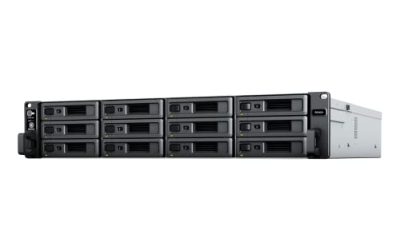
| Synology DS1823xs+ | Direct 10GbE editing for a busy desk or team | 8 bay, 2x 10GbE |
| Synology DS1821+ | Expandable archives that can add speed later | 8 bay, expandable to 18 bays |
| QNAP TS-873A | Buyers who want to choose their operating system | 8 bay, 2x PCIe Gen3 slots |
| Asustor Lockerstor 8 AS6508T | Fast networking without flagship pricing pressure | 8 bay, 2x 10GbE + 2x 2.5GbE |
How to Choose
Separate the flagship premium from features you will use
The DS1823xs+ charges for integrated 10GbE, a stronger processor and a management port. Those features pay off when editors genuinely open RAW files across the network all day. If the NAS mostly receives nightly ingest and serves one workstation, the DS1821+ delivers the same bay count and expansion ceiling for less, with a PCIe slot waiting for the day speed becomes necessary. List your actual traffic honestly: simultaneous editors, average file size and how often full shoots move. The honest list, not the spec sheet, should decide whether the flagship premium is justified.
Plan the array layout across eight bays
Eight drives invite a single RAID 6 volume, but alternatives deserve thought. Some photographers split the chassis into a six-drive main array and a two-drive mirror for the catalog and current year, gaining isolation between the working set and the deep archive. Others keep one bay free as a ready spare. Each layout trades capacity for resilience or convenience, and changing your mind later means copying everything elsewhere first. Decide before the first drive goes in, and remember that parity choices, like every RAID decision, protect uptime rather than replacing a separate backup copy.
Compare cache and memory ceilings, not just base figures
Base memory figures flatter some models and undersell others. The TS-873A starts at eight gigabytes yet accepts far more, which matters if the enclosure will also run sync services, media indexing or virtual machines beside file duties. M.2 slots appear across this group for NVMe cache or pools, accelerating catalogs and previews. Consider what the NAS must juggle in year three, not just on installation day. An archive server that also indexes hundreds of thousands of images for a DAM or gallery tool needs noticeably more headroom than a quiet file store.
Check the upgrade story for networking and capacity
Every model here expands to 18 bays or connects faster networking through slots, but the routes differ. The DS1821+ leans on its PCIe slot for a 10 or 25GbE card, the TS-873A offers two PCIe slots for networking or storage expansion, and the AS6508T simply includes fast ports from the start. Expansion units also differ in connection type and cost. Sketch the two most likely upgrades you will make, then verify the enclosure supports both without conflict. A slot already occupied by a network card cannot later accept the cache card you had planned.
The 4 Best Options
Synology DS1823xs+

This is the eight-bay enclosure for photographers who edit from the server rather than merely storing on it. Twin 10GbE ports are built in, the Ryzen V1780B processor has ample strength for multi-user file service, and eight gigabytes of ECC memory can quadruple as demands grow. Two M.2 slots accept NVMe for cache or a fast pool, and expansion to 18 bays protects the investment. A dedicated management port suits studios that separate administration from editing traffic. Nothing here needs an immediate add-on purchase, which is precisely the point of a flagship: the specification is complete on arrival.
Specs
- 8 bays for 3.5″ and 2.5″ SATA drives, plus 2x M.2 2280 NVMe slots
- AMD Ryzen V1780B quad-core processor
- 8 GB DDR4 ECC memory, expandable to 32 GB
- 2x 10GbE plus 1x 1GbE management port
- 3x USB 3.2 Gen 1 ports
- Expandable to 18 bays
Best for: Teams editing directly over 10GbE who want expansion without add-on cards.
Watch out for: Its capabilities are stranded if the studio network remains gigabit throughout.
ASIN: B0BSTNV5TG
Synology DS1821+

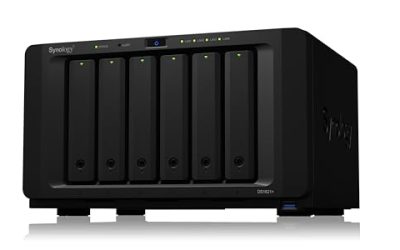
The DS1821+ remains the pragmatic centre of Synology’s eight-bay line. Its Ryzen V1500B and ECC memory handle archive duties confidently, four gigabit ports aggregate for multi-user homes and studios, and the PCIe slot keeps a 10 or 25GbE future open. Dual M.2 slots cover catalog cache, and the same 18-bay expansion ceiling as the flagship means capacity is never the reason to replace it. Buyers trade away built-in fast networking and some processor headroom, and in return keep budget available for the drives themselves, which at eight bays is where most of the money belongs anyway.
Specs
- 8 bays
- AMD Ryzen V1500B quad-core 2.2 GHz
- 4 GB DDR4 ECC memory, expandable to 32 GB
- 4x 1GbE network ports
- 2x M.2 NVMe slots
- Expandable to 18 bays
- PCIe slot for 10/25GbE card option
Best for: Archives that value expansion and an open upgrade path over day-one speed.
Watch out for: Four gigabytes of base memory is tight if extra services join file duties.
ASIN: B08NCMB2HQ
QNAP TS-873A

QNAP’s TS-873A stands out for choice. It can run either QTS or the ZFS-based QuTS hero, letting buyers decide how the archive’s storage layer should behave, and its memory ceiling is the highest in this group. Two 2.5GbE ports provide a genuine speed step without add-ons, while two PCIe Gen3 slots and two M.2 slots leave room for faster networking or more cache. Hot-swap bays keep maintenance simple during busy seasons. For photographers who also run a small server stack beside the archive, or who specifically want ZFS snapshots and checksums, this is the flexible option.
Specs
- 8 bays for 3.5″ SATA drives, 2.5″ SSDs supported, hot-swap
- AMD Ryzen V1500B quad-core 2.2 GHz
- 8 GB DDR4 memory, expandable to 64 GB
- 2x 2.5GbE network ports
- 2x PCIe Gen3 slots
- 2x M.2 NVMe slots
- QTS or QuTS hero operating system
Best for: Technical buyers wanting ZFS, high memory ceiling and slot-based expansion.
Watch out for: Choosing and tuning the operating system asks more of the owner than rivals.
ASIN: B0GN4WFV67
Asustor Lockerstor 8 AS6508T

The AS6508T is an older design whose networking specification still reads like a flagship’s: two 10GbE ports and two 2.5GbE ports on the same chassis. That combination lets a studio run a fast editing link and a separate backup or ingest network without touching a slot. M.2 NVMe caching supports the catalog, and eight gigabytes of memory covers file service comfortably. The Atom processor is the honest compromise, adequate for storage duties but not the choice for heavy extra workloads. Photographers who mainly need their archive served quickly, rather than a general-purpose server, get remarkable connectivity for the class.
Specs
- 8 bays
- Intel Atom C3538 quad-core 2.1 GHz
- 8 GB DDR4 memory
- 2x 10GbE and 2x 2.5GbE network ports
- M.2 NVMe SSD caching
Best for: Studios wanting multiple fast network links for editing and backup traffic.
Watch out for: The Atom processor limits heavier applications beyond file serving.
ASIN: B07Y2BJZKC
Which One Fits Your Situation
Two editors sharing one growing archive
The DS1823xs+ is the natural anchor when both workstations pull RAW files from the same volume daily. Built-in 10GbE removes the upgrade project entirely, ECC memory guards long transfers, and expansion to 18 bays means the archive will not force another platform change mid-growth. Pair it with a proper 10GbE switch so both desks actually receive the speed the enclosure can deliver.
A solo archive that has outgrown six bays
Step up to the DS1821+ and spend the savings on drives. One editor rarely saturates its aggregated gigabit links during normal culling and editing, and the PCIe slot preserves a credible route to faster networking if a second workstation arrives. Its 18-bay ceiling turns this purchase into the last chassis decision for a long stretch of shooting.
The archive also runs your studio services
Choose the TS-873A when the NAS must index media, sync client galleries or host small services beside storage. The 64 GB memory ceiling and twin PCIe slots support that ambition, and the choice between QTS and QuTS hero lets you set the storage behaviour deliberately. That flexibility rewards an owner comfortable making a few considered configuration decisions at setup.
Separate fast lanes for editing and backup
The AS6508T fits studios that want traffic separation without buying network cards. Run editors on its 10GbE ports and schedule backup or ingest over the 2.5GbE pair, keeping a long initial copy from strangling the editing day. Its processor asks little of the workflow in return, provided the enclosure’s job stays focused on serving and protecting files.
Common Mistakes
- Buying the flagship for its 10GbE ports, then connecting it through a gigabit switch that silently caps every transfer.
- Running one giant array with no plan for the catalog, so a rebuild or volume problem touches every year of work at once.
- Filling the memory with extra services until file performance suffers, because the enclosure was specced only for storage on day one.
- Assuming eight bays make backup optional, when a larger array simply means a larger single point of failure without a second copy.
- Postponing the expansion decision until the chassis is full, then discovering the needed unit or card conflicts with existing hardware.
Frequently Asked Questions
Is an 8-bay NAS worth it over a 6-bay model?
It is when the archive feeds more than one workstation or when parity maths matter. Eight bays make RAID 6 proportionally cheaper, leave room for a spare or a separate catalog mirror, and extend the expansion story. Solo photographers with modest growth may find six bays sufficient, but busy studios usually value the headroom quickly.
Which 8-bay NAS here is fastest for direct editing?
The models with built-in 10GbE, the DS1823xs+ and AS6508T, move large RAW files fastest once the rest of the network matches. The TS-873A’s 2.5GbE sits between gigabit and 10GbE, while the DS1821+ needs its PCIe slot populated to reach similar speeds. Workstation adapters and switch ports decide the real-world result as much as the enclosure.
Should I run QTS or QuTS hero on the TS-873A?
QuTS hero brings ZFS features such as checksums and strong snapshot behaviour, which suit an archive holding irreplaceable client work. QTS is the more familiar, lighter route. Decide before loading data, because switching later means rebuilding the storage. For a photography archive, the data-integrity argument usually favours the ZFS option.
How should I lay out drives in an 8-bay archive NAS?
A common pattern is one RAID 6 array across most bays for the main library, giving two-drive fault tolerance with good usable capacity. Some photographers reserve bays for a catalog mirror or a hot spare instead. Whatever layout you choose, keep a separate backup copy off the enclosure, since RAID only covers drive failure.
More from Amazon
Programs that pair well with the guide above. Offers and eligibility are set by Amazon and may change.
Free shipping on eligible items, Prime Video and more. Eligible new members can start with a free trial.
Start a Prime free trialAudiobooks and podcasts to listen to on the go. Eligible new members can start with a free trial.
Try Audible freeAd-free music streaming. Eligible new subscribers can start with a free trial.
Try Music Unlimited freeA free business account with business pricing and bulk-buying tools for work, shop or home office.
Create a business accountAs an Amazon Associate we earn from qualifying purchases.