Key takeaways
- Compare 12-bay NAS enclosures for photography archives, with RAID options, 10GbE networking and expansion paths for growing RAW libraries and catalogs.
A twelve-bay enclosure is rarely an impulse purchase. It is the point where a photography archive stops fitting on scattered external drives and starts behaving like shared studio infrastructure, with weddings, commercial shoots and personal projects all competing for the same pool of space. Choosing badly here locks you into slow transfers, cramped expansion or a RAID layout that wastes bays you paid for.
That decision looks different for a solo shooter centralising a decade of RAW files than for a small studio where two editors pull from the same Lightroom catalog. The three enclosures below were picked from their Amazon listings for bay count, processor class, memory type, network ports and expansion headroom, so you can match the chassis to the archive you actually keep.
Quick Picks
As an Amazon Associate we earn from qualifying purchases
| Product | Best for | Key spec from title |
|---|---|---|
| Synology DS3622xs+ | Studios that need built-in 10GbE and serious RAID choices | 12 bay, 2x 10GbE |
| Synology DS2422+ | Large archives that can start on gigabit networking | 12 bay, expandable to 24 bays |
| QNAP TVS-h1288X | Mixed drive pools with fast networking already fitted | 8x 3.5″ + 4x 2.5″ bays, 2x 10GbE |
How to Choose
Count usable capacity after RAID, not raw bay count
Twelve bays sounds enormous until parity takes its share. A RAID 6 array across twelve drives surrenders two drives to protection, and RAID 5 surrenders one, so the archive you can actually store is always smaller than the headline figure. Work backwards from your current library: measure how many terabytes your RAW folders, video clips and exported masters already occupy, then double it for growth before choosing a layout. Photographers who shoot high-resolution bodies fill space faster than they expect, and rebuilding an array later because the first plan was optimistic is slow, disruptive work that ties up the NAS for days.
Decide whether 10GbE belongs in the box today
Network speed decides whether editing directly from the NAS feels responsive or frustrating. A single gigabit link suits ingest, backup jobs and one editor working through selects. Two editors rendering previews, or one editor scrubbing large panoramas and video, will feel the ceiling quickly. The DS3622xs+ and TVS-h1288X carry 10GbE built in, while the DS2422+ ships with gigabit ports only. Retrofitting speed later depends on expansion slots and spare bays, so it is cheaper to be honest now about how many workstations will mount the archive at once and how often full-resolution files move across the wire.
Treat RAID as failure protection, never as backup
RAID keeps the archive online when a drive dies, and for a working studio that continuity matters. What it cannot do is rescue files deleted by mistake, corrupted by faulty software or lost with the building itself. Every enclosure here supports multiple RAID levels, yet none of that replaces a second copy stored somewhere else. Plan the twelve-bay purchase alongside an off-site or cloud copy of finished work, and treat the NAS as the fast, resilient working tier of a wider system. Buyers who blur that distinction tend to discover the gap only after the first serious loss.
Leave expansion headroom for the archive you will have
A photography archive only moves in one direction. Expansion units let a chassis grow without a forklift migration, and the three models here stretch to 24 or 36 total bays. That headroom is worth weighing against price and desk space today, because moving a catalog to a different platform later means re-checking file integrity across millions of images. Also consider memory ceilings and spare slots: ECC memory protects long transfers from silent errors, and an empty PCIe slot can later accept faster networking or cache hardware as your workflow changes.
The 3 Best Options
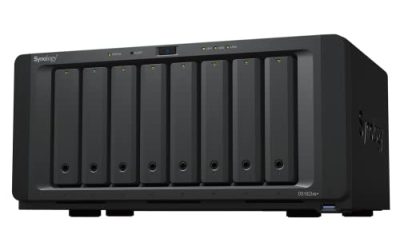
Synology DS3622xs+

Built around an Intel Xeon D-1531 processor and ECC memory, the DS3622xs+ is the enclosure here that behaves most like a small server. Dual 10GbE ports arrive fitted rather than as an upgrade project, which suits studios where editors open RAW files straight from the archive all day. Support for RAID F1 alongside the conventional levels gives flash-based pools a wear-aware option, and expansion to 36 bays means the chassis can outlast several generations of drives. For a busy photography business consolidating years of client work into one managed volume, it is the most complete package in this group.
Specs
- 12 bays for 3.5″ and 2.5″ SATA drives
- Intel Xeon D-1531 6-core 2.2 GHz, turbo up to 2.7 GHz
- 16 GB DDR4 ECC memory, expandable to 48 GB
- 2x 10GbE, 2x 1GbE and a management port
- RAID 0, 1, 5, 6, 10, JBOD and RAID F1
- Expandable to 36 bays
- PCIe Gen3 x8 slot
Best for: Studios running shared editing over 10GbE with room to expand for years.
Watch out for: Its server-grade hardware is wasted if your network and workstations stay on gigabit.
ASIN: B09LXRKNWJ
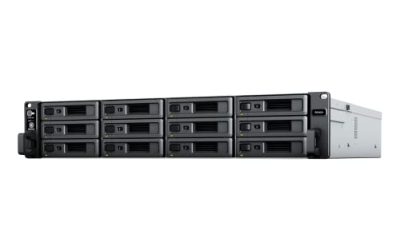
Synology DS2422+

The DS2422+ takes a quieter route to the same bay count, pairing a quad-core AMD Ryzen V1500B with ECC memory and hot-swap bays that make a failed drive a five-minute job. Four gigabit ports can be aggregated for multi-user access, although there is no fast networking fitted from the factory. Expansion to 24 bays keeps the long-term story credible, and the lower memory ceiling matters mainly for buyers planning heavy virtualisation rather than file service. For a photographer whose archive has outgrown an eight-bay unit but whose editing still happens one workstation at a time, it covers the essentials without paying for unused network speed.
Specs
- 12 bays, expandable to 24 bays
- AMD Ryzen V1500B quad-core processor
- 4 GB DDR4 ECC memory, expandable to 32 GB
- 4x 1GbE network ports
- Hot-swap drive bays
Best for: Growing solo or duo archives that prioritise capacity and drive serviceability.
Watch out for: Gigabit-only networking will bottleneck direct editing for several simultaneous users.
ASIN: B09JNRPK2Z
QNAP TVS-h1288X
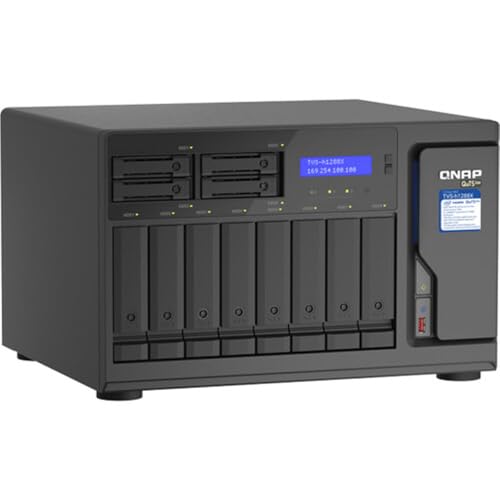
QNAP splits this chassis into eight 3.5-inch bays and four 2.5-inch bays, a layout that invites a fast SSD tier beside bulk spinning storage for current projects. The Xeon W-1250 processor and generous memory ceiling give it the strongest raw specifications here, while QuTS hero brings ZFS-based storage management to the archive. Networking is equally ambitious, with dual 10GbE plus four 2.5GbE ports for segregating editors, ingest stations and backup traffic. Two M.2 NVMe slots add cache or fast scratch space without consuming a drive bay. It rewards buyers willing to learn a deeper operating system in exchange for flexibility.
Specs
- 8x 3.5″ bays plus 4x 2.5″ bays
- Intel Xeon W-1250 6-core, up to 4.7 GHz
- 16 GB DDR4 ECC memory, expandable to 128 GB
- 2x 10GbE and 4x 2.5GbE network ports
- 2x M.2 NVMe slots
- QuTS hero operating system with ZFS
Best for: Power users who want a separate SSD tier and ZFS storage management.
Watch out for: The split bay layout complicates a single large uniform RAID array.
ASIN: B08LD4189S
Which One Fits Your Situation
A working studio with two or more editors
Choose the DS3622xs+ when several workstations mount the archive simultaneously. Its built-in 10GbE ports, Xeon processor and ECC memory are aimed squarely at sustained multi-user file service, and the 36-bay expansion ceiling means the same chassis can absorb years of client shoots without another migration. Budget for a 10GbE switch and workstation adapters too, because the enclosure alone cannot deliver that speed to older computers still running gigabit connections.
A solo photographer consolidating a decade of drives
The DS2422+ fits the consolidation job well. Hot-swap bays simplify the inevitable drive replacements, expansion to 24 bays postpones the next upgrade, and gigabit networking is adequate when one person ingests, culls and edits. Money saved against the faster models can fund the larger drives this project usually needs, since twelve fresh bays are only useful once they are populated with matching, archive-grade storage.
A hybrid archive with current projects on SSD
Pick the TVS-h1288X if your workflow separates active work from deep storage. Keep the current season on the 2.5-inch SSD bays and finished years on the larger 3.5-inch pool, then let the M.2 slots accelerate the catalog you open daily. The ZFS-based system also appeals to photographers who value snapshot discipline and want checksummed storage watching over irreplaceable client files in the background.
A growing archive that will move to a rack later
Any of the three can anchor a desk-based archive today, yet the DS3622xs+ leaves the most doors open. Its PCIe slot, management port and server-style networking translate naturally into a rack environment when the studio formalises its infrastructure. Starting with that headroom avoids replacing the enclosure at the exact moment the business is busiest, which is when storage migrations hurt most and mistakes are hardest to undo.
Common Mistakes
- Filling all twelve bays with the largest drives available, then realising the RAID layout leaves less usable space than the archive already needs.
- Assuming RAID protects against accidental deletion or ransomware, when it only keeps the volume online through a drive failure.
- Buying a 10GbE enclosure while every switch, cable run and workstation in the studio still negotiates gigabit speeds.
- Mixing ageing desktop drives pulled from old enclosures into a new array, creating a pool only as reliable as its weakest disc.
- Skipping a written plan for which folders live on the NAS, so duplicates and exports slowly consume the capacity bought for originals.
Frequently Asked Questions
How much usable space does a 12-bay NAS give a photo archive?
It depends on drive size and RAID level. RAID 6 reserves two drives for parity and RAID 5 reserves one, so a twelve-bay array always yields less than twelve drives of storage. Calculate from your current library size, add realistic growth for several years of shoots, and then choose drives that keep the array comfortably below full.
Can I edit RAW files directly from a 12-bay NAS?
Yes, provided the network keeps up. Over gigabit, one editor usually works comfortably with stills, while 10GbE models such as the DS3622xs+ and TVS-h1288X suit several editors or heavier files. Keep the Lightroom catalog responsive by storing previews sensibly and avoid forcing every workstation to rebuild them from the shared volume each session.
Is RAID on a large NAS enough to protect client work?
No. RAID only covers drive failure, keeping the archive available while a replacement rebuilds. It does nothing for deleted folders, corrupted catalogs, theft or fire. Keep at least one additional copy of finished work away from the NAS, and test restoring from it occasionally so the backup is proven rather than assumed.
Should a photography archive use ECC memory?
ECC memory corrects single-bit errors during long transfers and rebuilds, which is valuable when terabytes of irreplaceable images move through the system. All three enclosures here use it, and the DS3622xs+ and TVS-h1288X allow larger maximum capacities. For a business archive, that quiet error protection is worth prioritising over small differences in processor speed.
More from Amazon
Programs that pair well with the guide above. Offers and eligibility are set by Amazon and may change.
Free shipping on eligible items, Prime Video and more. Eligible new members can start with a free trial.
Start a Prime free trialAudiobooks and podcasts to listen to on the go. Eligible new members can start with a free trial.
Try Audible freeAd-free music streaming. Eligible new subscribers can start with a free trial.
Try Music Unlimited freeA free business account with business pricing and bulk-buying tools for work, shop or home office.
Create a business accountAs an Amazon Associate we earn from qualifying purchases.