Our Top Picks
 QNAP TR-004 4 Bay USB Type-C Direct Attached4 Bay8.62 x 6.31 x 6.63 inches4.08 poundsCheck on Amazon
 TERRAMASTER D4-320 External Hard Drive Enclosure 4-Bay222 x 179 x 154 mm8.74 x 7.04 x 6.06 inches1.3 poundsCheck on Amazon
A four-bay enclosure is where many photography archives start: compact enough for a desk corner, big enough for a mirrored working set plus room to grow, and attached directly to the workstation so ingest after a shoot goes straight onto the archive. The key decision is not the bay count but what the box does with those bays — because in this group, two models build proper hardware RAID, one offers no RAID at all, and one sits in between with host software RAID only.
That spread makes reading the fine print essential. The picks below include a QNAP expansion unit with a full hardware RAID menu, a fast TerraMaster tower that deliberately skips RAID for speed and simplicity, a Mediasonic box with a temperature-aware fan, and an OWC unit sold in a JBOD edition. Each connects straight to your computer over USB rather than through a network.
Quick Picks
As an Amazon Associate we earn from qualifying purchases
| Product | Best for | Key spec from title |
|---|---|---|
| QNAP TR-004 | Hardware RAID protection in a compact box | RAID 0/1/5/10, USB-C 5Gbps, DIP switch control |
| TERRAMASTER D4-320 | Fastest simple storage with no RAID complexity | USB 3.2 Gen 2 10Gbps, tool-less push-lock trays |
| Mediasonic ProBox HF7-SU31C | Quiet desk use with smart fan cooling | Temperature-sensing smart fan, USB-C 10Gbps |
| OWC Mercury Elite Pro Quad | Per-bay performance with quality bridge chips | Dedicated ASMedia bridge chip per bay, USB-C 10Gb/s |
How to Choose
Be honest about whether you want RAID at all
Four bays tempt buyers to assume RAID is included, yet one enclosure below offers none and another leaves it to your computer’s software. Hardware RAID inside the box keeps a mirrored or parity volume alive through a drive failure and presents one tidy disk to your editing software. No-RAID enclosures instead give you four independent drives, which some photographers prefer for rotating backup sets. Both layouts are legitimate; the mistake is buying one while expecting the other. Decide which camp you are in first, then compare the models inside that camp on speed and handling.
Understand what the interface speed means for hard drives
Headline connection speeds need context with spinning disks. A single hard drive cannot fill a 5Gbps link, let alone a 10Gbps one, but an array reading from several drives at once can approach the faster ceiling, and a striped set benefits most. That is why the 10Gbps enclosures below quote much higher combined figures than the 5Gbps QNAP. For a mirrored pair used as an archive, the slower interface rarely matters in daily editing. For ingesting a day of shooting while previews build, the faster link is worth having if your workstation offers a matching port.
Look at tray design and cooling for desk duty
A four-bay box usually lives within arm’s reach, so mechanics and noise shape your experience. Tool-less trays turn a drive swap into a quick pull and click, while screwed caddies make the same job a small project. Cooling design matters just as much: four drives under a long ingest warm up considerably, and a fan that responds to temperature protects the drives without running at full blast all day. If the enclosure will sit beside your monitor during editing sessions, a smart fan and solid build are worth more than a small speed advantage.
Plan the growth path before the bays fill up
An archive always grows, so think about the day all four bays are occupied. With a RAID array, growing usually means replacing every drive with a larger one, a slow and all-at-once expense. With individual disks, you can retire the oldest drive and slot in a bigger replacement whenever budget allows, which spreads the cost. Neither is clearly better, but they lead to different spending patterns. Also consider whether finished years can move to cold storage offline, because a four-bay box used for recent work only can serve far longer than one expected to hold everything forever.
The 4 Best Options
QNAP TR-004
The TR-004 is the protection-first pick, a compact four-bay unit with a genuine hardware RAID controller covering mirroring, parity, and striped-mirror modes. You set the array either with physical DIP switches on the box or through QNAP’s External RAID Manager software, a reassuringly direct approach. Its USB-C connection runs at 5Gbps, and QNAP’s listed performance is up to about 227MB/s, so this is a steady archive rather than a speed machine. Although designed to expand QNAP NAS systems, it also works as a standalone DAS with a regular computer, which is how most photographers will use it.
Specs
- 4 bays for 3.5″/2.5″ SATA drives
- USB 3.2 Gen 1 Type-C connection at 5Gbps
- Hardware RAID 0/1/5/10/JBOD/Single via DIP switch or QNAP External RAID Manager
- Listed performance up to about 227MB/s
Best for: Photographers who want real hardware RAID guarding the archive in a small footprint.
Watch out for: The 5Gbps interface and modest transfer ceiling make it the slowest option here for big ingests.
ASIN: B07K4RC7X9
TERRAMASTER D4-320
The D4-320 makes the opposite trade to the QNAP: no RAID whatsoever, in exchange for the fastest simple connection in this group. Its USB-C link runs at 10Gbps, and TerraMaster lists up to about 1,016MB/s with four hard drives working together as individual volumes. Push-lock trays are tool-less and the bays are hot swappable, so managing four separate disks stays painless. This layout suits photographers who rotate drives as backup sets or keep each project year on its own disk. Just be clear-eyed that protection is entirely your backup routine’s job, because the enclosure adds none.
Specs
- 4 bays for 2.5″/3.5″ SATA drives
- USB 3.2 Gen 2 Type-C connection at 10Gbps
- Listed speeds up to about 1,016MB/s with 4 HDDs
- Hot swappable, tool-less push-lock trays
- No RAID: individual disks only
Best for: Photographers who want fast, simple individual drives and already run a disciplined backup system.
Watch out for: There is no RAID option at all, so a failed drive takes its contents with it unless backed up.
ASIN: B0CTTL9R7Z
Mediasonic ProBox HF7-SU31C
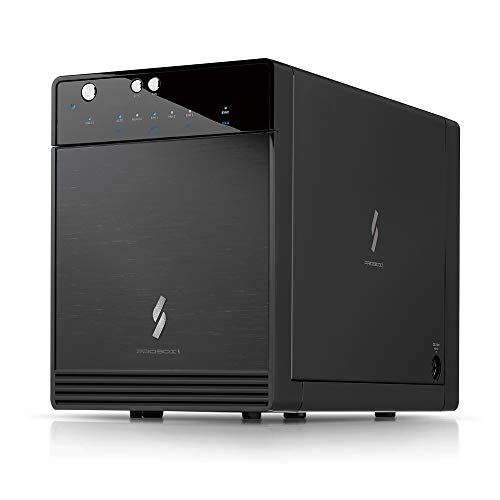
The HF7-SU31C focuses on living comfortably on a desk. Its standout feature is a temperature-sensing smart fan that adjusts to the drives’ heat instead of spinning at one fixed speed, which keeps a four-drive box tolerable during long editing sessions. The USB-C connection runs at 10Gbps, matching the faster units here. There is no hardware RAID inside; Mediasonic leaves array duties to host software RAID if you want it, or you can run four individual disks. The bays are built for 3.5-inch drives, so smaller 2.5-inch disks need a bracket to fit properly.
Specs
- 4 bays for 3.5″ SATA drives (2.5″ drives need a bracket)
- USB 3.1 Gen 2 Type-C connection at 10Gbps
- Temperature-sensing smart fan
- No hardware RAID: host software RAID only
Best for: Desk-based photographers who value quiet, temperature-aware cooling and a fast USB-C link.
Watch out for: Anyone wanting RAID must rely on software on the host computer; the box itself provides none.
ASIN: B078YQHWYW
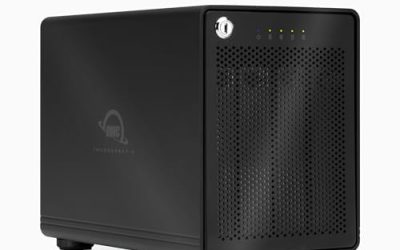
OWC Mercury Elite Pro Quad
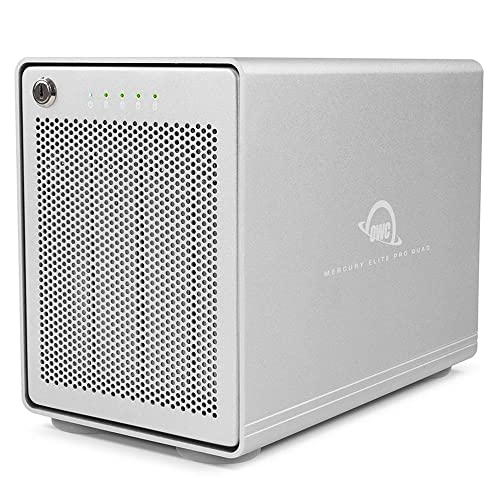
The Mercury Elite Pro Quad takes an engineering-led approach, giving each bay its own dedicated ASMedia bridge chip rather than sharing one controller path, which helps every drive perform consistently. Its USB-C connection runs at 10Gb/s with listed speeds up to about 947MB/s. The important detail is the edition: this listing is the JBOD version, presenting four independent disks, while RAID editions of the same enclosure use OWC’s SoftRAID software instead of hardware. Buy this one for well-built individual-drive storage from a storage specialist, and choose a different pick if an in-box hardware array is what you actually need.
Specs
- 4 bays for 2.5″/3.5″ SATA drives
- USB 3.2 Gen 2 Type-C connection at 10Gb/s
- Listed speeds up to about 947MB/s
- Dedicated ASMedia bridge chip per bay
- This listing is the JBOD edition; RAID editions use SoftRAID software
Best for: Photographers who want four fast, independent drives with per-bay bridge chips and OWC build quality.
Watch out for: This is the JBOD edition, so do not expect RAID from this listing; RAID versions are separate editions.
ASIN: B09SC124GS
Which One Fits Your Situation
You want the archive protected inside the box
The QNAP TR-004 is the only pick here with a full hardware RAID menu, so it is the natural choice if a dead drive should never interrupt your access to the archive. A mirrored pair is the simple setup; RAID 5 stretches capacity further. Accept the slower interface as the price of that built-in protection.
You rotate drives as your backup system
Pick the D4-320 or the Mercury Elite Pro Quad, both built around independent disks. The TerraMaster is faster on paper and cheaper to run day to day with its tool-less trays, while the OWC counters with per-bay bridge chips and a specialist build. Either way, label drives carefully, because your rotation discipline is the entire protection scheme.
Your desk is also your editing suite
The Mediasonic HF7-SU31C earns its place beside a monitor. The smart fan reacts to temperature instead of droning constantly, and the 10Gbps connection keeps ingest quick after a shoot. Run the drives individually or set up software RAID on your computer if you want an array without giving up the quiet behaviour.
Common Mistakes
- Buying a no-RAID enclosure while assuming four bays automatically means a protected array.
- Confusing the JBOD edition of an enclosure with its RAID edition when ordering.
- Judging an enclosure only by interface speed when a single hard drive cannot use most of it.
- Screwing drives into caddies without checking whether 2.5-inch disks need a bracket in 3.5-inch bays.
- Keeping the only copy of a season’s work on one DAS because it feels safer than a portable drive.
Frequently Asked Questions
Is four bays enough for a photography archive?
For many photographers, yes, especially when finished years eventually move to offline cold storage. Four large drives in a mirrored or parity setup hold a substantial working archive, and individual-disk layouts stretch further still. The honest test is your yearly growth: if each season adds several terabytes that must all stay online, a five or eight-bay enclosure will serve you longer than a four-bay one.
What is the difference between JBOD and RAID?
JBOD presents the drives as separate volumes, or in some cases one combined volume, without any protection; if a disk fails, its files are gone unless backed up. RAID spreads data across drives with mirroring or parity so the array survives a drive failure. JBOD is simpler and uses every byte of capacity, while RAID trades some capacity for that failure tolerance.
Can I move a DAS between my desktop and laptop?
Yes, that portability is one of the format’s strengths. A hardware RAID enclosure carries its array with it, so the volume mounts the same way on either machine. With individual disks it is even simpler. Just eject the volumes properly before unplugging, and remember that software RAID setups may only be recognised by the computer and software that created them.
Why do some four-bay enclosures have no RAID at all?
Because many photographers prefer managing drives themselves. Individual disks make rotating backup sets easy, let you pull one drive and hand it to a client or store it off-site, and avoid array rebuilds entirely. Manufacturers also save cost and complexity. The design is deliberate, not a defect, but it only works if your own backup habits supply the protection the box does not.
More from Amazon
Programs that pair well with the guide above. Offers and eligibility are set by Amazon and may change.
Free shipping on eligible items, Prime Video and more. Eligible new members can start with a free trial.
Start a Prime free trialAudiobooks and podcasts to listen to on the go. Eligible new members can start with a free trial.
Try Audible freeAd-free music streaming. Eligible new subscribers can start with a free trial.
Try Music Unlimited freeA free business account with business pricing and bulk-buying tools for work, shop or home office.
Create a business accountAs an Amazon Associate we earn from qualifying purchases.