Key takeaways
- Compare the best 5-bay DAS enclosures for photography archives, with hardware RAID and hybrid NVMe options for fast RAW ingest and editing at your desk.
Five bays hit a practical middle ground for a photography archive: enough room for several years of RAW files plus a protected working set, without the cost and desk footprint of a full eight-bay tower. The decision that matters is what those bays do for you — whether the enclosure builds a hardware RAID array that survives a dead drive, mixes fast NVMe storage with bulk disks, or simply gives you five straightforward volumes attached directly to your editing machine.
The three enclosures below cover those different priorities. Two are TerraMaster units with contrasting layouts, one a classic all-hard-drive RAID box and one a hybrid that trades some bays for NVMe slots. The third, from Syba, offers hardware RAID over USB 3.0 or eSATA for workstations that lack faster ports. All connect directly to your computer rather than through a network.
Quick Picks
As an Amazon Associate we earn from qualifying purchases
| Product | Best for | Key spec from title |
|---|---|---|
| TERRAMASTER D5-300 | A classic hardware RAID archive on USB-C | 5 SATA bays, RAID 0/1/5/10/Clone, USB-C 5Gbps |
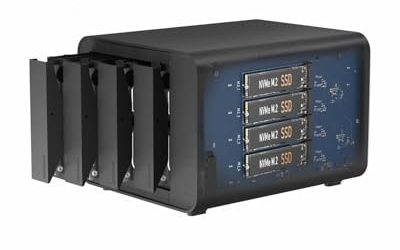
| TERRAMASTER D5 Hybrid | Fast NVMe working space beside two bulk drives | 2 SATA bays plus 3 M.2 NVMe slots, USB-C 10Gbps |
| Syba SY-ENC50122 | Hardware RAID on older USB 3.0 or eSATA machines | 5 SATA bays, RAID 0/1/5/10/JBOD, up to 120TB |
How to Choose
Pick the RAID levels your workflow actually needs
A five-bay enclosure can protect an archive in several ways, and the levels on offer differ between models. RAID 5 is the popular balance for photo storage, keeping data safe through one drive failure while giving up only one bay’s capacity. RAID 1 mirrors a pair of drives and suits a smaller working set. Clone mode, offered by one pick below, duplicates a drive automatically and appeals to photographers who want a hands-off second copy. Decide which failure you are protecting against before comparing speeds, because an enclosure missing your preferred level is the wrong box no matter how fast it is.
Weigh hard drive bays against NVMe slots
Hybrid enclosures trade some hard drive bays for M.2 NVMe slots, and whether that trade helps depends on how you work. NVMe storage makes an active catalog and current project folder feel instant, which matters during long culling and editing sessions. Hard drives still win for cheap bulk capacity, where finished seasons belong. A five-slot hybrid effectively gives you two bulk drives plus fast working space, while a traditional five-bay unit gives you five bulk drives and a larger single array. Count your archive’s yearly growth honestly: if you add terabytes every season, bay capacity probably beats NVMe convenience.
Check the connection speed against your ports
Direct-attached storage is only as quick as the cable between box and computer. USB 3.2 Gen 2 at 10Gbps feeds a hybrid’s NVMe slots properly and keeps hard drive arrays unhurried during ingest. USB 3.1 Gen 1 at 5Gbps remains fine for hard drives, whose combined real-world speed in a small array rarely overwhelms it, but it throttles faster media. eSATA appears on one pick here as a legacy option for older workstations. Look at the ports on your editing machine first, then choose the enclosure that runs at full speed on the hardware you already own.
Think about drive swaps and daily handling
An archive enclosure earns its keep over years, so handling details matter. Hot-swap bays let you pull a failed or full drive without shutting down in the middle of a session. Tray design decides whether a swap needs tools or takes seconds. You should also consider how the enclosure reports trouble: status lights and management software that flag a degrading drive give you time to react before data is at risk. Finally, five spinning drives make some noise and heat, so a unit destined for the desk beside you should cool itself without sounding like a small vacuum cleaner.
The 3 Best Options
TERRAMASTER D5-300

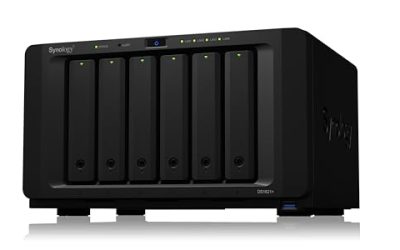
The D5-300 is the traditional choice in this group: five SATA bays behind a hardware RAID controller, connected over USB-C at 5Gbps. Its RAID menu is the broadest here, including a Clone mode that keeps an automatic duplicate, managed through TerraMaster’s RAID Manager software. Hot-swap bays make replacing a drive straightforward when one eventually fails. For a photographer whose archive is mostly hard drive based and who values a protected single volume over raw interface speed, this is the settled, uncomplicated option. The 5Gbps connection is the compromise; it suits hard drives well but leaves no headroom for faster media later.
Specs
- 5 bays for 3.5″/2.5″ SATA drives
- USB 3.1 Gen 1 Type-C connection at 5Gbps
- Hardware RAID 0/1/5/10/Clone/JBOD/Single via RAID Manager software
- Hot-swap drive bays
Best for: Photographers who want a set-and-forget hardware RAID 5 archive for several years of shoots.
Watch out for: The 5Gbps USB connection is half the speed of the hybrid model’s 10Gbps link.
ASIN: B005IOLBT2
TERRAMASTER D5 Hybrid

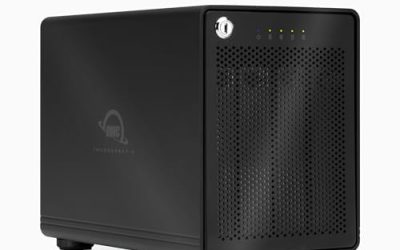
The D5 Hybrid rethinks what five slots should be. Two bays take SATA hard drives and support hardware RAID between them, while three M.2 2280 NVMe slots run independently as fast individual volumes. In practice that means a mirrored pair of large drives for the archive, plus NVMe space for the current catalog, previews, and this month’s shoots. Its USB-C connection runs at 10Gbps, double the D5-300, which the NVMe slots genuinely need. The trade is total bulk capacity: with only two hard drive bays, the deep archive is smaller than a full five-drive array, so fast-growing libraries may outgrow it sooner.
Specs
- 5 slots total: 2x SATA 3.5″/2.5″ bays plus 3x M.2 2280 NVMe slots
- USB 3.2 Gen 2 Type-C connection at 10Gbps
- Hardware RAID 0/1/Single/JBOD on the 2 SATA bays
- NVMe slots operate independently
Best for: Photographers who edit from fast NVMe storage daily and archive to a mirrored hard drive pair.
Watch out for: Only two bays hold hard drives, so bulk archive capacity is limited compared with a true five-bay unit.
ASIN: B0CR4168M8
Syba SY-ENC50122
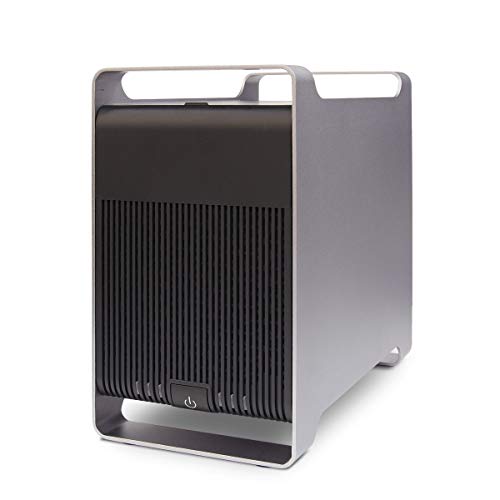
The Syba SY-ENC50122 is the utility option for workstations without modern USB-C speeds. It offers hardware RAID across five SATA bays and connects over USB 3.0 or eSATA, so older studio machines can still run a protected array. Syba lists capacity up to 120TB, giving a long runway for growing archives as drive sizes increase. The RAID set covers the levels most photographers use, including parity and mirroring, without depending on software running on the host computer. What you give up is transfer speed: neither interface matches a 10Gbps USB-C link, so large ingests after a shoot take noticeably longer.
Specs
- 5 bays for 2.5″/3.5″ SATA drives
- USB 3.0 and eSATA connections
- Hardware RAID 0/1/5/10/JBOD
- Listed capacity up to 120TB
Best for: Studios with older computers that need hardware RAID and large capacity over USB 3.0 or eSATA.
Watch out for: USB 3.0 and eSATA transfers are slower than USB-C enclosures during big card ingests.
ASIN: B08NSJM8CK
Which One Fits Your Situation
Your archive is one protected volume you rarely think about
Pick the D5-300. A five-drive hardware RAID 5 array gives you a single large volume with tolerance for one failed drive, and Clone mode is there if you prefer an automatic duplicate instead. Set it up once, let the RAID Manager watch drive health, and spend your attention on shooting rather than storage administration.
You edit every day and hate waiting on your catalog
The D5 Hybrid fits an active desk. Current projects live on the NVMe slots where culling and preview rendering feel immediate, while the mirrored SATA pair quietly holds the archive behind them. It is the only pick here that speeds up the work in front of you instead of only storing the work behind you.
Your editing machine is a few years old
Choose the Syba if your workstation offers USB 3.0 or eSATA but no fast USB-C port. You still get genuine hardware RAID and room for very large drives, and the slower connection mainly costs you time during ingest rather than during editing itself. It also leaves budget room for the drives themselves.
Common Mistakes
- Counting a hybrid enclosure’s NVMe slots as archive bays and overestimating total bulk capacity.
- Choosing RAID 0 for an archive volume, where one failed drive loses the entire array.
- Forgetting that a DAS only works when the host computer is on and connected, unlike a NAS.
- Filling all five bays immediately instead of leaving a slot free for expansion or a replacement drive.
- Skipping a separate backup because the enclosure has RAID, when RAID only covers drive failure.
Frequently Asked Questions
How many drives do I need to start with in a five-bay enclosure?
You can start with as few as your chosen RAID level requires: two for mirroring, three for a small RAID 5 array. Many photographers begin with three drives in RAID 5 and add more as the archive grows, since empty bays are free expansion. Starting partially filled also spreads drive ages apart, which reduces the chance of several drives wearing out at the same time.
Can a five-bay DAS hold my whole photography archive?
For many photographers, yes. Five bays of large hard drives hold years of RAW files, especially in RAID 5 where four drives’ worth of space is usable. The exception is a hybrid unit with only two hard drive bays, where bulk space is far smaller. Estimate your yearly growth first; if a season adds more than a couple of terabytes, plan the enclosure size around that number.
Is hardware RAID better than software RAID for a DAS?
Hardware RAID keeps the array managed inside the enclosure, so the volume appears as one disk to any computer you plug it into and rebuilds do not burden your editing machine. Software RAID can be equally capable but ties the array to the host system and its software. For a DAS that may move between workstations, hardware RAID is usually the simpler and more portable arrangement.
Should my working catalog live on the DAS or on internal storage?
It can live on the DAS if the connection and drives are fast enough, and a hybrid enclosure’s NVMe slots are made for exactly that. With hard drive arrays, many photographers keep the catalog and current project on the computer’s internal SSD and use the DAS for the underlying photo files and archive. Either layout works; what matters is that the catalog itself is included in your backups.
More from Amazon
Programs that pair well with the guide above. Offers and eligibility are set by Amazon and may change.
Free shipping on eligible items, Prime Video and more. Eligible new members can start with a free trial.
Start a Prime free trialAudiobooks and podcasts to listen to on the go. Eligible new members can start with a free trial.
Try Audible freeAd-free music streaming. Eligible new subscribers can start with a free trial.
Try Music Unlimited freeA free business account with business pricing and bulk-buying tools for work, shop or home office.
Create a business accountAs an Amazon Associate we earn from qualifying purchases.