Our Short List of 3

- Best for: Photographers wanting four-bay hardware RAID that can also expand a QNAP NAS.
- Bays: 4 drive bays
- Host connection: USB 3.2 Gen 1 Type-C, 5Gbps
- RAID modes: hardware RAID 0, 1, 5, 10, JBOD and Single
- Configuration: DIP switch on the enclosure plus QNAP External RAID Manager

- Best for: Deep archives that value five bays and a Clone mode for offline drive copies.
- Bays: 5 drive bays
- Host connection: USB 3.1 Gen 1 Type-C, 5Gbps
- RAID modes: hardware RAID 0, 1, 5, 10, Clone, JBOD and Single
- Drive handling: hot-swap bays
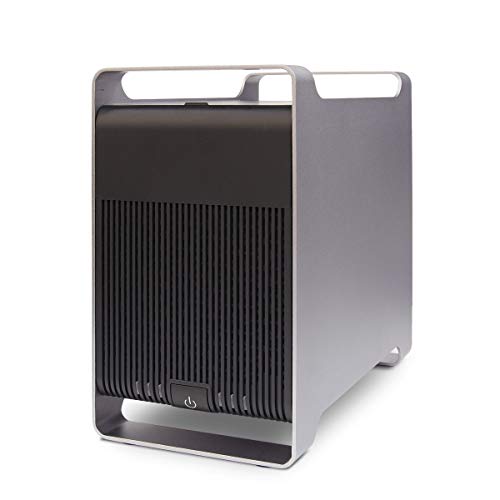
- Best for: Five-bay archives attached to older workstations that still offer eSATA.
- Bays: 5 drive bays
- Host connections: USB 3.0 and eSATA
- RAID modes: hardware RAID 0, 1, 5, 10 and JBOD
All 4 Picks at a Glance
| Product | Specs | Action |
|---|---|---|
| QNAP TR-004 |
| Check price on Amazon |
| TERRAMASTER D5-300 |
| Check price on Amazon |
| Syba SY-ENC50122 |
| Check price on Amazon |
 Mediasonic ProRaid HFR7-SU31CH |
| Check price on Amazon |
Key takeaways
- Compare hardware RAID storage enclosures for photography archives, from 2-bay to 5-bay USB boxes with true onboard RAID, speeds, ports and archive uses.
Many boxes marketed as RAID enclosures quietly hand the work to your computer. A true hardware RAID enclosure carries its own controller, so the array is built, monitored and rebuilt inside the box and the volume looks the same to any machine you connect. For a photography archive, the decision that matters is whether you want that independence, and how many bays and which connection speed your library actually needs.
This guide suits photographers who plug an archive into different computers, small studios that want protection without configuring software on every workstation, and anyone replacing a basic single-drive enclosure. The five models below were chosen from their Amazon product names and specifications, and each one performs RAID in hardware rather than asking the host computer to manage the drives.
Quick Picks
As an Amazon Associate we earn from qualifying purchases
| Product | Best for | Key spec from title |
|---|---|---|
| QNAP TR-004 | Four-bay hardware RAID expansion over USB Type-C | 4 bays, hardware RAID 0/1/5/10 |
| QNAP TR-002 | Compact two-bay mirrored archive with a faster port | 2 bays, USB 3.2 Gen 2 Type-C 10Gbps |
| TERRAMASTER D5-300 | Five bays with the widest mode list, including Clone | 5 bays, hardware RAID 0/1/5/10/Clone |
| Syba SY-ENC50122 | Five bays with a choice of USB 3.0 or eSATA connection | 5 bays, USB 3.0 and eSATA |
| Mediasonic ProRaid HFR7-SU31CH | Four bays arranged as two protected drive pairs | 4 bays, USB 3.2 Gen 2 Type-C 10Gbps |
How to Choose
Confirm the RAID Is Really Done in Hardware
A hardware RAID enclosure contains a controller that presents one finished volume to the computer. The QNAP units here set modes with physical DIP switches and the QNAP External RAID Manager, while the TERRAMASTER and Syba boxes configure their arrays on the enclosure itself. Software RAID products, by contrast, install a utility on the host and fall apart as a volume if that software is missing. JBOD-only boxes do neither job: they simply pass drives through. For an archive you may attach to a replacement computer after a failure, hardware control keeps the array readable without recreating a software setup first.
Count Bays Against the RAID Level You Intend to Run
Bay count decides which RAID levels are even possible. Two bays, like the QNAP TR-002, limit you to RAID 0, RAID 1 or separate drives, which suits a mirrored working archive. Four bays unlock RAID 5 and RAID 10, and the Mediasonic design splits its four bays into two independently configured pairs. Five bays, as on the D5-300 and the Syba unit, give RAID 5 more usable capacity and leave headroom for a growing library. Match the box to the mode you will actually run, not the longest mode list in the title.
Weigh USB Speed Against Real Archive Workloads
These enclosures connect over USB rather than Thunderbolt, so interface speed shapes ingest and verification times. USB 3.2 Gen 2 Type-C at 10Gbps, found on the TR-002 and the Mediasonic, roughly doubles the ceiling of the 5Gbps USB 3.2 Gen 1 links on the TR-004 and D5-300. Spinning hard drives in RAID rarely saturate even the slower link during ordinary photo work, so the difference shows mainly in full-archive copies. Check that your computer’s USB ports match the enclosure’s generation, because the slowest link in the chain sets the pace.
Plan for Rebuilds, Spares and a Separate Backup
When a drive in a hardware RAID set fails, the controller rebuilds onto a replacement, and hot-swap bays, as fitted to the D5-300, let you exchange the drive without powering down. Keep one spare drive of the same capacity on the shelf so a rebuild starts immediately rather than after a delivery. Rebuilds on large photo archives take hours, during which a second failure can still hurt you. Hardware RAID protects against a failed drive; it does not replace a separate backup kept apart from the enclosure.
The 5 Best Options
QNAP TR-004
- Best for: Photographers wanting four-bay hardware RAID that can also expand a QNAP NAS.
- Bays: 4 drive bays
- Host connection: USB 3.2 Gen 1 Type-C, 5Gbps
- RAID modes: hardware RAID 0, 1, 5, 10, JBOD and Single
- Configuration: DIP switch on the enclosure plus QNAP External RAID Manager
Photographers wanting four-bay hardware RAID that can also expand a QNAP NAS.
The 5Gbps link is the slower USB generation here, so full-archive copies take longer than on 10Gbps models.
The TR-004 is a four-bay expansion enclosure whose hardware RAID supports RAID 0, 1, 5, 10, JBOD and Single modes, set through DIP switches and fine-tuned with QNAP’s External RAID Manager software. That combination suits an archive that might start as a mirror and later become a RAID 5 set as the library grows. Its USB 3.2 Gen 1 Type-C connection runs at 5Gbps, and QNAP’s figures put transfers at up to about 227MB/s, which comfortably covers culling and exporting from spinning drives. It also works as direct-attached expansion for a compatible QNAP NAS.
QNAP TR-002
The TR-002 shrinks the same idea into two bays for 3.5-inch or 2.5-inch SATA drives, with hardware RAID 0, RAID 1, JBOD and Individual modes. Its USB 3.2 Gen 2 Type-C connection runs at 10Gbps, twice the interface speed of its bigger sibling, which suits a mirrored pair of faster drives used as a working archive. For photographers, the natural setup is RAID 1: every shoot exists twice the moment it is written, and either drive can fail without losing the library. The compact chassis also travels more easily between home and studio desks.
Specs
- Bays: 2 drive bays for 3.5-inch and 2.5-inch SATA drives
- Host connection: USB 3.2 Gen 2 Type-C, 10Gbps
- RAID modes: hardware RAID 0, 1, JBOD and Individual
Best for: A compact mirrored archive for photographers who work between two desks.
Watch out for: Two bays mean no RAID 5, and mirroring halves your usable capacity.
ASIN: B0BVCXFMDH
TERRAMASTER D5-300
- Best for: Deep archives that value five bays and a Clone mode for offline drive copies.
- Bays: 5 drive bays
- Host connection: USB 3.1 Gen 1 Type-C, 5Gbps
- RAID modes: hardware RAID 0, 1, 5, 10, Clone, JBOD and Single
- Drive handling: hot-swap bays
Deep archives that value five bays and a Clone mode for offline drive copies.
The 5Gbps connection is the ceiling for every transfer, however many drives you install.
The D5-300 offers the longest mode list in this group: hardware RAID 0, 1, 5, 10, Clone, JBOD and Single across five bays. The Clone mode is genuinely useful for photographers, duplicating a drive as an offline copy without tying up the computer. Hot-swap bays simplify replacing a failed drive mid-rebuild. The trade-off sits at the port: USB 3.1 Gen 1 Type-C runs at 5Gbps, so this enclosure prioritises capacity and flexibility over interface speed. For a deep archive of older shoots that is opened occasionally rather than edited daily, that balance makes sense.
Syba SY-ENC50122
- Best for: Five-bay archives attached to older workstations that still offer eSATA.
- Bays: 5 drive bays
- Host connections: USB 3.0 and eSATA
- RAID modes: hardware RAID 0, 1, 5, 10 and JBOD
Five-bay archives attached to older workstations that still offer eSATA.
USB 3.0 and eSATA are both older interfaces, so transfer speeds trail the USB Type-C models here.
The Syba SY-ENC50122 is a five-bay enclosure with hardware RAID 0, 1, 5, 10 and JBOD, aimed at buyers who want capacity without paying for features they will not use. Its distinguishing point is connectivity: alongside USB 3.0 it keeps an eSATA port, which still matters for older workstations and some NAS expansion setups where eSATA is the available socket. For a photography archive parked beside one ageing but capable desktop, that legacy port can be the difference between using the box and replacing the computer first. Configuration is handled on the enclosure, in keeping with the hardware RAID approach.
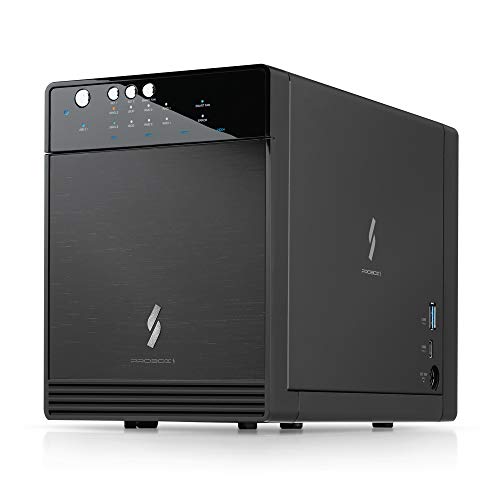
Mediasonic ProRaid HFR7-SU31CH
- Best for: Two independent mirrored pairs in one enclosure, with a handy front hub for readers.
- Bays: 4 drive bays for 3.5-inch SATA drives
- Host connection: USB 3.2 Gen 2 Type-C, 10Gbps
- RAID modes: hardware RAID as two drive pairs, each Single, JBOD spanning, RAID 0 or RAID 1
- Front hub: built-in USB hub with USB-A 5Gbps and USB-C 10Gbps ports
Two independent mirrored pairs in one enclosure, with a handy front hub for readers.
There is no RAID 5 across all four bays, because the array is built from two separate pairs.
The Mediasonic ProRaid takes a different structural approach: its four 3.5-inch SATA bays are organised as two drive pairs, each pair configurable as Single, JBOD spanning, RAID 0 or RAID 1. That layout suits a photographer who wants two separate mirrored sets in one box, for example current-year shoots on one pair and the back catalogue on the other. Its USB 3.2 Gen 2 Type-C connection runs at 10Gbps, and a built-in front USB hub adds a USB-A port at 5Gbps and a USB-C port at 10Gbps for card readers or a backup drive.
Which One Fits Your Situation
You Want One Protected Volume That Any Computer Can Read
Pick the QNAP TR-004 in RAID 5 or the TERRAMASTER D5-300. Both build the array in hardware, so the volume mounts as one drive on whatever machine you plug into, without installing RAID software first. The QNAP adds the option of NAS expansion later, while the TerraMaster gives you a fifth bay and the Clone mode for making offline drive copies.
Your Archive Is Small but Cannot Be Lost
The TR-002 in RAID 1 is the honest answer. A mirrored pair means every file is written twice, the box is small enough to move between desks, and the 10Gbps connection keeps a working library responsive. Accept that mirroring halves capacity and plan the drive size around your next two years of shooting rather than your current library alone.
You Keep Current and Older Work Separated
The Mediasonic ProRaid matches that habit physically: one mirrored pair for this year’s shoots, another for the archive, all in a single enclosure on a 10Gbps link. The front USB hub earns its place here too, because the card reader you use for ingest can stay plugged into the same desk unit instead of competing for computer ports.
Your Editing Computer Is Older but Still Capable
Look at the Syba enclosure. Its eSATA port lets a workstation without modern USB Type-C still run a five-bay hardware RAID archive at workable speeds. That avoids replacing a computer purely to gain a connector, which is a common hidden cost when photographers upgrade storage before they upgrade the machine that edits the photos.
Common Mistakes
- Assuming every box labelled RAID does the work in hardware, when some rely on host software or offer JBOD only.
- Setting DIP switches or mode controls after drives are loaded with data, which can reinitialise the array.
- Running RAID 0 for an archive because the enclosure supports it, leaving no failure protection at all.
- Forgetting that a hardware RAID array is tied to its controller family, complicating recovery if the enclosure itself fails.
- Skipping a separate backup because the enclosure has RAID in its name.
Frequently Asked Questions
What makes hardware RAID different from software RAID?
A hardware RAID enclosure has its own controller chip that builds and maintains the array, so the computer sees one finished volume and the array survives moving between machines. Software RAID runs on the host computer, which means the volume depends on that system’s tools and settings. For archives that change computers, hardware control is the more self-contained option.
Can these enclosures expand a NAS as well as serve a computer?
Some can. The QNAP TR-004 is designed to work both as a direct-attached enclosure for a computer and as expansion storage for a compatible QNAP NAS, which gives a growing studio two ways to use the same bays. The other models here are intended as direct-attached storage for a computer, so check your long-term plan before choosing.
Which RAID level should a photography archive use?
RAID 5 is the usual balance for four or five bays, keeping most capacity usable while tolerating one drive failure. RAID 1 mirroring suits two-bay boxes and paired designs like the Mediasonic. RAID 10 fits those who prefer simpler, faster rebuilds and can accept using half the raw capacity. RAID 0 offers no protection and belongs on scratch drives only.
Does a faster USB connection change photo editing from the archive?
Only up to a point. A 10Gbps link shortens big copies and full-library verifications, but spinning hard drives in RAID are usually the limit during everyday culling and exporting. The 5Gbps enclosures here remain practical for archives, especially deep storage that is opened for retrieval rather than edited from every day.
More from Amazon
Programs that pair well with the guide above. Offers and eligibility are set by Amazon and may change.
Free shipping on eligible items, Prime Video and more. Eligible new members can start with a free trial.
Start a Prime free trialAudiobooks and podcasts to listen to on the go. Eligible new members can start with a free trial.
Try Audible freeAd-free music streaming. Eligible new subscribers can start with a free trial.
Try Music Unlimited freeA free business account with business pricing and bulk-buying tools for work, shop or home office.
Create a business accountAs an Amazon Associate we earn from qualifying purchases.