Key takeaways
- Compare the best 8-bay DAS enclosures for photography archives, with RAID, Thunderbolt and USB options for fast RAW ingest and editing at your workstation.
A full wedding season or a year of commercial shoots can fill drives faster than a single external disk can handle, and the real decision is how your archive sits at the workstation: one big direct-attached box that ingests cards quickly, holds years of RAW files, and keeps the current catalog fast enough to edit without lag. Unlike a NAS, a DAS connects straight to your computer, so there is no network hop between the drives and your editing software.
The four enclosures below suit different kinds of photography workstations. High-volume shooters who want Thunderbolt speed and software RAID get one answer, studios that prefer simple USB and individual disks get another, and hybrid buyers who want NVMe cache space beside bulk hard drives get a third. Each pick comes from its Amazon product name and listed specifications.
Quick Picks
As an Amazon Associate we earn from qualifying purchases
| Product | Best for | Key spec from title |
|---|---|---|
| TERRAMASTER D8 Hybrid | Mixing NVMe speed with bulk HDD storage | 4 SATA bays plus 4 M.2 NVMe slots, USB-C 10Gbps |
| OWC ThunderBay 8 | Thunderbolt workstations needing maximum throughput | Dual Thunderbolt 3 ports, SoftRAID included |
| Mediasonic ProBox H82-SU31C | Simple high-capacity USB storage without RAID | USB 3.2 Gen 2 Type-C 10Gbps, up to 30TB per bay |
| Mediasonic ProBox H82-SU3S2 | Older workstations with eSATA ports | USB 3.0 plus eSATA, eight individual disks |
How to Choose
Decide whether you actually need RAID
RAID is the first fork in the road with an eight-bay box. A mirrored or parity array keeps the archive online if one drive fails, which matters when client work sits on the enclosure between delivery and your off-site backup. Two of the picks below offer RAID in some form, while the two Mediasonic units present every disk individually and leave protection entirely to your backup routine. Neither approach is wrong, but they suit different habits. If you already run disciplined backups to a second location, individual disks are simple and flexible. If the enclosure is your primary working archive, hardware or software RAID earns its place.
Match the interface to your workstation
The connection decides how fast cards ingest and how smoothly large previews render. Thunderbolt 3 moves data far faster than USB, and the OWC unit below is the only Thunderbolt option in this group. USB 3.2 Gen 2 at 10Gbps is the next tier and comfortably feeds hard drive arrays, whose spinning disks rarely saturate the link. Older USB 3.0 and eSATA connections still work for archive access but feel slow during big ingests. Check which ports your workstation actually has before choosing, because an enclosure you cannot plug in at full speed wastes the very performance you paid for.
Plan capacity per bay, not just bay count
Eight bays sound like endless room, yet the per-bay drive limit and your RAID choice decide the real total. An enclosure that accepts very large drives in every slot can hold a decade of RAW files, while a parity array gives up one or two drives’ worth of space to protection. Think in terms of your yearly growth: count how many terabytes a season of shoots adds, multiply by the years you want in this box, then add headroom for video files if you shoot hybrid work. Buying bays you fill in eighteen months is fine; buying an archive you outgrow in six is not.
Consider how drives are handled day to day
Small mechanics shape daily use more than headline speeds. Tool-less or push-lock trays make swapping a failed or full drive a two-minute job instead of a screwdriver project. Hot-swap support lets you change a disk without powering down mid-session. Cooling matters too, because eight spinning drives in a closed box generate real heat during a long ingest. Finally, think about where the enclosure lives: a unit beside your monitor should run quietly enough to tolerate during editing, while a box in a separate equipment area can prioritise airflow over silence.
The 4 Best Options
TERRAMASTER D8 Hybrid

The D8 Hybrid splits its eight bays into two personalities: four SATA bays for large hard drives and four M.2 NVMe slots for fast solid-state storage. That layout maps neatly onto a photography workflow, with the NVMe side holding the current season and active catalog while the hard drives carry the deep archive. Its USB-C connection runs at 10Gbps, quick enough for card ingest after a shoot. One important limit shapes how you plan arrays here: hardware RAID applies only to the first two hard drive bays, so the remaining drives work as individual volumes rather than one protected pool.
Specs
- 8 bays total: 4x SATA 3.5″/2.5″ bays plus 4x M.2 NVMe slots
- USB 3.2 Gen 2 Type-C connection at 10Gbps
- Hardware RAID 0/1/Single/JBOD on HDD1 and HDD2 only
- Push-lock drive trays
Best for: Photographers who want NVMe working space and bulk hard drive archive in one box.
Watch out for: Only the first two SATA bays support hardware RAID; the rest run as single disks.
ASIN: B0D3YZSK95
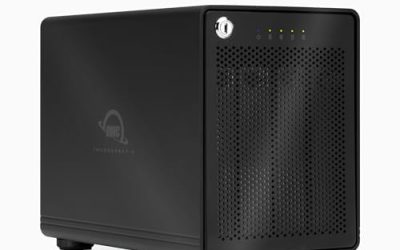
OWC ThunderBay 8

The ThunderBay 8 is the performance pick for Thunderbolt workstations. Two Thunderbolt 3 ports let it daisy-chain with up to six units and drive a display through its DisplayPort connection, so it slots into a tidy desk setup. RAID is handled by the included SoftRAID software rather than a hardware controller, offering levels from simple mirroring through parity and striped-mirror combinations. OWC lists speeds up to 2586MB/s, which suits editing directly from the array. It ships diskless, so you choose and install your own SATA drives, mixing 2.5-inch and 3.5-inch sizes as your archive demands.
Specs
- 8 bays for 2.5″/3.5″ SATA drives, diskless
- 2x Thunderbolt 3 ports at 40Gb/s plus DisplayPort 1.2
- RAID 0/1/4/5/1+0/JBOD via included SoftRAID software
- Listed speeds up to 2586MB/s
- Daisy-chaining for up to 6 units
Best for: Thunderbolt-based studios that edit straight from the array and want software RAID flexibility.
Watch out for: RAID depends on the SoftRAID software running on your computer, not on hardware in the box.
ASIN: B084S3S8JC
Mediasonic ProBox H82-SU31C

The H82-SU31C takes the opposite approach to the OWC: no RAID at all, just eight individual disks presented over a fast USB-C connection. For photographers who manage backups separately and simply need a large, straightforward archive tower, that simplicity is the appeal. Each bay supports drives up to 30TB, so total capacity can grow enormous as larger disks arrive. The USB 3.2 Gen 2 interface runs at 10Gbps with UASP and S.M.A.R.T support, keeping transfers efficient and drive health visible. Note that the bays are sized for 3.5-inch drives, so 2.5-inch disks need a bracket.
Specs
- 8 bays for 3.5″ SATA I/II/III drives (2.5″ drives need a bracket)
- USB 3.2 Gen 2 Type-C at 10Gbps with UASP and S.M.A.R.T support
- Supports up to 30TB per bay
- No RAID: JBOD and individual disk modes only
Best for: Photographers who want maximum simple capacity and handle backup protection themselves.
Watch out for: There is no RAID of any kind, so a failed drive means restoring that disk from backup.
ASIN: B073R51B3Y
Mediasonic ProBox H82-SU3S2

The H82-SU3S2 is the older, simpler sibling in this group, built for workstations that still rely on USB 3.0 or eSATA. Like the SU31C it offers no RAID, presenting eight 3.5-inch SATA drives as individual volumes for archive storage. That makes it a sensible home for completed projects, delivered galleries, and second copies that you access occasionally rather than edit from daily. The eSATA connection is increasingly rare on new computers but still useful on older studio machines that have the port. If your workstation is modern and USB-C equipped, the SU31C above is the better fit; this model serves legacy setups.
Specs
- 8 bays for 3.5″ SATA drives
- USB 3.0 and eSATA connections
- No RAID: individual disks only
Best for: Studios with older machines that have eSATA and need bulk archive space for finished work.
Watch out for: USB 3.0 and eSATA are noticeably slower than the 10Gbps USB-C on newer enclosures.
ASIN: B005GYDMYG
Which One Fits Your Situation
You edit current work and archive old work in one place
The D8 Hybrid was designed for exactly this split. Keep this season’s shoots and your working catalog on the NVMe slots where they open instantly, then let finished years settle onto the hard drive bays. The mirrored pair on the first two SATA bays can hold your most recent deliveries until off-site backups catch up.
Your workstation is Thunderbolt-based and speed comes first
Choose the ThunderBay 8. Its dual Thunderbolt 3 ports, daisy-chaining, and SoftRAID levels make it the fastest and most expandable option here, and editing large RAW files directly from the array feels responsive. Budget for drives separately, since the enclosure arrives empty and your choice of disks shapes the final performance.
You already back up elsewhere and just need room
Either Mediasonic box fits, and the choice is your ports. Pick the H82-SU31C for a modern USB-C workstation and the largest per-bay capacity, or the H82-SU3S2 if your machine has eSATA and the archive is mostly finished work. With no RAID in either, your separate backup routine is the protection, so keep it disciplined.
Your archive grows by several terabytes every year
Start with the enclosure whose ceiling you will not hit soon. The SU31C’s 30TB-per-bay support gives the longest runway, while the ThunderBay 8 answers growth by daisy-chaining additional units. Buying the bigger ceiling now is cheaper than migrating a full archive to a new box in two years, and it saves a weekend of copying terabytes across while deadlines wait.
Common Mistakes
- Assuming every eight-bay enclosure includes RAID, then discovering the disks are individual volumes only after setup.
- Treating RAID as a backup and skipping the separate off-site or cloud copy of the archive.
- Filling every bay on day one instead of leaving empty slots for painless future expansion.
- Plugging a 10Gbps enclosure into a slower USB port and blaming the drives for the ingest speed.
- Mixing very old, worn drives into a new array where one failure can take client work with it.
Frequently Asked Questions
Is a DAS better than a NAS for a photography archive?
For a single workstation, usually yes. A DAS connects directly to your editing computer, so transfers skip the network entirely and run at full interface speed, which makes ingesting cards and scrubbing through large catalogs quicker. A NAS makes more sense when several computers or people need the same archive at once, or when you want access away from the desk.
Does RAID protect my photos from being lost?
RAID protects against a drive failure, nothing more. A mirrored or parity array keeps working when one disk dies, but it cannot help if the enclosure is stolen, damaged, or hit by accidental deletion, because those events affect every drive at once. Keep a separate backup in another location; RAID buys you uptime, not a second copy.
Can I edit photos directly from an eight-bay DAS?
Yes, and that is a common setup. A Thunderbolt enclosure with fast drives handles editing smoothly, and even a 10Gbps USB model keeps up with most RAW workflows once previews are built. The slowest part is usually the hard drives themselves rather than the connection, so working from an NVMe section or a striped array feels noticeably snappier for current projects.
What happens when I outgrow eight bays?
You have three paths. Replace the installed drives with larger ones and rebuild or copy the data across, add a second enclosure if your model supports daisy-chaining or your computer has spare ports, or move completed years to cheaper cold storage and reserve the DAS for recent work. Planning which route you will take before the box is full avoids a rushed migration later.
More from Amazon
Programs that pair well with the guide above. Offers and eligibility are set by Amazon and may change.
Free shipping on eligible items, Prime Video and more. Eligible new members can start with a free trial.
Start a Prime free trialAudiobooks and podcasts to listen to on the go. Eligible new members can start with a free trial.
Try Audible freeAd-free music streaming. Eligible new subscribers can start with a free trial.
Try Music Unlimited freeA free business account with business pricing and bulk-buying tools for work, shop or home office.
Create a business accountAs an Amazon Associate we earn from qualifying purchases.