Key takeaways
- Learn how to choose a camera battery by capacity, fit, and charging, with five dependable packs for Canon, Nikon, Sony, Fujifilm, and Panasonic cameras.
A camera battery looks like a simple accessory until it runs out in the middle of a wedding ceremony, a sunrise hike, or a long video take. The right spare keeps you shooting, while the wrong one leaves a dead camera in your bag. Choosing well is less about chasing the biggest number on the label and more about matching a pack to your camera, your shooting style, and the conditions you work in. This guide explains capacity, compatibility, build quality, charging, and cold-weather behavior in plain language, then shows five dependable packs for the most common mirrorless systems.

As an Amazon Associate, we earn from qualifying purchases.
Match the Battery to Your Camera First
Compatibility comes before everything else. Camera makers assign a specific battery model to each body, and that code is printed on the battery supplied with the camera and in the camera manual. Write it down before you shop. A pack that looks almost identical can have different contacts or a different latch position, and a near match that does not lock in place is useless in the field.
Check the full model name of your camera, not just the brand. A Canon EOS R6 and a Canon EOS R50 take different batteries, and a Nikon Z6 II and a Nikon Z30 do the same. Older DSLR bodies and newer mirrorless bodies often share a battery family, yet there are exceptions, so confirm the exact list for your body. If you own a battery grip, check whether it takes the same pack, and whether it takes one pack or two.
Read Capacity the Right Way
Capacity is measured in milliamp-hours, written as mAh, and it tells you how much charge a pack holds. A higher mAh figure usually means more shots or more minutes of video from one charge, but only when you compare packs made for the same camera. A 2,280 mAh pack for a Sony body and a 2,130 mAh pack for a Canon body cannot be compared directly, because the cameras draw different amounts of power.
Watt-hours (Wh) combine capacity with voltage, so check both figures when a maker lists them. Real shooting rarely matches the lab figure in a camera manual. That figure comes from a fixed test pattern, while your day may include long bursts, heavy autofocus use, a bright rear screen, and video. Video drains a pack far faster than stills, and 4K recording with autofocus drains it faster still. Treat the manual figure as a rough guide, then carry one more spare than you think you need for video days, weddings, and winter outings. Be skeptical of printed capacities far above the original pack: a modest increase is plausible, while a wild jump in the same shell is a warning sign.
OEM or Third-Party: How to Decide
Original maker batteries, often called OEM packs, are made to the exact specification of the camera. They communicate fully with the body, so the camera shows an accurate charge level, records battery health, and warns you before the pack runs out. For paid work, for cameras that are fussy about decoded chips, and for bodies that receive frequent firmware updates, an original pack is the safest choice. The drawback is the higher cost of a single pack, which adds up when you need three or four.
Reputable third-party packs from established accessory brands offer a practical middle ground. They cost less per pack, they often include a charger in a two-pack kit, and many now include a USB-C port built into the battery itself. The best third-party brands use graded cells, a fully decoded chip, and a multi-year warranty with support based in the United States. Look for a brand you can find in camera stores, a clear warranty statement, and a model number that matches your camera exactly. Avoid no-name packs with no brand, no warranty, and no contact details.
Firmware is the hidden risk with cheap third-party packs. A camera update can reject a pack with an old or incomplete chip, and the pack may then show an error or refuse to power the camera. This does not happen often with established brands, which update their chips, but it is a real risk with the cheapest options. If your camera is your livelihood, keep at least one original pack in your kit, even if your spares are third-party.
Charging: USB-C, Dual Bays, and In-Camera Options
A good charging setup matters as much as the battery itself. A single-bay charger works well at home, but it charges one pack at a time and needs a wall outlet. On a travel day, a dual-bay charger with a USB-C input is far more useful, because it charges two packs at once from a laptop, a power bank, or a wall adapter. Some dual chargers show the charge level on a small display, which helps you decide which pack to grab next.
Batteries with a built-in USB-C port are the newest convenience. You plug a USB-C cable directly into the battery, with no charger in your bag at all. This is ideal for light travel, for charging from a power bank on a hike, and for topping up a pack in a car. The trade-off is a slightly slower charge in some models and a port that needs to stay clean and dry. Keep the rubber cover closed when the battery is in your bag.
Cold Weather and Heat: What Changes in the Field
Cold air reduces the usable capacity of every lithium-ion battery. A pack that lasts all morning in mild weather may fade in half the time on a freezing dawn shoot. The chemistry slows down in the cold, voltage drops under load, and the camera may warn of a low battery even though the pack still holds charge. The fix is simple: keep spare packs close to your body, in an inside jacket pocket, and swap a cold pack for a warm one when the camera warns you. A cold pack often recovers some charge after it warms up, so do not mark it as dead until it has warmed.
Care Habits That Extend Battery Life
Batteries age with every charge cycle, but good habits slow that aging. Store packs at about half charge if you will not use them for weeks, rather than full or empty. A pack stored full for months loses capacity faster, and a pack stored empty can drop so low that it will not take a charge. Check stored packs every month or two, top them up to about half, and keep them in a cool, dry place away from direct sun.
Five Dependable Camera Batteries to Consider
The five packs below cover five major systems, so most photographers will find their camera in this list. Each entry names the cameras it fits, the capacity, and the charging method.
1. Canon LP-E6NH Battery Pack
This is the original Canon pack for the EOS R5, EOS R6, EOS R6 II, EOS R7, EOS 5D Mark IV, EOS 6D Mark II, EOS 90D, and other bodies that take LP-E6 family batteries. It communicates fully with Canon bodies, so the camera shows an accurate charge level and battery health. The capacity is a step up from the older LP-E6N, which gives you more shots per charge on the same bodies.
Specs
- Lithium-ion, 2,130 mAh, 7.2 V, about 80 g, fits Canon EOS R5, R6, R6 II, R7, 5D Mark IV, 6D Mark II, and 90D, charges on LC-E6 charger and in-camera on compatible bodies.
2. Nikon EN-EL15c Battery Two-Pack Bundle with USB-C Charger
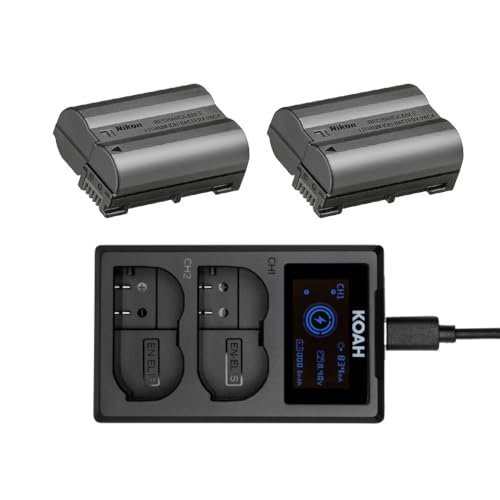
This Nikon bundle gives you two original EN-EL15c packs plus a dual USB-C charger with a display, which is a practical way to kit out a Nikon Z system in one purchase. The EN-EL15c fits the Nikon Z5, Z6, Z6 II, Z6 III, Z7, Z7 II, Z8, Zf, D850, D780, D500, and D7500, among others. The capacity is the highest in the EN-EL15 family, and the packs support in-camera charging on compatible Z bodies.
Specs
- Lithium-ion, 2,280 mAh per pack, 7.0 V, two packs plus dual USB-C charger with display, fits Nikon Z5, Z6, Z6 II, Z7, Z7 II, Z8, Zf, D850, D780, and D500.
3. Sony NP-FZ100 Z-Series Battery
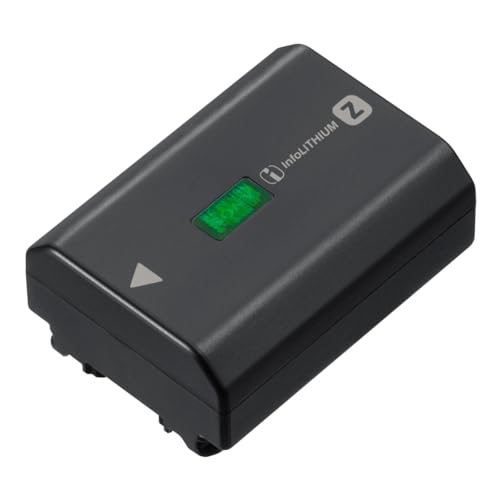
This is the original Sony pack for the A7 III, A7 IV, A7R III, A7R IV, A7R V, A7S III, A9, A9 II, A9 III, A1, A6600, A6700, A7C, A7C II, ZV-E1, FX3, and FX30. It is the standard battery across most of the Sony full-frame and high-end APS-C range, so one spare often covers two bodies if you own more than one Sony camera. The capacity is generous for stills and video, and the pack talks to the camera for an accurate level display and health data.
Specs
- Lithium-ion, 2,280 mAh, 7.2 V, fits Sony A7 III, A7 IV, A7R III, A7R IV, A7R V, A7S III, A9, A1, A6600, A6700, A7C, ZV-E1, FX3, and FX30, charges on BC-QZ1 charger and in-camera on compatible bodies.
4. SmallRig NP-W235 USB-C Battery for Fujifilm
This SmallRig pack is a third-party replacement for the Fujifilm NP-W235, and its built-in USB-C port is the reason it earns a place here. You can charge it directly from a power bank or a laptop, with no separate charger in your bag, and it reaches a full charge in about two and a half hours from a suitable USB-C source. The capacity is higher than the original Fujifilm pack, and the decoded chip reports the charge level to the camera.
Specs
- Lithium-ion, 2,400 mAh, 7.2 V, 17.28 Wh, built-in USB-C port, about 2.5 hours to full charge, fits Fujifilm X-T4, X-T5, X-H2, X-H2S, X-S20, GFX 100S, and GFX 50S II.
5. SmallRig DMW-BLK22 USB-C Battery for Panasonic

This SmallRig pack is a third-party replacement for the Panasonic DMW-BLK22, and it also carries a built-in USB-C port for direct charging. It fits the Panasonic Lumix S5, S5 II, S5 IIX, GH5 II, GH6, GH7, G9 II, and S9, which covers the current Lumix stills and video range. The capacity is higher than the original Panasonic pack, which helps on long video takes and event days.
Specs
- Lithium-ion, 2,520 mAh, 7.2 V, 18.15 Wh, built-in USB-C port, fits Panasonic Lumix S5, S5 II, S5 IIX, GH5 II, GH6, GH7, G9 II, and S9, also charges on the original Panasonic charger.
A Simple Buying Checklist
Use this checklist before you buy. First, write down your exact camera model and the battery code from the pack supplied with it. Second, decide how many spares you need: one for a short outing, two for a full day, and three for a wedding, a video shoot, or a cold-weather trip. Third, decide between an original pack and a reputable third-party pack, and keep at least one original pack if the shoot matters. Fourth, pick a charger that fits your habits: a dual USB-C charger for travel, or a USB-C battery for the lightest kit. Fifth, check the capacity and voltage, and be wary of figures far above the original. Sixth, check the warranty and the seller, then label and number your packs and store them at about half charge between trips.
FAQ
How many spare camera batteries should I carry?
Carry one spare for a short outing, two for a full day of stills, and three for a wedding, a long video shoot, or a cold-weather trip. Video and cold air drain packs faster, so add one more spare for those days.
Can I use a third-party battery in my camera?
Yes, if the pack matches your exact battery model, uses a fully decoded chip, and comes from an established brand with a clear warranty. Keep at least one original pack for paid work and for cameras that receive frequent firmware updates.
What does mAh mean on a camera battery?
Milliamp-hours measure how much charge a pack holds. A higher mAh figure usually means more shots or more minutes of video, but only when you compare packs made for the same camera. Watt-hours give a fuller picture when voltage differs.
How should I store camera batteries between trips?
Store packs at about half charge in a cool, dry place away from direct sun, with contacts covered. Check them every month or two, rotate them in order, and retire a pack that swells or holds far less charge than it used to.
Final Thoughts
A good camera battery kit is small, simple, and boring, and that is exactly the point. Match the pack to your camera, pick a believable capacity, decide between original and third-party with your eyes open, and choose a charging setup that fits how you travel. Keep spares warm in the cold and at half charge in storage, and the battery becomes one less thing to think about.
More from Amazon
Programs that pair well with the guide above. Offers and eligibility are set by Amazon and may change.
Free shipping on eligible items, Prime Video and more. Eligible new members can start with a free trial.
Start a Prime free trialAudiobooks and podcasts to listen to on the go. Eligible new members can start with a free trial.
Try Audible freeAd-free music streaming. Eligible new subscribers can start with a free trial.
Try Music Unlimited freeA free business account with business pricing and bulk-buying tools for work, shop or home office.
Create a business accountAs an Amazon Associate we earn from qualifying purchases.