
Key takeaways
- Resolution and sensor size: Higher resolution and larger sensors improve detail and low-light performance, but headline numbers apply to the whole sphere.
- Stabilisation: Gyro-based stabilisation is essential for handheld 360 and for comfort in a headset. Shaky VR footage can cause discomfort for some viewers.
- Stitching: Dual-lens cameras blend two images. Subjects close to the stitch line may show visible seams. Keep important subjects away from the seam when possible.
- Lens protection: Bulging lenses are exposed; use the maker’s guards, carry the case and clean carefully.
- Audio: Some models support spatial audio or external microphones, which boosts immersion.
- Battery and storage: High-resolution 360 consumes storage quickly; use fast cards the maker approves.
- Software: Desktop and phone editing apps determine how pleasant the workflow is. Look at what the maker’s app supports before buying.
For most people, a consumer 360-degree camera such as the Insta360 X5 is the best VR camera, creators who want true stereoscopic VR180 should look at a Canon EOS R5 C or EOS R7 paired with Canon’s dual-fisheye lenses, and anyone who just needs simple 360 stills for virtual tours will be well served by a Ricoh Theta model. The term “VR camera” covers three very different products, so decide which you need before comparing specs.
The three families are: 360-degree cameras that capture the entire sphere around them (monoscopic, no depth); VR180 cameras that capture a 180-degree field with two lenses to create a stereoscopic, depth-rich image; and professional multi-lens rigs for productions. Headsets such as the Meta Quest or Apple Vision Pro are for viewing, not capturing, though some record limited spatial video themselves.
Our top picks


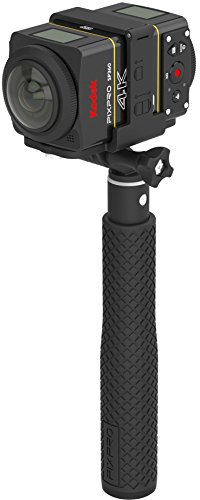
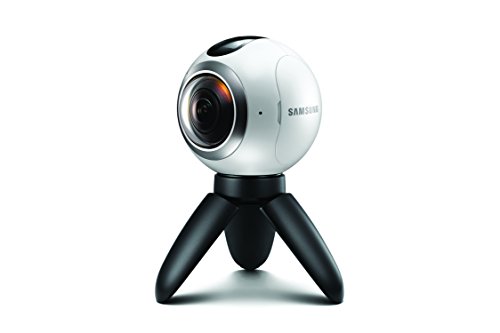
As an Amazon Associate we earn from qualifying purchases at no extra cost to you.
VR cameras at a glance
| Camera | Type | Best for | Key stated specs (per the maker) | Limits |
|---|---|---|---|---|
| Insta360 X5 | 360 consumer | Travel, action, social 360 video | Dual-lens 360 camera advertised with 8K 360 video capture, in-app reframing, stabilisation | Monoscopic; small sensors; lens care needed |
| Insta360 ONE RS 1-Inch 360 Edition | 360 modular | Higher image quality 360 with a larger sensor | Larger 1-inch sensors, co-engineered with Leica per the maker | Previous-generation modular system; bulkier |
| Ricoh Theta X | 360 compact | Virtual tours, property and street photos | Compact stick-style design, large touchscreen, still and video capture | Video less capable than action-oriented rivals |
| Canon EOS R5 C with RF 5.2mm f/2.8L dual fisheye | VR180 professional | High-end stereoscopic VR180 production | Full-frame cinema body, dual-fisheye stereo lens designed by Canon for VR | Premium tier; large files; specialist workflow |
| Canon EOS R7 with RF-S 3.9mm f/3.5 STM dual fisheye | VR180 enthusiast | Lower-cost stereoscopic VR180 | APS-C body, dual-fisheye lens for 3D VR | Smaller sensor; software workflow required |
| Insta360 Titan / Pro-class rigs | 360 professional | Broadcast and virtual production | Multi-lens high-resolution capture, per the maker | Very expensive, bulky, specialist stitching |
360 or VR180: which fits your goal?
360 cameras are the simplest. You hold or mount them, press record, and the camera captures every direction. Afterward you can crop out a regular flat video from any angle, which is hugely useful for action, driving, travel and tours. Viewed in a headset, the footage looks immersive but flat, as if projected inside a sphere, because both eyes see the same image.
VR180 uses two lenses spaced like human eyes to record stereoscopic depth across a 180-degree view. The result feels much more lifelike in a headset, especially for people, close-ups and interviews, but you only see the forward half of the world. VR180 requires more careful shooting: steady camera positions, good lighting and attention to the distance between camera and subject, since comfort in a headset is affected by close objects and shaky motion.
Consumer 360: Insta360 X5 and alternatives
The Insta360 X5 is the headline option for buyers who want an easy and capable 360 camera. The maker advertises 8K 360 video, improved low-light handling over earlier generations and replaceable lens protection. Reviewers frequently praise the companion app’s reframing, invisible selfie stick effect and stabilisation. Because the pixels are spread across the full sphere, a flat export from 8K 360 looks closer to 4K or lower in detail; this is a general property of 360 capture rather than a flaw of a single camera.
The earlier Insta360 ONE RS 1-Inch 360 Edition uses larger sensors with the aim of better image quality, particularly in low light, in a modular body. It is previous-generation but still relevant for those who prioritise image quality over compactness. The Ricoh Theta X targets still photography and virtual tours, with a straightforward stick design and large touchscreen. If your priority is property photography or street-view style images, it is a good fit; if you need rugged action video, an action-oriented 360 camera is better.
VR180 and stereoscopic: Canon’s approach
Canon has built a clear path for VR180 using conventional interchangeable-lens bodies. The RF 5.2mm f/2.8L dual fisheye lens, designed for EOS R5 C and certain other bodies, records two fisheye images side by side. Canon states that the lens is aimed at 3D VR content and works with its own software for processing. The RF-S 3.9mm f/3.5 STM dual fisheye is the smaller, more accessible lens for APS-C bodies like the EOS R7. Both need post-production software to convert the dual-fisheye frame into a viewable stereoscopic file, and large files are the norm.
For professional use, a cinema body such as the R5 C offers cooling and strong video tools, while the R7 is lighter and attractive for enthusiasts who want to experiment with VR180 without a premium budget.
Features that matter
- Resolution and sensor size: Higher resolution and larger sensors improve detail and low-light performance, but headline numbers apply to the whole sphere.
- Stabilisation: Gyro-based stabilisation is essential for handheld 360 and for comfort in a headset. Shaky VR footage can cause discomfort for some viewers.
- Stitching: Dual-lens cameras blend two images. Subjects close to the stitch line may show visible seams. Keep important subjects away from the seam when possible.
- Lens protection: Bulging lenses are exposed; use the maker’s guards, carry the case and clean carefully.
- Audio: Some models support spatial audio or external microphones, which boosts immersion.
- Battery and storage: High-resolution 360 consumes storage quickly; use fast cards the maker approves.
- Software: Desktop and phone editing apps determine how pleasant the workflow is. Look at what the maker’s app supports before buying.
Viewing and sharing
You can watch 360 video on a phone or computer by dragging to look around, which is how most audiences consume it. Headset viewing gives a stronger sense of presence. Major video platforms accept 360 uploads when metadata is included; the cameras’ apps usually add it automatically. Always check your headset maker’s guidance on safe use, including session length and play space, and take breaks if you feel discomfort.
Pick X if …
| Pick this | If you want |
|---|---|
| Insta360 X5 | The best all-round consumer 360 camera, mid-range tier |
| Insta360 ONE RS 1-Inch 360 | Larger sensors for image quality, previous generation |
| Ricoh Theta X | Simple 360 stills and virtual tours |
| Canon EOS R7 plus dual fisheye | Entry to stereoscopic VR180 on an APS-C body |
| Canon EOS R5 C plus dual fisheye | Professional VR180 in a cinema body, premium tier |
| Pro multi-lens rigs | Broadcast and high-end productions |
Alternatives
Action cameras. If you only want flat wide-angle video, a regular action camera is simpler, lighter and easier to edit than any 360 system.
Smartphone spatial video. Recent smartphones can record spatial video for compatible headsets. This is easier but offers a limited field of view and less control than a dedicated VR180 setup.
Used or previous-generation 360 models. Earlier Insta360, GoPro Max and Ricoh Theta models still produce good results at a budget tier, with older apps and lower resolution.
Shooting tips for immersive footage
Place a 360 camera at about eye level on a monopod or tripod for the most natural result, and keep people at a comfortable distance of at least a metre or so from the lenses to reduce stitching errors. Avoid fast panning movements; slow, steady motion is far more comfortable in a headset. For VR180, keep key subjects in the forward centre of the frame and avoid placing objects very close to the lenses, because close objects can strain the eyes.
Lighting matters as much as with ordinary cameras. Because a 360 camera sees everything, it will see the sun, your lamp and your shadow. Hide light stands, or use the camera’s app to remove them where possible. In low light, 360 cameras with small sensors show more noise, so use steady lighting indoors and consider larger-sensor models if you work in dim venues.
Plan your storage and backup before a trip: one hour of 8K 360 or VR180 footage can occupy a large portion of a card. Format cards in the camera, and carry a second card and a portable charger. Keep lens guards on during transport and clean lenses with a soft cloth, as smudges ruin an entire sphere of footage rather than just one corner of a frame.
Frequently Asked Questions
What is the difference between 360 and VR180?
A 360 camera captures a full sphere without depth, while VR180 captures a 180-degree view with two lenses to create a 3D stereoscopic effect. VR180 feels deeper in a headset but only covers the front half of the scene.
Do I need a headset to use a VR camera?
No. 360 footage can be watched on phones and computers by dragging the view, and many creators use it to produce standard flat video through reframing. A headset gives a more immersive experience.
Is 8K 360 video really 8K?
The 8K figure describes the full sphere. Any single viewing angle shows a smaller portion, so the sharpness you see is lower than a flat 8K video. It still improves detail over lower 360 resolutions.
Which VR camera is best for virtual tours?
Compact 360 stills cameras such as the Ricoh Theta X are popular for tours because they are simple and reliable. Tripod-mounted shots with consistent lighting give the best results.
Can I edit VR footage on a normal computer?
Consumer 360 files are manageable on a recent laptop using the maker’s app. VR180 dual-fisheye footage from Canon bodies is heavier and normally needs a stronger computer and specialist software.
Can VR footage cause motion sickness?
Some viewers feel discomfort, especially with shaky or fast-moving footage. Use stabilisation, keep camera movement smooth, and follow your headset maker’s advice on breaks.





