Our Short List of 3
- License: Fixed-term box license, download code included
- Platform: Windows
- Delivery: Box with download code
- Video app: PowerDirector 2026 with AI editing tools

- License: Perpetual-style license, one user
- Platform: Windows
- Delivery: PC Key Card with download code
- Version: VideoStudio Ultimate 2023

- License: Perpetual-style license, one user
- Platform: Windows
- Delivery: PC Key Card with download code
- Version: Pinnacle Studio 26 Ultimate
All 4 Picks at a Glance
| Product | Specs | Action |
|---|---|---|
| 2. CyberLink PowerDirector and PhotoDirector 2026 |
| Check price on Amazon |
| 3. Corel VideoStudio Ultimate 2023 |
| Check price on Amazon |
| 4. Pinnacle Studio 26 Ultimate |
| Check price on Amazon |
 5. Corel VideoStudio Pro 2021 |
| Check price on Amazon |
Key takeaways
- Find the best video editing software for creators. Compare five desktop editors with 4K timelines, AI tools, and exports for YouTube and social clips.
Every creator reaches the same point: the footage is shot, the memory card is full, and the real work is about to begin. Good editing software turns raw clips into a finished video people actually watch to the end. This guide covers video editing software only, which is different from the photo editing software covered in an earlier guide. Here the focus is on timelines, cuts, titles, color, sound, and clean exports.
As an Amazon Associate, we earn from qualifying purchases.
One honest note before the picks: the boxed and download-card software shelf on Amazon is narrow. Adobe, CyberLink, and Corel own most of it, and Corel owns both VideoStudio and Pinnacle Studio, so three of the five picks below come from the Corel family. Two picks also arrive as bundles with a photo editor included.
How to Choose Video Editing Software
Match the editor to the videos you actually make, not to the longest feature list.
Timeline style. A simple single-track timeline suits vlogs, family films, and short social clips. A multi-track timeline matters when you layer B-roll, titles, music, and voiceover at the same time. If you plan to grow into bigger projects, a multi-track editor saves you from switching apps later.
4K support. Most modern cameras shoot 4K, so your editor should handle 4K clips without stuttering on playback. Check that the app supports your camera’s file format and can export in the resolution your audience watches.
Effects and AI tools. Built-in titles, transitions, and filters speed up simple edits. AI tools that remove backgrounds, clean up audio, or add captions can save hours on talking-head videos.
Computer requirements. Video editing is demanding. A mid-range Windows PC with a solid graphics card and at least 16 GB of memory handles 1080p and light 4K work. Older machines cope better with simpler editors and proxy editing, where the app edits lightweight copies of your clips.
License type. Some editors sell as a one-time purchase with a fixed license term, while others run on a subscription. The picks below use fixed-term or perpetual-style licenses sold as a download code, key card, or disc.
1. Adobe Photoshop Elements 2025 and Premiere Elements 2025 Student and Teacher Edition
Adobe pairs its photo and video editors in one box, and this Student and Teacher Edition is the most affordable way into the pair. Premiere Elements 2025 is the video half: a guided editor with a simplified timeline, AI tools, color grading, and dynamic titles. It suits creators who want polished results without learning a professional suite. Photoshop Elements rides along in the same box, which is handy when a video thumbnail needs a quick touch-up.
The 3-year term license covers both apps on Windows and Mac, and you redeem a code to download them. The Student and Teacher edition asks for eligibility verification, so check that you qualify before buying.
Specs
- License: 3-year term, no monthly billing
- Platform: Windows and macOS
- Delivery: Box with download code, activation required
- Video app: Premiere Elements 2025 with AI tools and guided edits
- Bonus: Photoshop Elements 2025 included in the same box
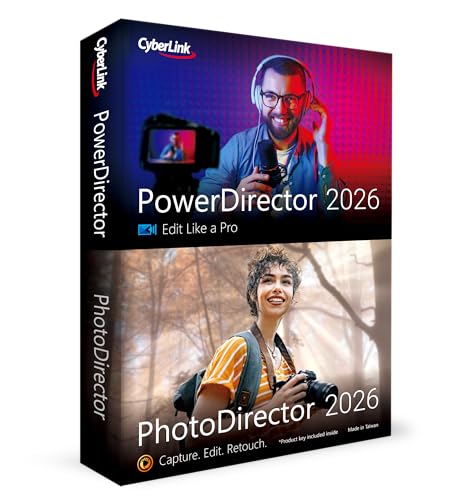
2. CyberLink PowerDirector and PhotoDirector 2026
- License: Fixed-term box license, download code included
- Platform: Windows
- Delivery: Box with download code
- Video app: PowerDirector 2026 with AI editing tools
CyberLink bundles its video editor with its photo editor in this 2026 box. PowerDirector is the main draw for creators: an AI-assisted editor with a full timeline, frame interpolation for smoother slow motion, screen recording with a separate webcam track, and brand kits that keep colors and fonts consistent across a channel. It handles the full journey from rough cut to finished upload.
The bundle suits YouTubers and course makers who record their screen and publish on a regular schedule. Note that this edition runs on Windows only, and the box contains a download code rather than a disc.
3. Corel VideoStudio Ultimate 2023
- License: Perpetual-style license, one user
- Platform: Windows
- Delivery: PC Key Card with download code
- Version: VideoStudio Ultimate 2023
VideoStudio Ultimate is Corel’s full-featured editor for creators who want room to grow. The 2023 Ultimate edition adds a premium effects collection from NewBlueFX, Boris FX, and proDAD, plus multi-cam editing, a screen recorder, and DVD authoring. The timeline supports multiple tracks, so you can stack video, titles, overlays, and music without fighting the interface.
This pick fits creators who film events, tutorials, or short films and want pro-style tools at a hobbyist level of complexity. The key card format means you get a code in the box and download the app, so keep the card safe until the software is installed. It runs on Windows only.
4. Pinnacle Studio 26 Ultimate
- License: Perpetual-style license, one user
- Platform: Windows
- Delivery: PC Key Card with download code
- Version: Pinnacle Studio 26 Ultimate
Pinnacle Studio is Corel’s other editor, aimed a step higher than VideoStudio. The 26 Ultimate edition offers pro-level tools: multi-cam editing, motion tracking, keyframe control, and 4K export, along with a screen recorder for tutorials and gameplay.
This is the pick for a creator moving from simple cuts into serious editing, such as wedding films, travel documentaries, or long-form YouTube content. It ships as a PC Key Card for Windows, with a code to download and activate the software.
5. Corel VideoStudio Pro 2021
- License: Perpetual-style license, one user
- Platform: Windows
- Delivery: PC Disc, older 2021 edition
- Version: VideoStudio Pro 2021
The Pro 2021 edition is the older, simpler sibling of the Ultimate 2023 pick above. It covers the core job well: trim clips on a timeline, add titles and transitions, adjust color, and export a finished video. It lacks the premium effects collections and some newer AI tools, but for straightforward vlogs, family movies, and short social clips, the basics are exactly what you need.
The disc format suits creators with slower internet or a preference for physical media. Be aware that it is an older version, so very new camera formats and the latest AI features may not be supported.
Tips for Faster, Cleaner Edits
Organize before you cut. Import your clips, label the good takes, and delete the obvious mistakes first. A tidy media bin makes every later step faster.
Cut for the ear as well as the eye. Clean audio matters more than fancy effects. Trim pauses, level your voice track, and add music at a low volume under speech.
Use templates and presets. Title presets, color presets, and transition packs give a consistent look across videos. Build a small set you reuse, and your channel gains a recognizable style.
Export a short test first. Render a 30-second section and watch it on a phone before exporting a long video. Catching a color or audio problem early saves a full re-export.
Back up your project files. Keep the project file and the original clips together in one folder, and copy that folder to an external drive. A finished video is easy to remake only when the project survives.
FAQ
Do I need a powerful computer to edit video?
A mid-range Windows PC with 16 GB of memory handles most 1080p and light 4K work. For heavy 4K projects, more memory and a stronger graphics card help.
Is a subscription or a one-time license better?
It depends on how often you edit. A fixed-term or perpetual-style license suits creators who edit in bursts, while a subscription suits daily editors who always want the newest features.
Can I edit on both Windows and Mac?
Only the Adobe bundle in this list covers both Windows and Mac. The CyberLink and Corel picks are Windows only, so Mac creators should check platform support before buying.
What is the difference between VideoStudio Pro and Ultimate?
Ultimate adds the premium effects collections, extra tools, and a larger feature set. Pro covers the core timeline, titles, and color tools at a simpler level, which is enough for many creators.
Should beginners pick the simplest editor?
Usually yes. A simple editor you actually use beats a complex one that sits unopened. Move up to a deeper tool once simple edits feel slow.
Final Thoughts
The best video editing software for creators is the one that matches your videos, your computer, and your patience. Beginners do well with Premiere Elements or VideoStudio Pro, regular YouTubers get a lot from PowerDirector, and deeper control comes from VideoStudio Ultimate or Pinnacle Studio 26 Ultimate. Pick the editor that fits the work you do today, learn its timeline well, and upgrade only when your videos outgrow it.
More from Amazon
Programs that pair well with the guide above. Offers and eligibility are set by Amazon and may change.
Free shipping on eligible items, Prime Video and more. Eligible new members can start with a free trial.
Start a Prime free trialAudiobooks and podcasts to listen to on the go. Eligible new members can start with a free trial.
Try Audible freeAd-free music streaming. Eligible new subscribers can start with a free trial.
Try Music Unlimited freeA free business account with business pricing and bulk-buying tools for work, shop or home office.
Create a business accountAs an Amazon Associate we earn from qualifying purchases.