Key takeaways
- Crop factor: Some Sony cameras apply a crop in certain 4K frame rates, which narrows the field of view. If you shoot with wide lenses, check the maker’s spec for the mode you will use.
- Bit depth and color sampling: 10-bit video with 4:2:2 sampling gives more room for color grading. Entry modes may be 8-bit.
- Frame rates: 4K at 24 or 30 frames per second suits most work. High frame rate 4K is useful for slow motion on bodies that list it.
- Recording limits and heat: Small bodies can overheat during long recordings. Cooling designs on FX-series cameras address this, and the manual describes limits for others.
- Stabilization: In-body stabilization with active modes helps handheld shooting, with a crop in active modes per the maker.
- Autofocus: Sony’s subject recognition for people, animals and vehicles helps with moving subjects and vlogging.
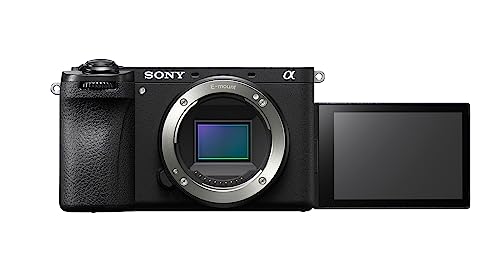
For most buyers, the Sony a6700 is the best all-round 4K camera in a compact APS-C body, the ZV-E10 II suits vloggers and beginners who want video-first controls, the A7 IV suits hybrid shooters who want full-frame stills and 4K video, the A7C II suits travelers who want full frame in a smaller body, and the FX30 or FX3 suits filmmakers who want cinema-style features and cooling. The right pick depends on sensor size, video demands and how much you want to carry.
Our top picks

As an Amazon Associate we earn from qualifying purchases at no extra cost to you.
Sony 4K Cameras at a Glance
| Camera | Sensor | Best for | Stated video features (per Sony) | Limits |
|---|---|---|---|---|
| Sony ZV-E10 II | APS-C | Vlogging, beginner video | 4K recording, vlog-oriented controls, interchangeable lenses | Fewer stills-oriented controls than a6700 |
| Sony a6700 | APS-C | Compact all-rounder | 4K with high frame rates, in-body stabilization, AI autofocus | Smaller sensor than full frame |
| Sony A7 IV | Full frame | Hybrid photo and video | 4K recording with 10-bit options, strong autofocus | Heavier; crop in some 4K modes |
| Sony A7C II | Full frame | Travel, compact full frame | 4K recording, compact body, AI autofocus | Smaller grip and viewfinder than A7 IV |
| Sony ZV-E1 | Full frame | Low-light video and vlogging | Compact body, 4K recording, in-body stabilization | Lower resolution sensor suits video more than stills |
| Sony FX30 | APS-C (Cinema Line) | Entry cinema work | 4K, cinema features, fan cooling | Cinema-oriented design, fewer stills features |
| Sony FX3 | Full frame (Cinema Line) | Professional video | 4K with high frame rates, active cooling, cage-friendly body | Premium tier; stills are secondary |
Sony frequently updates firmware and releases new bodies. Treat the table as a guide and check Sony’s page for the current specifications and for any 4K crop or time limits in the mode you plan to use.
APS-C or Full Frame?
APS-C cameras such as the a6700 and ZV-E10 II are smaller, lighter and use more compact lenses. They are a good fit for beginners, travel and vloggers. Full-frame bodies such as the A7 IV and A7C II offer better low-light performance, shallower depth of field and a wider selection of high-end lenses. They cost more and the lenses are larger.
Reviewers often note that for outdoor and well-lit work, the difference is smaller than the specification sheet suggests. For dim events, weddings and indoor interviews, full frame offers a visible advantage.
4K Details That Matter
- Crop factor: Some Sony cameras apply a crop in certain 4K frame rates, which narrows the field of view. If you shoot with wide lenses, check the maker’s spec for the mode you will use.
- Bit depth and color sampling: 10-bit video with 4:2:2 sampling gives more room for color grading. Entry modes may be 8-bit.
- Frame rates: 4K at 24 or 30 frames per second suits most work. High frame rate 4K is useful for slow motion on bodies that list it.
- Recording limits and heat: Small bodies can overheat during long recordings. Cooling designs on FX-series cameras address this, and the manual describes limits for others.
- Stabilization: In-body stabilization with active modes helps handheld shooting, with a crop in active modes per the maker.
- Autofocus: Sony’s subject recognition for people, animals and vehicles helps with moving subjects and vlogging.
Lens and Accessory Notes
Sony’s E-mount accepts native lenses plus a wide range from Sigma, Tamron and Viltrox. APS-C bodies can use full-frame lenses, often with a crop; full-frame bodies can use APS-C lenses in crop mode with a loss in resolution. For video, look for lenses with quiet autofocus and minimal focus breathing. A compact zoom such as a 16-50mm kit lens is fine for casual use, while a fast 24mm or 35mm prime serves vlogging and low light.
Accessories that matter: extra batteries (Sony’s NP-FZ100 for full-frame bodies, per the maker), a fast memory card of the type listed in the manual, a small microphone, and a handle or cage if you work on a rig. The FX3 and FX30 have mounting points and a handle with XLR inputs per Sony.
Budget Tiers
| Tier | What to expect | Examples |
|---|---|---|
| Budget | APS-C, simple controls, vlog features | ZV-E10 II, previous-generation a6000-series bodies |
| Mid-range | Advanced APS-C or entry full frame | a6700, A7C II, ZV-E1 |
| Premium | Full-frame hybrid or cinema line | A7 IV, FX30, FX3 |
Pick X If You Need…
| If you need… | Pick | Why |
|---|---|---|
| A lightweight video-first starter | ZV-E10 II | Vlog controls and APS-C size |
| One camera for stills and 4K travel | a6700 | Compact body with strong autofocus and stabilization |
| Full-frame stills and hybrid video | A7 IV | High resolution and 4K features |
| Full frame in a smaller body | A7C II | Compact build and AI autofocus |
| Best low-light video in a compact body | ZV-E1 | Full-frame sensor and compact design |
| Long takes and cinema workflow | FX30 or FX3 | Cooling and cinema-style design |
Care and Practical Notes
- Format cards in the camera and use the card types the manual specifies for 4K high-bit-rate modes.
- Keep firmware current from Sony’s support site, and read release notes before updating mid-project.
- Use a lens cap and avoid touching the sensor. If the sensor needs cleaning, follow the manual or use a service centre.
- Charge batteries with the supplied or recommended charger, and stop using any battery that swells or overheats.
- In hot weather, shade the camera and give it breaks between long clips, following the maker’s heat warnings.
Alternatives Worth Considering
- Canon EOS R50 and R7: Good alternatives for APS-C, with strong color and user interfaces.
- Panasonic Lumix G9 II or S5 II: Offer strong video features and stabilization, with different lens systems.
- Fujifilm X-S20: Compact APS-C with video features and film simulations.
- Sony ZV-1 II: A compact fixed-lens vlogging camera for those who do not want to buy lenses.
Setting Up for Better 4K Footage
Good 4K starts with settings. Choose a frame rate that matches your delivery, commonly 24 or 30 frames per second, and set the shutter speed to about double the frame rate for natural motion. Use a flat or log profile only if you plan to color grade; otherwise standard profiles give usable footage straight from the camera. Lock exposure and white balance for interviews so the look does not drift between takes.
Plan storage, because 4K files are large and high-bit-rate modes need fast cards. Back up footage to two locations before reformatting a card. Use a sturdy tripod or gimbal for smooth shots, and if you shoot handheld, keep stabilization on and move deliberately. Finally, check the manual for restrictions in your chosen mode, such as crop, recording time or disabled stabilization, so there are no surprises on shoot day.
Common Buying Mistakes
Buyers often compare megapixels when video features matter more for 4K work. Check crop factors, recording limits, bit depth and heat behavior in the exact mode you will use, and read Sony’s own specification pages alongside independent reviews. Another mistake is forgetting the lens budget: a body with a weak lens will not show its potential. Also consider battery life, memory card requirements and whether you will need an external recorder or microphone adapter. Finally, a newer body is not automatically the right choice; a previous-generation camera that fits your needs and budget can be the smarter purchase if its features cover your shooting.
Reviewers also stress reading the maker’s manual before first use, because many settings, limits and safety notes are documented there and are easy to miss. Keep the box, receipt and warranty details in one place, and register the product with the maker if a registration option exists, so support and firmware notices reach you. If you buy used, ask for proof of the original purchase, inspect the product for wear, and confirm that all included parts match the maker’s list.
Frequently Asked Questions
Which Sony camera is best for 4K video on a budget?
The ZV-E10 II is the common recommendation for budget video because it is video-oriented and light. The older a6000-series bodies may offer lower cost but lack current video features. Check recording modes in the spec.
Does 4K video on Sony cameras overheat?
Some compact bodies can overheat in long takes, especially in warm conditions. Sony publishes recording limits and heat settings in manuals, and FX-series bodies have active cooling. If you shoot long interviews, consider a body with cooling or plan for breaks.
Is full frame better for video?
Full-frame sensors often perform better in low light and give shallower depth of field. They also need larger lenses and cost more. For well-lit travel and vlogging, APS-C can be enough.
What lens should I buy first?
A versatile zoom such as a 24-70mm or 16-55mm equivalent covers most needs. For vlogging, a wide prime such as a 20mm or 24mm helps. For portraits and low light, a fast prime such as 35mm or 50mm is useful.
Can I use these cameras as webcams?
Many Sony cameras offer a USB streaming mode or clean HDMI output. Check Sony’s support page for your model, and expect that some modes limit resolution compared with direct recording.
Do I need the cinema line for professional work?
Not always. Many professionals shoot with the A7 IV or a6700 for paid work. Cinema line cameras add cooling, audio inputs and cinema-style profiles, which are useful for long takes and rigged setups.
More from Amazon
Programs that pair well with the guide above. Offers and eligibility are set by Amazon and may change.
Free shipping on eligible items, Prime Video and more. Eligible new members can start with a free trial.
Start a Prime free trialAudiobooks and podcasts to listen to on the go. Eligible new members can start with a free trial.
Try Audible freeAd-free music streaming. Eligible new subscribers can start with a free trial.
Try Music Unlimited freeA free business account with business pricing and bulk-buying tools for work, shop or home office.
Create a business accountAs an Amazon Associate we earn from qualifying purchases.