
For most households, a eufyCam kit with a HomeBase suits whole-property coverage, a SoloCam suits one or two spots without a base station, an Indoor Cam suits rooms and pets, and a Floodlight Cam suits garages and driveways. Eufy’s main selling point, according to the maker, is local storage that avoids a mandatory monthly plan.
Our top picks
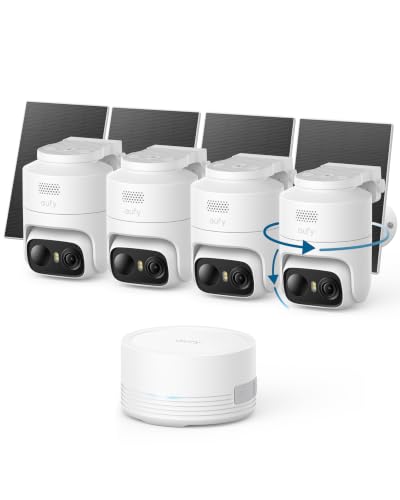 eufy Security eufyCam C37 4-Cam Kit
- 𝟑𝟔𝟎° 𝐀𝐈 𝐓𝐫𝐚𝐜𝐤𝐢𝐧𝐠 𝐰𝐢𝐭𝐡 𝐏𝐚𝐧 𝐚𝐧𝐝 𝐓𝐢𝐥𝐭: Deliver…
- 𝐙𝐞𝐫𝐨 𝐌𝐨𝐧𝐭𝐡𝐥𝐲 𝐅𝐞𝐞𝐬: Protect your home without cloud…
- 𝐔𝐧𝐥𝐨𝐜𝐤 𝐒𝐦𝐚𝐫𝐭𝐞𝐫 𝐅𝐞𝐚𝐭𝐮𝐫𝐞𝐬 𝐰𝐢𝐭𝐡 𝐇𝐨𝐦𝐞𝐁𝐚𝐬𝐞 𝐌𝐢𝐧𝐢: Connect up…


As an Amazon Associate we earn from qualifying purchases at no extra cost to you.
At a Glance: Eufy Camera Families Compared
| Family | Where | Power and storage | Best for | Limits |
|---|---|---|---|---|
| eufyCam (S3 Pro, E330 and related) | Outdoor | Rechargeable battery, solar-capable on some; recording to a HomeBase | Multi-camera outdoor coverage | Needs a base station; batteries need occasional charging |
| SoloCam (S340, S220, E30 and related) | Outdoor | Battery or solar, built-in storage | One or two cameras, no base station | Built-in storage can be lost if the unit is stolen |
| Floodlight Cam | Outdoor | Mains-wired | Driveways and garages | Wiring may need an electrician |
| Indoor Cam (pan and tilt, 2K models) | Indoor | Plug-in, microSD storage | Living rooms, nurseries, pets | Not weatherproof |
| Video Doorbell | Front door | Wired or battery, local storage | Door coverage | Battery versions need recharging |
| Wired and PoE camera lines | Outdoor | Wired power | Continuous recording | Installation effort |
Model names change often, so use this table as a guide to the families and read the maker’s current listing for exact specifications before buying.
What to Know Before Choosing
Local storage and the base station
Eufy’s eufyCam kits record to a HomeBase hub in the house, which keeps video off the camera itself. The HomeBase acts as a bridge, stores footage locally, and often sounds a siren, per the maker. SoloCam units record to built-in storage instead, so there is no hub to place. Both approaches avoid a required subscription, though Eufy also sells an optional cloud plan. Reviewers like the lack of ongoing fees; a hub-based design also means a stolen camera does not take its recordings with it.
Resolution and night vision
Eufy lists 2K resolution on many cameras and 4K on some newer models. The maker also advertises color night vision on select cameras that pair a spotlight or low-light sensor. As with any brand, low-light quality depends on ambient light, so test placement.
AI detection on device
Eufy emphasizes on-device processing of person and pet detection, according to its materials, rather than sending everything to a cloud. Accuracy depends on placement and angle. Reviewers report that fine-tuning sensitivity and activity zones reduces false alerts from passing cars or trees.
Battery life and solar
Makers give battery life as a range that depends on activity and temperature, and some eufyCam and SoloCam models support a solar panel accessory. Solar suits sunny positions; in shaded spots, plan on manual charging.
Smart-home support
Eufy states compatibility with Alexa and Google Assistant on many cameras, and some support Apple HomeKit. Check the product listing for the exact assistant support on the model you buy.
Top Picks by Need
1. eufyCam kits: the full outdoor system
A kit of two or three battery cameras plus a HomeBase is the choice for covering the front, back and side of a house. Reviewers highlight the long battery claims, local storage and optional solar upgrades. Trade-offs include a larger initial setup and the need to place the hub within range of the cameras. Mid-range to premium tier.
2. SoloCam series: no hub, quick setup
SoloCams connect directly over Wi-Fi and store video internally, which suits renters and single-spot coverage. Some models include a built-in spotlight or solar panel, according to the maker. Because storage lives in the camera, a thief who removes it also removes the footage, so some buyers add cloud backup for key spots. Budget to mid-range tier.
3. Eufy Floodlight Cam: lighting plus video
Floodlight cameras replace an existing floodlight fixture and are wired to mains power. Reviewers like them for dark driveways and garages. Installing mains-wired fixtures can require a licensed electrician depending on local rules and your experience. Mid-range tier.
4. Eufy Indoor Cam: rooms, pets and kids’ areas
Indoor models typically offer pan and tilt, 2K resolution and microSD or local storage, according to the maker, with motion alerts and two-way talk. They are not weatherproof. Follow privacy rules: tell household members and guests about indoor cameras, and avoid private spaces such as bathrooms. Budget tier.
5. Eufy Video Doorbell: front-door coverage
Available in wired and battery versions, the doorbell offers a head-to-toe view in some models and local storage. A wired version is easier to maintain; a battery version avoids wiring but needs periodic charging. Budget to mid-range tier.
Pick X If… Decision Table
| Pick this | If | Watch for |
|---|---|---|
| eufyCam kit with HomeBase | You want several outdoor cameras and local hub storage | Initial cost, hub placement |
| SoloCam | You need one or two cameras without a hub | Footage lives in the camera |
| Floodlight Cam | You want light plus video at a garage or driveway | Mains wiring |
| Indoor Cam | You want to check on pets or kids at home | Privacy, indoor use only |
| Video Doorbell | You want front-door coverage | Choose wired versus battery |
Setup, Fit and Safety Notes
- Test signal first. Check Wi-Fi strength where the camera will sit. Battery cameras that drop off Wi-Fi miss events.
- Hub placement. A HomeBase should be centrally located and wired to your router. Thick walls and distance reduce range.
- Mounting height. Eufy and other makers suggest mounting a few feet above head height; the manual gives the best range for motion sensors.
- Weather. Outdoor Eufy cameras list IP ratings and temperature ranges. Cold weather shortens battery runtime.
- Account security. Use a strong, unique password, enable two-factor authentication, and keep firmware current, as the maker advises.
- Privacy law. Aim cameras at your own property and check local rules on audio recording.
Budget Tiers
- Budget: Indoor Cam and entry-level SoloCam models.
- Mid-range: Single eufyCam kits, SoloCams with solar, wired doorbells, floodlight cameras.
- Premium: Multi-camera eufyCam kits with 4K or advanced low-light features.
Alternatives
- Reolink: Another local-storage brand with a wide choice of PoE, battery and solar cameras, and an app that reviewers describe as less polished.
- Arlo: A refined ecosystem with strong video quality, but saved clips generally rely on a subscription.
- Ring and Google Nest: Best for people already in those ecosystems; recorded history is tied to paid plans.
Buying Checklist
- Decide how many locations you need to cover. Three or more outdoor spots usually favor a eufyCam kit with a HomeBase, while one or two favor SoloCams.
- Confirm that you have a spot for the HomeBase near your router if you choose a kit.
- Decide between battery, solar and wired power for each location. Sunny spots suit solar accessories; shaded spots suit wired power or manual charging.
- Choose resolution to match the area. A small porch is well served by 2K, while a wide yard may benefit from 4K, according to the maker’s listings.
- Think about storage redundancy. Local storage avoids fees, but pairing it with an optional cloud plan on key cameras protects against theft of the unit.
- Pick a voice assistant ecosystem and confirm the camera lists support for it.
- Place indoor cameras with household consent and keep them out of private rooms.
Reviewers often say that Eufy’s strength is value for the features rather than any single standout model, so compare current listings across the SoloCam, eufyCam and Floodlight lines before deciding. Model names rotate regularly, and an older generation can be a sensible saving when the feature set still fits.
Frequently Asked Questions
Do Eufy cameras require a subscription?
No, the maker states that cameras record locally, either to a HomeBase or to built-in storage. An optional cloud plan is sold for those who want off-site backup.
Do I need a HomeBase?
For eufyCam kits, yes, since the base station stores footage and links the cameras. SoloCam units work without one because they store video internally.
How long does the battery last?
Eufy lists battery life as a range that depends on activity and temperature. Cold weather and busy locations shorten runtime, and a solar accessory can reduce how often you recharge.
Can Eufy cameras work with Alexa or Google Assistant?
Many models do, according to the maker, for live view on smart displays. Support differs by model, so read the specific listing.
Which Eufy camera is best for a front porch?
A SoloCam or the Video Doorbell are common picks for a porch, depending on whether you want a separate camera or a doorbell. For the whole property, a eufyCam kit gives more coverage.
Are Eufy cameras secure?
Eufy has faced scrutiny over past privacy practices, and the company has made public statements about changes. Use a unique password, enable two-factor authentication, keep firmware updated, and read the current privacy policy before buying.





