A MacBook’s built-in keyboard is competent, but most photographers and editors working at a desk find it limiting once they connect to an external display. The angle is wrong, the keys sit too close together for long editing sessions in Lightroom or Capture One, and reaching for function shortcuts without looking becomes a guessing game. A dedicated external keyboard solves this by letting you set the keyboard at the height and distance your wrists need, while keeping your laptop screen at eye level.
What separates a good MacBook keyboard from a mediocre one comes down to a handful of practical concerns: how well the key layout maps to macOS shortcuts without remapping, whether the connection stays stable during file transfers or screen mirroring, and whether the build quality justifies the price over years of daily use. The options below span budget Bluetooth combos that get the job done under fifty dollars to Apple’s own Touch ID models that eliminate the need for a password prompt entirely.
Our top picks
 Apple Magic Keyboard
- Magic Keyboard delivers a remarkably comfortable and precise…
- It’s also wireless and rechargeable, with an incredibly…
- It pairs automatically with your Mac, so you…
 Apple Magic Keyboard with Numeric Keypad
- WIRELESS, RECHARGEABLE CONVENIENCE
- WORKS WITH MAC, IPAD, OR IPHONE
- Magic Keyboard delivers a remarkably comfortable and precise…


As an Amazon Associate we earn from qualifying purchases at no extra cost to you.
Quick Picks
| Product | Best for | Price |
|---|---|---|
| Apple Magic Keyboard (US English) | Streamlined desk setups | $86 |
| Apple Magic Keyboard with Numeric Keypad (White) | Data-heavy workflows | $119 |
| Magic Keyboard with Touch ID and Numeric Keypad (Black) | Security-focused Apple Silicon users | $182.99 |
| Seenda SKM64-2 Combo | Tight budgets needing keyboard and mouse | $39.99 |
| Magic Keyboard with Touch ID and Numeric Keypad (White) | Same Touch ID features, lighter aesthetic | $172 |
| Macally Wireless Bluetooth Keyboard | Multi-device switching | $49.98 |
| ProtoArc KM100-A | Backlit typing in dim editing rooms | $47.99 |
| Macally USB C Wired Keyboard | Zero-latency connection, no charging | $29.98 |
How We Picked
We narrowed this list by weighing four criteria: macOS shortcut compatibility out of the box, connection reliability (Bluetooth pairing stability versus wired latency), typing ergonomics for extended editing sessions, and price-to-build-quality ratio. Owner feedback across retail listings helped flag persistent complaints like key chatter, pairing dropouts, and shortcut conflicts that spec sheets never reveal.
The 8 Best Macbook Keyboard in 2026
Apple Magic Keyboard (US English, Bluetooth)
The baseline external keyboard for anyone who already has a trackpad or mouse and just needs a proper typing surface at desk height. It uses Apple’s scissor-switch mechanism with a low profile that photographers moving between laptop and external screen will find familiar. Bluetooth pairing is seamless with macOS, and the internal rechargeable battery lasts weeks between charges via Lightning or USB C depending on revision.
- Pro: Identical key travel and feel to the MacBook’s built-in keyboard, so there is zero adjustment period.
- Pro: Compact footprint keeps a clean desk when paired with a single display.
- Con: No numeric keypad means photo file naming and batch renaming become awkward.
Skip this if you regularly type EXIF values, catalog numbers, or timestamps that demand a number pad.
Apple Magic Keyboard with Numeric Keypad (White)
Same typing experience as the compact version, but the added number pad makes it a better fit for anyone logging into Lightroom catalogs where batch renaming and keyboard-driven file management are constant tasks. The white aluminum finish matches iMac and MacBook Air aesthetics without looking out of place next to darker editing monitors.
- Pro: Full numeric keypad speeds up file renaming, export settings, and color correction value entry.
- Pro: Extended row of function keys reduces reliance on key combinations for brightness and media controls.
- Con: Wider footprint pushes your mouse further from the keyboard, which some users find disrupts their editing rhythm.
Skip if desk space is genuinely tight and you rarely enter numbers.
Magic Keyboard with Touch ID and Numeric Keypad for Apple Silicon (Black)
This is the most capable option on the list for Apple Silicon Mac users who want to unlock their machine, authenticate purchases, and fill passwords without typing anything. The black keycaps against the silver aluminum base create a subtle two-tone look that pairs well with dark-mode interfaces common in photo editing software. Touch ID response is near-instant and removes the friction of remembering a login password after a battery swap or software update.
- Pro: Touch ID eliminates password entry entirely for unlock and authentication prompts.
- Pro: Numeric keypad plus full function row covers every typing scenario a photographer encounters.
- Con: Touch ID requires proximity to the keyboard for scanning, so users who prefer the keyboard pushed back at elbow height may find it less convenient.
Skip if you use an Intel Mac (no support) or if you sit far enough from your desk that reaching forward for Touch ID feels like a chore.
Seenda SKM64-2 Bluetooth Keyboard and Mouse Combo
At under forty dollars for both keyboard and mouse, this is the entry point for anyone setting up a secondary editing station or a laptop on a travel desk who does not want to spend Apple prices. The keyboard uses membrane switches rather than scissor mechanisms, so the feel is softer and the travel slightly shorter. Pairing is straightforward and the mouse tracks without issues on most desk surfaces.
- Pro: Lowest total cost in this roundup for a complete input setup.
- Pro: Multi-device Bluetooth switching lets you jump between a MacBook and an iPad without re-pairing.
- Con: Membrane keys feel mushy compared to Apple’s scissor switches, and the shortcuts map inconsistently to macOS without third-party software.
Skip if typing feel matters to you or if you rely heavily on macOS-specific shortcuts during editing.
Magic Keyboard with Touch ID and Numeric Keypad (White Keys, Bluetooth)
Functionally identical to the black-key version above, this white variant is simply the finish choice for users who prefer a uniform light-colored desk. The price sits slightly lower at $172, which is worth noting if budget matters and color is not a deciding factor. Everything from Touch ID performance to key spacing matches the black model exactly.
- Pro: Slightly lower price than the black-key equivalent for identical functionality.
- Pro: White keys blend seamlessly with a MacBook or iMac display for a unified aesthetic.
- Con: Finger oils and dust show more visibly on white keycaps, requiring more frequent cleaning.
Skip if you work in dusty environments like studios with spray paint or if you dislike the maintenance of light-colored surfaces.
Macally Wireless Bluetooth Keyboard for Mac
Macally has built a reputation among Mac users who want a full-size layout with a number pad and dedicated shortcut row without the Apple price tag. This model connects to up to three devices simultaneously, which is genuinely useful if you alternate between a MacBook, an iPad for reference images, and an iPhone for client communication. Rechargeable via USB C means no battery swaps.
- Pro: Three-device Bluetooth switching with dedicated keys to jump between them instantly.
- Pro: 110 keys with a numeric pad and function row rival the Apple full-size layout at roughly half the cost.
- Con: Keycaps have a slightly loose, rattly feel compared to Apple’s tighter tolerances, noticeable during fast typing.
Skip if you want the exact typing feel of an Apple keyboard and cannot tolerate any looseness.
ProtoArc KM100-A Backlit Bluetooth Keyboard and Mouse
Photographers who work in darkened editing rooms or home studios without overhead lighting will appreciate the adjustable backlight on this combo. The space gray finish is understated and matches MacBook aluminum without looking like a direct clone. Like the Seenda, it includes a mouse, making it a practical all-in-one purchase for a secondary setup.
- Pro: Backlit keys let you find shortcuts and function keys without desk lighting, useful during color-critical sessions in dim rooms.
- Pro: Includes a mouse that matches the keyboard in finish and connectivity.
- Con: The backlight adds slight bulk to the keycaps, changing the tactile feel in a way some users find distracting.
Skip if you work in well-lit spaces and find any visual distraction on your keys unnecessary.
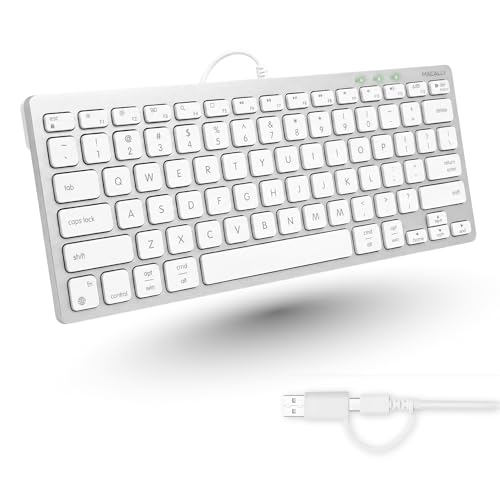
Macally USB C Wired Keyboard for Mac
At just under thirty dollars, this is the cheapest way to get a full Mac-layout external keyboard with no charging, no pairing, and no latency concerns. The wired USB C connection means it is always ready the moment you plug it in, which appeals to photographers who value reliability over cable management aesthetics. It is also a sensible choice for locked-down studio or classroom setups where Bluetooth interference or battery depletion is undesirable.
- Pro: Lowest price for a Mac-compatible keyboard with no batteries, no pairing, no dropouts.
- Pro: Compact layout fits tight desks while still including the function keys photographers need for shortcuts.
- Con: The USB C cable is short and cannot be replaced, which may limit positioning on larger desks.
Skip if you want wireless freedom or if you frequently move your setup between locations.
Buying Guide
Connection Type and Stability
Bluetooth gives you a clean desk with no cable, but connection quality varies. Apple’s own keyboards use a proprietary protocol that pairs reliably and reconnects quickly after sleep. Third-party Bluetooth keyboards sometimes take longer to wake or drop connection when you are simultaneously mirroring a MacBook to a display over USB C. Wired keyboards eliminate this entirely. If you work in spaces with heavy wireless traffic, a wired option is the safer bet.
Layout: Compact vs Full-Size with Number Pad
Photographers need number pads more than most users because file naming conventions, export batch numbers, and color adjustment values all require numeric input. A compact keyboard forces you to reach for the MacBook’s built-in number keys or use function-row overlays, which slows workflow. If your editing process involves any typed values beyond letter-based folder names, prioritize a full-size layout. The trade-off is desk width: a number pad pushes your mouse roughly seven inches further right.
Touch ID Compatibility
Touch ID on an external keyboard only works with Apple Silicon Macs running macOS Ventura or later. If you use an Intel-based MacBook or an older desktop, the Touch ID models above will function as ordinary keyboards without the biometric feature, but you are paying a premium for hardware you cannot use. Confirm your Mac’s processor family before purchasing. For Apple Silicon users, Touch ID is the single most practical quality-of-life addition on this list because it removes repeated password entry during software updates and purchase confirmations.
Our Verdict
The top pick is the Magic Keyboard with Touch ID and Numeric Keypad in white (or black, depending on your desk) because it covers every practical need a photographer has at a workstation: full layout, biometric authentication, and Apple’s proven typing mechanism. The budget pick is the Macally USB C Wired Keyboard at $29.98, which delivers a clean Mac layout with zero connectivity concerns. If you need backlit keys for dark editing rooms specifically, the ProtoArc KM100-A wins over both because neither Apple nor Macally offers illumination at any price.
FAQ
Can I use any USB keyboard with a MacBook?
Yes, any standard USB or USB C keyboard will type on a MacBook. The difference is whether the layout matches macOS shortcuts. Non-Mac keyboards often place Alt and Ctrl in positions that conflict with Mac conventions, requiring remapping through System Settings or a third-party utility.
Is a wired keyboard better for photo editing than Bluetooth?
There is no measurable latency difference that affects editing speed. The real advantage of wired is reliability: no battery anxiety, no reconnection delay after sleep, and no interference in studios crowded with Wi-Fi signals. If you dislike charging cycles, wired is the simpler choice.
Do I need a number pad for photo editing?
Most photographers benefit from one. Batch renaming, export settings, lens correction values, and color temperature adjustments all involve typing numbers repeatedly. Without a number pad you either reach for the MacBook’s built-in keys (awkward) or use function-key overlays (slow).
Will an older Apple Magic Keyboard work with a 2026 MacBook?
Yes. Apple maintains backward compatibility across Bluetooth keyboards for macOS, and the Lightning-to-USB C cable situation is resolved by the fact that the keyboard charges independently. Any Magic Keyboard model, including the older white-key versions, will pair and function with current MacBooks.