The best kids digital camera depends mostly on age: for ages 3 to 6, choose a rugged, simple model such as the VTech KidiZoom Duo FX; for ages 6 to 12, the myFirst Camera 3 or a screen-free Camp Snap are popular choices; and for tweens who want to learn photography, an entry-level Kodak PIXPRO FZ55 or Canon EOS R100 grows with them. Look for drop resistance, easy buttons, a memory card slot, and a screen that is bright enough outdoors. Megapixels matter far less than durability.
Our top picks


As an Amazon Associate we earn from qualifying purchases at no extra cost to you.
Quick comparison by age and need
| Pick | Best for | Typical age | Key traits | Price range |
|---|---|---|---|---|
| VTech KidiZoom Duo FX | Toddlers and preschoolers | 3 to 6 | Rubberized shell, two lenses, built-in games and filters | Budget |
| myFirst Camera 3 | Everyday kids camera | 4 to 13 | Lightweight at about 80 g, selfie lens, photos and video | Budget to mid |
| Camp Snap screen-free camera | Screen-free play | 6 and up | No screen, simple controls, photos on a card | Budget |
| Fujifilm Instax Mini 12 or 13 | Instant prints | 6 and up | Film prints, self-timers, selfie mirror | Mid (plus film cost) |
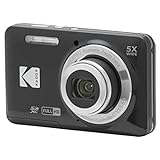
| Kodak PIXPRO FZ55 | Older kids and tweens | 8 and up | 16 MP, 5x optical zoom, standard compact controls | Budget to mid |
| OM System Tough TG-7 | Adventure and water | 10 and up | Waterproof, shockproof, macro modes | Premium |
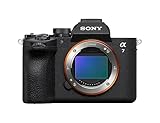
| Canon EOS R100 | Serious young photographers | 11 and up | Interchangeable lenses, viewfinder, manual modes | Mid |
Specifications come from manufacturer pages and may differ by model year; confirm before buying.
Best for young children: VTech KidiZoom Duo FX
This camera is built for small hands, with a shock-absorbing exterior, two viewfinders so a child can look through either, and built-in filters and games. Resolution is modest, so photos look fine on the screen but not in big prints. It uses internal memory or an SD card, depending on the version, and is the safest pick for preschoolers who will drop it.
Best all-rounder: myFirst Camera 3
The myFirst Camera 3 is light, easy to hold, and includes a selfie lens. It takes decent photos for a child’s camera and records video. It suits kids from preschool through the early teens. Check what comes in the box, such as a memory card and a strap, and remember that tiny buttons can be tricky for younger kids.
Best screen-free option: Camp Snap
Camp Snap cameras remove the screen so kids learn to frame a shot and wait to see results. They suit summer camps, hikes, and families trying to reduce screen time. The trade-off is quality: photos are modest, and you cannot review the image immediately.
Best for instant prints: Fujifilm Instax Mini
An Instax camera prints a credit-card-sized photo in about a minute. Kids love the tangible result, and it teaches them to think before pressing the shutter, since each print costs money. Factor in ongoing film costs, since every print is a recurring purchase.
Best for older kids: Kodak PIXPRO FZ55
The FZ55 is a basic compact with a 5x optical zoom and 16 MP sensor. It is not fancy, but it resembles a real camera and is cheap enough to replace if damaged. It is a good bridge before moving to more advanced models.
Best rugged pick: OM System Tough TG-7
For adventurous older kids who swim, hike, or visit the beach, the TG-7 is waterproof and shockproof. It is expensive for a child’s camera but works as a family camera too.
Best for budding photographers: Canon EOS R100
The EOS R100 is an entry-level interchangeable-lens camera that teaches aperture, shutter speed, and ISO. It is more fragile and costly than other options and is better suited to responsible tweens and teens.
How to choose a camera for a child
Start with age and durability
Young children need rubber shells, no sharp edges, and button lockouts. Look for drop protection claims, such as 1 to 2 meters. Older children can handle regular compacts but benefit from a wrist strap.
Check storage and charging
Choose cameras with a microSD or SD slot so photos can be moved easily. A common size is 32 GB, which holds thousands of 8 to 16 MP photos. Many kids’ cameras use AA batteries or built-in rechargeable batteries; rechargeable AAs save money.
A worked cost comparison
An Instax camera can cost less up front than many digital cameras, but film is a recurring expense: a child who shoots 100 prints a year buys about ten 10-sheet packs, and over two or three years the film can cost more than the camera itself. A digital kids’ camera has no running costs beyond the card. For families on a budget, digital is cheaper; for a gift focused on creativity, instant film is memorable.
Think about safety and privacy
Skip cameras with Wi-Fi and social features for young children. Choose models without cloud accounts unless you plan to manage them, and keep location tagging off.
Plan for growth
A child who is still interested after six months may benefit from an entry-level compact. Choose a model that uses standard cards and USB charging so it is easy to pass on to a sibling.
Ownership realities
Kids’ cameras fail in predictable ways. Screens scratch, battery doors crack, and straps break. A silicone sleeve and a clip-on lanyard add a year of life. Format the memory card in the camera, not on a computer, and help children copy photos regularly so one broken card does not erase a summer’s pictures.
Matching a camera to a child’s age
| Age range | What matters | Suggested type |
|---|---|---|
| 3 to 5 | Drop resistance, huge buttons, fun filters | VTech KidiZoom Duo FX |
| 6 to 9 | Simple controls, video, selfie lens | myFirst Camera 3 or Camp Snap |
| 8 to 12 | Optical zoom, better image quality | Kodak PIXPRO FZ55 or Instax Mini |
| 11 and up | Manual control, interchangeable lenses | Canon EOS R100 |
Teaching photography with a kids camera
A camera becomes a learning tool when you give kids a small project. Start with a photo scavenger hunt: ask for ten photos of something red, three of something tiny, and one from a very low angle. This teaches framing and perspective, and it makes kids look more carefully at ordinary scenes. Next, introduce the idea of light: shoot the same object near a window and in a dark room and compare the results. Finally, print a handful of favorites or make a small album; seeing their pictures on paper encourages kids to be selective rather than snapping hundreds of random frames.
Set simple rules as well. Ask permission before photographing people, keep the strap around the wrist, and delete obviously blurry shots only together with an adult so nothing precious disappears by accident.
Frequently Asked Questions
What age is best to give a child a camera?
Many children enjoy simple cameras by age 3 or 4. Choose a rugged, simple model, and expect much of the early photography to be blurry and creative.
Are kids’ cameras worth buying instead of using a phone?
Yes, if you want a durable device without apps, messages, or games. A dedicated camera also helps children focus on observing and composing pictures.
How many megapixels does a kids camera need?
8 to 16 MP is plenty for screens and small prints. Durability, battery life, and ease of use matter more.
Should I get a waterproof kids camera?
If your child goes to pools or beaches, yes. Make sure the doors are sealed before use, and rinse the camera in fresh water afterward.
Is an instant camera or a digital camera better for kids?
Instant cameras provide instant gratification and tangible prints but cost more to run. Digital cameras are cheaper to use and let kids take many more photos.
More from Amazon
Programs that pair well with the guide above. Offers and eligibility are set by Amazon and may change.
Free shipping on eligible items, Prime Video and more. Eligible new members can start with a free trial.
Start a Prime free trialAudiobooks and podcasts to listen to on the go. Eligible new members can start with a free trial.
Try Audible freeAd-free music streaming. Eligible new subscribers can start with a free trial.
Try Music Unlimited freeA free business account with business pricing and bulk-buying tools for work, shop or home office.
Create a business accountAs an Amazon Associate we earn from qualifying purchases.