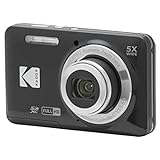
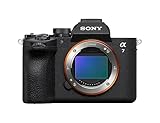
The best 4K digital camera for most buyers in 2026 is the Canon EOS R50 if you want interchangeable lenses and the Canon PowerShot V1 or G7 X Mark III if you want a pocket camera. What separates good 4K cameras from weak ones is not the “4K” label but whether the image is full width or cropped, how long the camera records before overheating, and whether the lens and autofocus keep up with your subject. Several budget 4K modes crop heavily or run at 15 or 24 fps, so read the fine print.
Our top picks


As an Amazon Associate we earn from qualifying purchases at no extra cost to you.
Quick comparison
| Pick | Best for | Sensor | 4K modes | Mic input | Price range |
|---|---|---|---|---|---|
| Canon EOS R50 | Best overall entry mirrorless | APS-C, 24.2 MP | Uncropped 4K 30p oversampled from 6K | Yes | Mid |
| Canon PowerShot V1 | Pocket vlogging | 1.4-inch type | 4K 30p full width, 4K 60p cropped | Yes | Upper-mid |
| Canon PowerShot G7 X Mark III | Compact 4K travel | 1-inch type, 20.1 MP | 4K 30p uncropped | Yes | Mid |
| Sony ZV-E10 II | Video-first creators | APS-C, 26 MP | 4K up to 60p | Yes | Mid |
| Nikon Z50 II | Photo and video hybrid | APS-C, 20.9 MP | Full-width 4K up to 30p | Yes | Mid |
| Panasonic Lumix ZS99 | Budget long zoom | 1/2.3-inch, 20.3 MP | 4K 30p | No | Budget to mid |
Best overall: Canon EOS R50
The R50 records 4K oversampled from 6K, so it keeps the full sensor width and produces detailed footage, per Canon’s specifications. Dual Pixel autofocus with subject detection holds focus on faces and moving subjects, and the body is small enough to carry daily. It has no in-body stabilization, so walking shots look steadier with a stabilized lens or a gimbal, and the kit lens is slow in low light.
Best pocket 4K camera: Canon PowerShot V1
The V1 combines a large 1.4-inch type sensor with a wide lens, built-in ND filter, and a mic jack. Full-width 4K runs at 30 fps and 4K 60p is cropped, according to published reviews. Supply has been tight since launch, and it costs more than a basic compact.
Best 4K compact for travel: Canon PowerShot G7 X Mark III
This 1-inch compact has a bright 24-100 mm f/1.8-2.8 lens, a flip-up screen, a mic input, and uncropped 4K at 30 fps. It also supports live streaming. The zoom is short, and battery life is average, so carry a spare.
Best for creators: Sony ZV-E10 II
The ZV-E10 II offers 4K up to 60 fps, 10-bit options, and Sony’s autofocus on a 26 MP APS-C sensor. A flip-out screen and a large battery suit long shoots. Stabilization is electronic only, so a stabilized lens or a gimbal is worthwhile.
Best hybrid: Nikon Z50 II
Nikon’s Z50 II records full-width 4K up to 30p and offers subject detection and a nice viewfinder, which makes it a good camera if photos matter as much as video. Higher frame rates may involve crops, so check the manual for each mode.
Best budget zoom: Panasonic Lumix ZS99
The ZS99 has a 30x 24-720 mm lens and 4K video in a pocketable body. The small sensor limits low-light quality and there is no mic input, but it is the cheapest route to 4K with real optical zoom.
What to check before buying a 4K camera
Crop factor and frame rate
If a camera needs a 1.5x crop to record 4K 60p, a 24 mm lens becomes a 36 mm view. For vlogging or tight rooms, prefer cameras that offer uncropped 4K at 30p. Higher frame rates are mainly useful for slow motion.
Bitrate and storage
4K files are large. At 100 Mbps, an hour is roughly 45 GB. A 128 GB card holds close to 2.8 hours, and a 256 GB card nearly 5.7 hours. Use UHS-I V30 cards or faster for 4K and check whether your camera uses one or two card slots.
Overheating limits
Compact bodies can stop recording after 20 to 30 minutes in warm conditions. Check reviews for recording time limits if you shoot long interviews or events.
Computer requirements
4K editing benefits from a recent CPU with hardware decoding, 16 GB of RAM, and fast storage. If your computer struggles, ask whether the camera records in an efficient codec (H.265) or an editing-friendly one (All-I).
Which 4K camera fits your project
| Project | Recommended camera | Key setting |
|---|---|---|
| Family trips and holidays | Canon PowerShot G7 X Mark III | 4K 30p, auto ISO |
| YouTube talking-head videos | Sony ZV-E10 II or Canon EOS R50 | 4K 24p or 30p, 1/50 or 1/60 shutter |
| Vlogging with a wide framing | Canon PowerShot V1 | 4K 30p full width, ND filter on in sunlight |
| Photos plus occasional video | Nikon Z50 II | 4K 30p, record in 8-bit H.265 for small files |
| Wildlife or sightseeing zoom | Panasonic Lumix ZS99 | 4K 30p, stabilization on, bright light |
Setting up 4K video correctly
Follow these steps to avoid the most common problems. First, set the frame rate to 24 or 30 fps for a cinematic look and 60 fps only when you want slow motion. Second, set shutter speed to roughly twice the frame rate (1/48 or 1/60 for 24 or 30 fps) so motion has natural blur; in bright sun use an ND filter instead of raising the shutter speed, which makes footage look choppy. Third, use a manual white balance or a preset for indoor mixed lighting, since automatic modes shift color between shots. Fourth, record audio with an external microphone and monitor levels so peaks stay below roughly minus 6 dB. Fifth, test the camera for a full planned recording length before an important event, because heat limits appear faster in warm rooms.
A worked example: a wedding speech lasts 25 minutes. At 4K 30p and 100 Mbps, the file takes about 18.75 GB. A 64 GB card handles that once with room to spare, but you should carry a second card and fresh batteries, since many compacts only give about 60 to 90 minutes of 4K recording per battery.
Image stabilization and 4K: a short reality check
Many buyers assume 4K means sharper handheld video. Sharpness depends on stabilization and shutter speed. Walking footage from a camera without stabilization looks wobbly even at 4K, because the extra pixels reveal every shake. Electronic stabilization fixes some of the movement but crops the frame by 10 to 20 percent, which turns a 24 mm view into roughly 27 to 30 mm. If you plan to vlog at arm’s length, choose a camera with a very wide lens or one that offers optical or in-body stabilization. For static interviews on a tripod, stabilization is irrelevant and you should spend on microphones and lighting instead.
Frequently Asked Questions
Is 4K necessary for a digital camera?
Not strictly, but 4K gives editing flexibility, sharper details, and room to crop. Nearly all current cameras at moderate prices include it.
What is the difference between 4K and UHD?
Consumer cameras shoot UHD at 3840 by 2160 pixels, which is marketed as 4K. Cinema 4K is slightly wider at 4096 pixels.
Does a 4K camera need a special memory card?
Yes, a fast card such as UHS-I V30 or better prevents dropped frames. Higher-bitrate modes may need V60 or V90.
Are cheap 4K cameras worth buying?
Very cheap models often use digital zoom, tiny sensors, and interpolation, so the 4K label means little. Choose a reputable brand with a larger sensor.
Which is better for 4K video, a compact or a mirrorless camera?
Mirrorless gives better low-light performance and lens choice, while a compact is easier to carry. Pick based on how you travel and how much you plan to edit.
More from Amazon
Programs that pair well with the guide above. Offers and eligibility are set by Amazon and may change.
Free shipping on eligible items, Prime Video and more. Eligible new members can start with a free trial.
Start a Prime free trialAudiobooks and podcasts to listen to on the go. Eligible new members can start with a free trial.
Try Audible freeAd-free music streaming. Eligible new subscribers can start with a free trial.
Try Music Unlimited freeA free business account with business pricing and bulk-buying tools for work, shop or home office.
Create a business accountAs an Amazon Associate we earn from qualifying purchases.