Key takeaways
- iPhone 15, 15 Plus, 15 Pro, 15 Pro Max, 16 series, and later: You need a USB-C thermal dongle. Most brands now sell USB-C native versions. A Lightning dongle with an Apple Lightning-to-USB-C adapter will not work reliably because thermal cameras require direct USB OTG support.
- iPhone 14 and earlier (Lightning): You need a Lightning version. FLIR and Seek still sell Lightning variants, while InfiRay, HIKMICRO and TOPDON are primarily USB-C — you will need a Lightning adapter from the manufacturer, not a generic charging adapter, and performance can be less stable.
- Case clearance: Thermal dongles are wide and short. If you use a thick rugged case (OtterBox Defender, etc.), you may need to remove the case or use the short extension cable included with FLIR ONE and InfiRay kits. Without the cable, the dongle often cannot seat fully.
What's inside
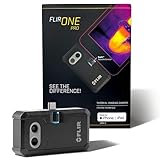
The best thermal camera for iPhone for most users in 2026 is the InfiRay P2 Pro for USB-C iPhones (iPhone 15 and later) and the FLIR ONE Pro (Lightning or USB-C version) if you need the most polished app and better temperature measurement tools, while budget buyers are best served by the TOPDON TC002 or HIKMICRO Mini2.
All current iPhone thermal cameras are dongles that plug directly into the charging port — there are no true thermal camera cases with built-in sensors, only cases with a port cutout to keep the dongle attached. Your choice comes down to connector type, thermal resolution, temperature accuracy, and whether you need advanced software features or just a clear thermal image.
As an Amazon Associate we earn from qualifying purchases at no extra cost to you.



Lightning vs USB-C: Check Your iPhone First
Compatibility is the first filter. Apple switched from Lightning to USB-C with the iPhone 15 series in 2023.
- iPhone 15, 15 Plus, 15 Pro, 15 Pro Max, 16 series, and later: You need a USB-C thermal dongle. Most brands now sell USB-C native versions. A Lightning dongle with an Apple Lightning-to-USB-C adapter will not work reliably because thermal cameras require direct USB OTG support.
- iPhone 14 and earlier (Lightning): You need a Lightning version. FLIR and Seek still sell Lightning variants, while InfiRay, HIKMICRO and TOPDON are primarily USB-C — you will need a Lightning adapter from the manufacturer, not a generic charging adapter, and performance can be less stable.
- Case clearance: Thermal dongles are wide and short. If you use a thick rugged case (OtterBox Defender, etc.), you may need to remove the case or use the short extension cable included with FLIR ONE and InfiRay kits. Without the cable, the dongle often cannot seat fully.
Top Thermal Camera Dongles for iPhone Compared
These five represent the current market leaders for iOS. Specs below are manufacturer-rated for iOS versions sold in 2026.
| Model | Thermal Resolution | Temperature Range / Accuracy | NETD (Sensitivity) | Frame Rate | Weight / Size | Connector |
|---|---|---|---|---|---|---|
| FLIR ONE Pro (Gen 3) | 160 x 120 (19,200 pixels) + VividIR | -20C to 400C / +/- 3C or +/-5% | 70 mK | 8.7 Hz | 36.5g / 68 x 34 x 14 mm | Lightning or USB-C (separate SKUs) |
| InfiRay P2 Pro | 256 x 192 (49,152 pixels) | -20C to 600C / +/- 2C or +/-2% | 40 mK | 25 Hz | 9g / 27 x 18 x 9.8 mm | USB-C (Lightning adapter optional) |
| HIKMICRO Mini2 Plus | 256 x 192 (49,152 pixels) | -20C to 550C / +/- 2C or +/-2% | 40 mK | 25 Hz | 20g / 41.7 x 37.2 x 14.3 mm | USB-C |
| Seek Thermal Compact | 206 x 156 (32,136 pixels) | -40C to 330C / +/- 5C or +/-5% | 70 mK | 9 Hz | 14g / 44 x 25 x 13 mm | Lightning or USB-C |
| TOPDON TC002 / TC002C | 256 x 192 (49,152 pixels) | -20C to 550C / +/- 2C or +/-2% | 40 mK | 25 Hz | 30g / 71 x 42 x 14 mm | Lightning (TC002) / USB-C (TC002C) |
What those numbers mean in practice
Resolution: 256×192 captures roughly 2.5x more thermal data than 160×120. In real use, that means you can identify a cold draft around a window frame from 6-8 feet away instead of needing to be within 2-3 feet. 160×120 with FLIR’s MSX technology overlays visible-light edge detail to make images look sharper, but the underlying thermal data is still lower.
NETD (mK): Lower is better. A 40 mK sensor detects temperature differences as small as 0.04C, compared to 70 mK at 0.07C. This matters for subtle issues like moisture behind drywall or a slightly warm circuit breaker, where a 40 mK sensor will show contrast that a 70 mK sensor smooths over.
Frame rate: 25 Hz looks smooth when panning across a room. 8.7-9 Hz devices have noticeable lag and stutter, which makes video recording less useful but does not affect still image quality.
Accuracy: The +/-2C vs +/-3-5C difference looks small on paper, but for HVAC or electrical diagnostics it matters. None of these dongles are calibrated inspection tools — consider them screening devices. For comparing relative temperatures (e.g., which wall stud is colder), accuracy matters less than sensitivity.
App Features and Image Quality Differences
Hardware is only half the experience. The app determines how useful the image becomes.
- FLIR ONE App (iOS): The most feature-complete. Offers MSX blending (thermal + visual edge detail), multiple palettes, spot meters (up to 3-4 simultaneous), area min/max/average, time-lapse, and detailed radiometric JPEGs where every pixel retains temperature data for later analysis on desktop. FLIR also provides FLIR Tools for reporting.
- InfiRay P2 Pro / HIKMICRO Viewer: Both use similar 256×192 sensors (InfiRay supplies cores for several brands) and offer clean apps with 25 Hz video, adjustable palettes, 3 spot meters, area measurement, and temperature alarm thresholds. InfiRay’s app includes a useful x2 digital zoom without MSX, while HIKMICRO adds a dedicated super-resolution mode and frequent firmware updates. Neither has MSX-style visual overlay.
- Seek Thermal App: Minimalist. Offers spot temperature, high/low threshold, and four palettes. Lacks area measurement and file-level radiometric data on some iOS versions. Image processing tends to be higher contrast but noisier.
- TOPDON App: Surprisingly capable for the price range, with 3 spot meters, area box, temperature range lock (to visualize only 20-30C for building checks), and radiometric video. UI is less polished than FLIR but more functional than Seek.
All apps save to the iPhone Photos library and allow sharing. FLIR and HIKMICRO retain the most temperature data in the file for post-analysis.
Decision Matrix: Which Dongle Matches Your Situation
| Your Situation | Priority | Recommended Type | Why |
|---|---|---|---|
| Homeowner checking insulation, air leaks, radiant floor heating, occasional DIY | Value + clear image | InfiRay P2 Pro or TOPDON TC002C (USB-C) | 256×192 resolution and 40 mK sensitivity reveal subtle drafts and moisture patterns that 160×120 misses; lowest weight for pocket carry |
| Electrician, HVAC tech, home inspector needing reports | Accuracy + reporting | FLIR ONE Pro | Best app ecosystem, MSX for documentation, reliable +/-3% accuracy, FLIR Tools reporting; worth the higher price range and larger size |
| iPhone 12/13/14 user who does not plan to upgrade soon | Connector certainty | FLIR ONE Pro Lightning or Seek Compact Lightning | Native Lightning support without adapter hassles; avoids OTG issues |
| iPhone 15/16 user wanting smallest possible dongle | Portability | InfiRay P2 Pro | 9g and under 1 inch long; can stay on a keychain, no battery to charge |
| Budget under general market mid-range and frequent use | Cost per use | HIKMICRO Mini2 Plus or TOPDON TC002C | Same core sensor as premium compacts, 25 Hz video, broad temperature range; fewer app extras than FLIR |
Cost Per Use: A Worked Calculation
Thermal dongles in 2026 generally fall into two market ranges: entry to mid-range (approx. $180-$300) for 256×192 dongles like TOPDON and HIKMICRO, and premium ($300-$500) for FLIR ONE Pro. InfiRay P2 Pro typically sits between them.
Unlike handheld thermal cameras with built-in batteries and screens, dongles have no battery to replace and draw power from the iPhone. So the calculation is simple:
Example: A $249 dongle used twice a month for home and auto checks over 3 years = 72 uses. $249 / 72 = $3.46 per use. A $449 FLIR ONE Pro used weekly for professional screening over 2 years = 104 uses. $449 / 104 = $4.32 per use. If you use it daily on jobs, cost drops below $2 per day within the first year. For infrequent users (3-4 times per year), renting or borrowing makes more sense than buying premium, as sensor tech improves every 18-24 months.
Power draw is negligible but real: expect 2-4% iPhone battery per 15 minutes of continuous scanning. Bring a power bank for long inspections.
Durability and Ownership Realities
Dongles are more fragile than they look. What actually fails:
- Connector flex: The USB-C/Lightning plug is the weak point. Never carry the dongle plugged into the phone in a pocket — lateral pressure bends the connector pins. Use the included hard case. The 20-30g weight seems light, but leverage from a drop while attached can crack the iPhone port.
- Lens contamination: The germanium lens is recessed but collects pocket lint and fingerprints. Oil from skin changes emissivity and creates hazy spots. Clean only with a dry lens cloth or air blower — no alcohol, no microfiber with cleaning spray, and never compressed air directly on the lens.
- Shutter calibration: All models show a brief freeze/click every 30-60 seconds (automatic non-uniformity correction). This is normal, not a defect. If the image freezes permanently, unplug and replug rather than force-closing the app.
- Heat shutdown: Using the dongle in direct sun on a hot dashboard can trigger an over-temperature warning above 40-45C ambient. Let it cool in shade before reconnecting.
- No consumables: There are no batteries or calibration gases. Factory calibration drifts slowly over 2-3 years. For professional use, annual comparison against a known temperature source (ice water at 0C, black tape on a heated surface) is recommended.
Common mistakes to avoid: storing without the lens cap, using a generic USB-C adapter that blocks data lines (only power passes through), and expecting wall-penetrating vision — thermal cameras see surface temperatures only, not through walls or glass.
Setup in 3 Steps
No pairing or charging is needed. Setup is plug-and-play but order matters for iOS:
- 1. Install the correct app before plugging in. FLIR ONE, Seek Thermal, P2 Pro, HIKMICRO Viewer, or TOPDON TCView all prompt for camera permission. Install first so iOS recognizes the accessory.
- 2. Remove thick cases and plug in firmly. You should see a prompt to allow the accessory to connect. If iOS says “Accessory not supported,” unplug, close the app fully, replug, then reopen.
- 3. Lock your temperature span for the task. For building inspections, set the range to 10C-35C to exaggerate small differences. For electronics or engines, set to 0C-150C so hot spots do not wash out the image. Auto-range makes everything look similar and hides defects.
FAQ
Do I need a separate thermal camera case for my iPhone?
No. As of 2026 there is no mass-market iPhone case with an integrated thermal sensor. All options are dongles. Some sellers advertise “thermal cases” but they are standard phone cases with a cutout to keep the dongle semi-permanently attached. A regular case with good port access works the same.
Will a thermal dongle work through phone cases, windows, or water?
It will not see through glass, clear plastic, or water — those materials block long-wave infrared. It measures the surface temperature of the window or water surface itself. Similarly, it cannot see inside walls, only the temperature pattern on the wall surface.
How accurate are iPhone thermal cameras for fever or health checks?
These devices are not medical thermometers and should not be used to diagnose fever, illness, or skin conditions. Skin emissivity, ambient temperature, and distance create large errors. For health concerns, use an approved medical device and consult a healthcare professional.
Can I use the same dongle on iPhone and Android or iPad?
USB-C versions work across USB-C iPhones, iPads Pro/Air, and Android phones that support USB OTG, often with the same app. Lightning versions are iPhone-only. Check the app listing for iPadOS support — FLIR and HIKMICRO support iPad, Seek and InfiRay have more limited tablet optimization.