Key takeaways
- A memory card is the only part of a camera kit that holds the one thing you cannot replace: the shots themselves.
A memory card is the only part of a camera kit that holds the one thing you cannot replace: the shots themselves. Photographers searching for the best cards are rarely after the cheapest option on the shelf. They want a card that keeps up when the shutter is held down for a burst of action, that records 4K video without stopping, and that fits the slot in their body. Speed labels, class symbols, and capacity tiers pile up fast, which is why two cards that look identical in a photo can behave very differently in a camera.
This guide is written for wedding, travel, wildlife, and hobby shooters who want a sensible shortlist rather than a spec-sheet lecture. It covers SD cards in the UHS-I and UHS-II families plus an older CompactFlash option for legacy bodies, and it explains the letters printed on each label. A theme throughout 2026 listings is inflated headline numbers, so the sections below separate read speed, sustained write speed, and capacity, and show where each product fits. Everything here is drawn from what each listing title states, so check the listing before you buy for the exact slot type of your camera.
Quick Picks
Our top picks




As an Amazon Associate we earn from qualifying purchases at no extra cost to you.
| Product | Best for | Key spec taken from the product title |
|---|---|---|
| PNY Elite-X 128GB 2-Pack | Everyday 4K shooting with a spare | 128GB, U3, V30, UHS-I, up to 100MB/s read |
| Lexar SILVER PRO 128GB | Demanding professional work | 280MB/s read, V60, U3, UHS-II |
| GIGASTONE 128GB 4K Camera Pro | Budget-minded 4K shooters | 150MB/s read, A1, V30, U3, Class 10, UHS-I |
| SanDisk Extreme PRO 32GB | Short bursts and small files | Up to 100MB/s read, up to 90MB/s write, V30, U3 |
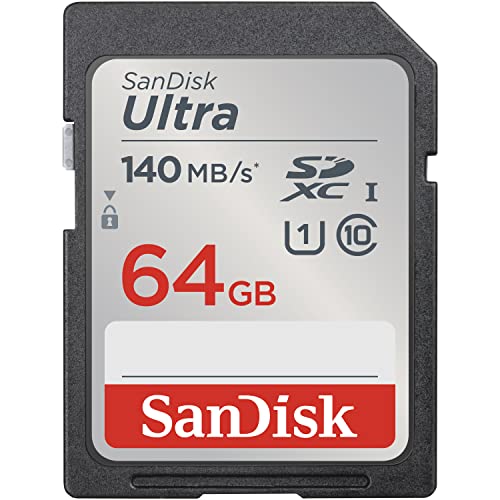
| SanDisk Ultra 64GB | Compact and mid-range cameras | Up to 140MB/s read, U1, C10, Full HD |
| GYWY 16GB CF Card | Older bodies with a CF slot | CF 16GB, UDMA |
How to Choose
Read Speed Is Not the Same as Write Speed
Marketing leads with the biggest number, and that number is almost always read speed, which governs how fast files move to your computer. What matters in the camera is sustained write speed. The V class system tells you the minimum sustained video write speed: V30 means 30MB/s and V60 means 60MB/s. U3 means at least 30MB/s, and U1 means at least 10MB/s. For 4K video or raw bursts, aim for V30 at the very least, and step to V60 when the camera supports UHS-II and you shoot long clips or fast sequences.
Match the Bus Type to Your Camera
UHS-II cards add a second row of pins and can reach far higher speeds than UHS-I, but only if the camera slot supports UHS-II. In a UHS-I slot they still work, just at the lower ceiling. Check the body specifications before paying more for UHS-II. CompactFlash cards use a completely different slot, so a CF card cannot go into an SD port. Many older SLR bodies still use CF, and the right size is whatever the camera manual or listing states.
Pick Capacity by Workflow, Not by Habit
A 32GB card holds fewer raw files than most people expect, while a 128GB card can carry a full day of shooting. Buying two 64GB or 128GB cards, as in several listings below, spreads risk: if one fails or fills, the second saves the shoot. Avoid one giant card that holds an entire trip. Also check the SD family label: SDHC covers up to 32GB and SDXC covers larger sizes, and older cameras must support SDXC to read the bigger cards.
Know Where Budget Cards Cut Corners
Budget cards often publish a strong read number while holding back sustained writes, which shows up as buffer stalls in burst mode. Counterfeits are common on online marketplaces, so buy from authorized sellers and format the card in the camera itself. Features like data recovery services and A1 application labels sound helpful, but A1 is aimed at running apps on phones and is irrelevant to cameras. Ignore the free adapter, and weigh warranty terms instead. A card that lists a high read number but no V or U class is hard to judge, so favor listings that spell out the class for the job you have in mind.
The 6 Best Options
PNY Elite-X 128GB 2-Pack
The PNY Elite-X comes as two 128GB SDXC cards, labeled C10, U3, and V30 on UHS-I, with read speed up to 100MB/s and support for 4K UHD video. A two-pack is a quiet advantage: you get a spare card for the same trip, so you can swap when one fills up. The specs align with a mid-range mirrorless or DSLR body that shoots 4K at standard bitrates.
- Strength: V30 and U3 mark a sensible floor for 4K video.
- Strength: two cards in one pack give a built-in backup.
- Trade-off: UHS-I caps the speed, so it will not match UHS-II cards in long bursts.
Skip it if your camera shoots high bitrate 4K or long raw sequences and supports UHS-II. Confirm the write speed on the listing before relying on it.
Lexar SILVER PRO 128GB
This card jumps to UHS-II, with up to 280MB/s read, V60, and U3, and the listing mentions compatibility with Canon, Sony, and Nikon. It is the one for professionals and serious enthusiasts who shoot fast sequences or demanding 4K video. It is offered as both a two-pack and a single card, so you can start with one and add a second.
- Strength: V60 and UHS-II suit high bitrate recording and long raw bursts.
- Strength: available as a single or a two-pack.
- Trade-off: you only get the extra speed if your camera has a UHS-II slot.
Skip it if your body is UHS-I only; a cheaper V30 card will perform the same inside it. Also confirm the card reader you use at home supports UHS-II.
GIGASTONE 128GB 4K Camera Pro
GIGASTONE advertises 150MB/s read, UHS-I, A1, V30, U3, and Class 10, plus a five-year data recovery service. The pairing of 128GB capacity and V30 suits 4K recording on a budget, and the recovery offer adds a safety net if a card fails. The A1 marking is irrelevant for cameras, but it does not hurt.
- Strength: V30 and U3 with a large 128GB capacity.
- Strength: recovery service named in the title.
- Trade-off: a lesser-known brand, so buyers should read warranty terms and buy from an authorized seller.
Skip it if you want the reassurance of a long-established camera brand or UHS-II speed for bursts. Look at the warranty terms and the exact data recovery conditions on the listing, because the service wording varies by seller and region.
SanDisk Extreme PRO 32GB
This SD card lists up to 100MB/s read and up to 90MB/s write on UHS-I, with V30, U3, C10, and 4K UHD. The stated write speed is unusually clear for a listing and matters for burst photography. At 32GB, capacity is smaller, which makes it a practical pick for photographers who offload often, or for a spare in the camera bag.
- Strength: a stated write speed of up to 90MB/s helps burst shooting.
- Strength: V30 class supports 4K video.
- Trade-off: 32GB fills quickly with raw files or video.
Skip it if you shoot long events without a chance to offload, or if you record lots of 4K video. Photographers who prefer fewer card swaps in the middle of a ceremony or a game will likely want a larger capacity in the same family, so compare the available sizes on the listing.
SanDisk Ultra 64GB (140MB/s)
The Ultra line targets compact to mid-range cameras and camcorders, with up to 140MB/s read, UHS-I, U1, C10, and Full HD. The U1 class means the card is meant for Full HD video and standard photos, not for 4K. It is the entry-tier choice for a travel compact or an older body.
- Strength: 64GB gives room for a day of casual shooting.
- Strength: a familiar brand name and a modest, easy-to-manage capacity tier.
- Trade-off: U1 is not intended for 4K video or fast raw bursts.
Skip it if you shoot 4K or continuous action, where a V30 card is the safer minimum. It also pairs well with a card reader at home, since the read speed helps when copying a day of photos to a computer.
GYWY CF 16GB UDMA
For cameras with a CompactFlash slot, this is a CF card in a UDMA format at 16GB, aimed at professionals, videographers, and enthusiasts using older gear. A sibling 8GB version is also listed. The title does not state a speed beyond UDMA, so treat it as a legacy answer for a body that cannot use SD.
- Strength: fits older CF-slot cameras that SD cards cannot.
- Strength: capacity small enough to act as a spare.
- Trade-off: the listing gives no speed figure, so performance is hard to compare.
Skip it if your camera uses SD, or if you need large capacities for raw files. Check the manual of your camera to confirm which CF type and which UDMA mode it supports, and buy from a seller who accepts returns, since CF cards from unknown makers are harder to verify.
Which One Fits Your Situation
You Shoot 4K Video on a Mirrorless Camera
The PNY Elite-X two-pack gives you two V30 cards in a single purchase, with a spare at hand. If your body supports UHS-II, the Lexar SILVER PRO is the upgrade.
You Photograph Sports or Wildlife
Choose the Lexar SILVER PRO for its UHS-II speed and V60 label, provided the camera slot supports it. Otherwise the SanDisk Extreme PRO 32GB offers a stated write speed for bursts, with frequent offloading.
You Use an Older Compact or Entry-Level Body
The SanDisk Ultra 64GB suits Full HD and casual stills without paying for speed the camera cannot use.
You Still Shoot with a CF Camera
Older bodies reward simple choices, so match the slot type first and the capacity second.
The GYWY CF card is the match for the slot. Keep two on hand and offload often.
Common Mistakes
- Buying on headline read speed without checking the V or U class for writes.
- Paying for UHS-II when the camera slot supports only UHS-I.
- Putting a whole trip on one large card instead of splitting across two.
- Skipping formatting in the camera, which can cause errors later.
- Ignoring the physical slot: SD and CF cards are not interchangeable.
Related guides
Frequently Asked Questions
What does V30 mean on a memory card?
V30 is a video speed class guaranteeing at least 30MB/s sustained writes. It is a common minimum for 4K video and burst photography.
Is UHS-II worth the extra cost?
Only if the camera has a UHS-II slot and you shoot long bursts or high bitrate video. In a UHS-I slot the card runs at the lower ceiling.
How many cards should a photographer carry?
At least two, so a full or failed card never ends a shoot. Label them and keep them in a case. Flash cards also wear out over time, so copy files to a computer soon after each session and retire any card that starts showing errors.
Can an SD card be used in a CompactFlash slot?
Not directly, since the formats differ in size and pins. Use the card type named in the camera manual.
More from Amazon
Programs that pair well with the guide above. Offers and eligibility are set by Amazon and may change.
Free shipping on eligible items, Prime Video and more. Eligible new members can start with a free trial.
Start a Prime free trialAudiobooks and podcasts to listen to on the go. Eligible new members can start with a free trial.
Try Audible freeAd-free music streaming. Eligible new subscribers can start with a free trial.
Try Music Unlimited freeA free business account with business pricing and bulk-buying tools for work, shop or home office.
Create a business accountAs an Amazon Associate we earn from qualifying purchases.