Our Top Picks
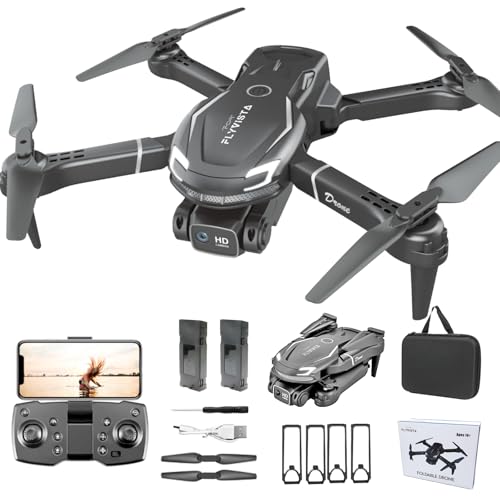 FLYVISTA Cool Mini Drone with Camera for Kids4.8 x 3 x 2.1 inches4.8 x 3 x 2.1 inches0.2 PoundsCheck on Amazon
The best practice drone is the one you can crash twenty times without worrying, and in this group that means the small indoor quadcopters, which cost little to replace and weigh almost nothing. The Holy Stone HS210 and the Veeniix V995 each list three batteries, hover assist and headless mode, which is the safest way to learn orientation. If you want footage while you learn, the FLYVISTA, ASFSFQ and Vrcyu add cameras. Keep the Sewsunny GPS model in mind as the second purchase, once your landings stop being surprises.
Quick picks
As an Amazon Associate we earn from qualifying purchases at no extra cost to you.




- Most batteries: Holy Stone HS210 or Veeniix V995, each listing three
- Easiest to carry: Holy Stone HS190, a foldable pocket nano
- Camera on a budget: FLYVISTA or ASFSFQ with 1080P cameras
- Angle practice: Vrcyu with a 90 degree tilt lens
- No phone needed: RELIDOL with a screen on the remote
- Next step up: Sewsunny GPS drone
Side-by-side comparison
| Model | Key point from title | Best for |
|---|---|---|
| Holy Stone HS210 | Nano quadcopter, auto hover, headless, 3 batteries | Indoor stick practice |
| Holy Stone HS190 | Foldable pocket nano, altitude hold, headless | Carry-anywhere practice |
| Veeniix V995 (2 listings) | 3 batteries, circle fly, 360 rotation, headless | Battery-rich trainer |
| FLYVISTA Mini Drone | 1080P FPV camera, 2 batteries, 3 speed gears | First camera drone |
| ASFSFQ Foldable Drone | 1080P camera, trajectory flight, foldable | Compact camera practice |
| Vrcyu Mini Drone | 90 degree tilt lens, 3 speed modes, 2 batteries | Camera-angle practice |
| RELIDOL Screen Drone | Screen on remote, gesture control, emergency stop | App-free flying |
| Sewsunny GPS Drone | GPS return, follow me, brushless, under 249g | Outdoor step-up |
The eight practice drones, one by one
Holy Stone HS210 Mini Drone
The HS210 is described as a nano quadcopter for indoor flying, which is exactly where a first session should happen: no wind, short distances, soft landings. The title lists auto hovering, headless mode, 3D flips and three batteries. Headless mode keeps forward pointing away from you, which removes the most common beginner stumble. Three batteries matter because small drones fly briefly and charge slowly, though the title gives no flight time, so confirm it on the listing. No camera is mentioned, so this is pure stick practice, and that suits a first week of drills where attention belongs on the sticks rather than on a phone screen.
Pros
- Three batteries listed, the most stick time per charging cycle in this group
- Nano size and indoor focus forgive bumps
Cons
- No camera in the title
- Indoor design, so not for breezy yards
Who it’s for: total beginners and younger pilots who need a cheap crash-friendly trainer.
Holy Stone HS190 Foldable Mini Drone
Where the HS210 stays a flat nano, the HS190 folds into a pocket-sized package, according to its title. It lists altitude hold, 3D flips and headless mode, a familiar trio for learners. The part to check is the battery count, because the title never states one, and a single battery means long waits between attempts. There is also no camera, which keeps focus on control rather than footage. Foldable arms may help it survive a bag better than a rigid frame, but the listing should be read for any care notes, such as how to open the arms without bending them or how to store it between sessions. Pocket size also means it can be flown during a lunch break.
Pros
- Folds small enough to carry daily
- Altitude hold and headless mode listed
Cons
- Battery count not stated in the title
- No camera for later skills
Who it’s for: someone who wants a practice drone that rides in a backpack.
Veeniix V995 Mini Drone (two listings)
Two near-identical V995 listings appear here, one marked Red and one with no colour in the title. Both list 3D flips, 360 degree rotation, circle fly, auto hover, headless mode and three batteries, with an indoor focus. The titles do not explain how circle fly works, so the full listing should say whether it is automatic or manual. Because the product name matches, compare the seller and listing details and pick whichever is available with the colour you want. Treat it as the same trainer sold twice, and check that the spare propellers and chargers are described identically in both before you spend anything.
Pros
- Three batteries listed
- Circle fly and rotation tricks to practise once hovering is solid
Cons
- No camera mentioned
- Duplicate listings can be confusing to compare
Who it’s for: beginners who want a battery-rich trainer with a few tricks to grow into.
FLYVISTA Mini Drone with 1080P FPV Camera
This one adds a 1080P FPV camera to the usual beginner list: two batteries, one-click takeoff and landing, altitude hold, headless mode, 360 degree flips and three speed gears. One-click landing is the feature that protects props on a bad day. The title is cut off mid-word near the end, apparently the start of an emergency feature, so read the full listing before assuming it has an emergency stop. Camera quality beyond the 1080P label is unknown, and how video reaches your phone is worth confirming, including whether an app download is needed and whether the picture lags during flips. Use it to film practice runs and spot errors.
Pros
- Camera plus three speed gears lets skills grow
- One-click takeoff and landing
Cons
- Two batteries only
- Listing title is truncated, so some features are unclear
Who it’s for: learners who want footage from day one but still need hover assist.
ASFSFQ Foldable Drone with 1080P Camera
ASFSFQ pairs a 1080P camera with a foldable body, stable hover, trajectory flight, one-key takeoff and landing, and two batteries. Trajectory flight usually means sketching a path and letting the drone follow, but the title does not describe it, so confirm in the listing. The black colourway and toy-gift wording suggest a younger audience, yet the feature list is the same as the other camera minis. The brand is unfamiliar, so look for the seller’s stated support and replacement-part availability. A drone you cannot repair after a crash is a short-lived trainer, whatever its camera claims.
Pros
- Folds for carrying
- Hover assist plus one-key takeoff and landing
Cons
- Unfamiliar brand, so check support
- Two batteries, camera detail limited to 1080P
Who it’s for: families wanting a compact camera drone for supervised backyard sessions.
Vrcyu Mini Drone with 90 Degree Tilt Lens
Vrcyu’s selling point is a 90 degree tilt lens, which could let you angle the camera down to watch your landing spot, though the title does not say whether the tilt is manual or motorised. It also lists altitude hold, one-key takeoff, 3D flips, three speed modes, two batteries and 25 minutes of flight. That last figure is ambiguous: it may be total across both batteries rather than one flight. Teens and adults are named as the audience, and the colour is gray. A tilting lens is also a useful learning tool, since seeing the ground under the drone makes landing drills easier to judge.
Pros
- Tilting lens gives more framing options
- Three speed modes let you progress
Cons
- Flight time claim is unclear
- Only two batteries
Who it’s for: older beginners who care about practising camera angles.
RELIDOL Drone with Built-in Screen Controller
The RELIDOL title leads with a screen on the remote, so there is no phone to pair, which is one fewer thing to break or forget to charge. It also lists foldable arms, gesture control, 3D flips, one-key start and emergency stop. Screen size, camera resolution and battery count are not in the title, and gesture control is vague; read the listing to learn what it triggers. The emergency stop is useful for halting spinning props quickly after a crash. The title offers no weight or size, so check the folded dimensions if you plan to carry it in a bag.
Pros
- Controller screen removes the phone dependency
- Emergency stop and one-key start listed
Cons
- Screen size and camera specs not in the title
- Battery count unstated
Who it’s for: learners who prefer a self-contained kit over an app.
Sewsunny GPS Drone with 4.5 Inch Screen Remote
Sewsunny sits a class above the minis. The title lists a brushless foldable quadcopter, a 4.5 inch LCD remote, GPS auto return, follow me and a weight under 249g. The 5G in the title usually refers to 5 GHz Wi-Fi, not cellular. GPS return needs open sky and a clear home point, and real wind means mistakes cost more than with a nano. Treat it as the second drone, bought after hovering and landing are routine, and read the FAA guidance regardless of the weight claim. Its brushless motors and screen remote suit a pilot ready for wider flying fields and stronger gusts than any indoor nano can handle.
Pros
- GPS return and brushless motors listed
- Screen remote with no phone needed
Cons
- Larger mistakes cost more than with a nano
- Weight claim is the seller’s, not verified here
Who it’s for: pilots who have outgrown a mini and want outdoor stability.
How we picked these
We worked from each listing’s published title and specification text, grouped repeat listings, and weighed what matters to a learner: battery count, hover assist, orientation aids, crash tolerance and whether a camera helps or distracts. Ratings, review counts and prices are left out because they shift constantly, and we group duplicate listings so you are not choosing between the same drone twice. Nobody on the team used or measured these units, so flight time, range and camera quality are the sellers’ claims. The basis is published specifications, manufacturer documentation and buyer reviews.
What to look for in a practice drone
Battery count beats camera resolution
A nano drone flies for a few minutes and then needs a long charge. Three batteries mean three attempts per sitting, which means more repetitions, and repetitions are what build thumb memory. A sharper camera does nothing for a pilot who cannot hold a hover. When two listings look equal, take the one with more batteries and more spare propellers.
Orientation and safety aids
Altitude hold keeps the drone at a steady height so you only manage direction. Headless mode removes nose-direction confusion. One-key takeoff and landing take the two riskiest moments out of your hands, and an emergency stop kills the motors when something goes wrong. Switch features off one at a time as you improve, because relying on them forever slows skill growth.
Indoor nano or outdoor foldable
Light drones are pushed around by wind that you will barely feel on your face. Fly nanos indoors or in a still courtyard and keep larger foldable or GPS models for open fields. Whatever the size, keep spinning props away from faces and pets, and never leave lithium batteries charging unattended.
Spare parts and what is in the box
Count the batteries, the charging cable or multi-charger, the propellers and the small screwdriver, if any. A drone is only as durable as its supply of props, and a cracked blade is the usual cause of a sudden tumble. If the listing never mentions spares, assume you will buy a set separately and confirm that the same model name returns matching parts.
A five-session practice ladder
- Session 1: take off, hover at head height for 30 seconds, land on a marked spot
- Session 2: fly a slow square, keeping the nose facing the same wall
- Session 3: turn headless mode off and repeat the square
- Session 4: fly a figure eight at walking pace
- Session 5: add one flip or a camera pass, then land with a battery to spare
If you cannot complete a rung in two batteries, repeat it. The ladder works with any drone above.
Mistakes buyers make
- Buying the GPS drone first. A larger aircraft makes every mistake more expensive.
- Judging by the camera label. A 1080P or 2K label says nothing about image quality, lens size or how stable the picture will be.
- Ignoring spare parts. Propellers wear out and cracked ones cause unstable flight.
- Charging overnight. Small lithium packs need attention while they charge.
- Skipping the manual. Calibration and binding steps differ by model, and a drone that drifts is often just uncalibrated.
- Flying near people. Learn in an empty room or field; even a nano can scratch a face or startle a pet.
Verdict
For a first drone, choose the Holy Stone HS210 or Veeniix V995 for the three-battery advantage, or the HS190 if portability matters. Pick the FLYVISTA or Vrcyu if you want a camera and accept two batteries. Save the Sewsunny for later. Whatever you buy, read the full listing for flight time, battery counts and what is included, since the titles above are only a starting point. For deeper options, see our camera drones, 4K drones and FPV drones guides.
Frequently asked questions
Does a small practice drone need to be registered?
It depends on weight and where you fly. Indoor nano drones are generally treated differently from outdoor aircraft, and the FAA publishes current rules for recreational flyers in the US, including a weight threshold that changes the registration requirement. A listing claim such as under 249g is the seller’s statement, so read the FAA guidance yourself before flying outdoors.
Is a drone with a camera a good first drone?
Only if you can still afford to crash it. A camera adds weight, a phone or screen to manage, and a reason to fly higher and farther than your skills allow. Many learners get further by spending the first week on a camera-free nano model, then moving to a 1080P model once hovering and landing feel automatic.
How long will the batteries last?
Each listing here advertises features rather than a verified flight time, and small drones usually fly for only a few minutes per charge. The useful number is how many batteries come in the box, because charging takes far longer than flying. Check the full listing for the stated minutes and for charge time before you order.
Is it better to learn indoors or outdoors?
Start indoors in a large room with soft furniture moved aside, because even a light breeze can push a nano drone off course. Move outdoors on a calm day once you can hold a hover and land on a marked spot. GPS models such as the Sewsunny are built for open sky and need space.
What does headless mode actually do?
It makes the drone treat the direction it faced at takeoff as forward, so pushing the stick forward always moves it away from you regardless of where the nose points. That removes the most common beginner confusion. Once you understand orientation, switch it off, because racing and camera work need you to read the nose direction.