Our Top Picks
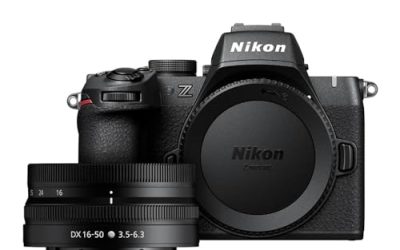
 Canon EOS R50 Mirrorless Camera RF-S18-45mm F4.5-6.3 is2.71 x 4.58 x 3.37 Inches1 poundsCheck on Amazon

Choosing a camera for video is different from choosing one for stills. A stills camera needs one sharp frame; a video camera needs thousands of sharp frames in a row, with steady focus, consistent color, clean audio, and no overheating halfway through a take. The spec sheet can mislead you, because the numbers that matter most for video are not the ones that top the marketing page. This guide explains what to look for, then shows five cameras that cover the main kinds of video work.

As an Amazon Associate, we earn from qualifying purchases.
This is a how-to guide, not a ranking. The five cameras below are examples of different answers to the same question, from a cinema camera to an action camera, and each one teaches a different lesson about what matters. Read the buying advice first, then match the camera to your work.
Sensor Size: What It Changes and What It Does Not
Sensor size shapes depth of field, low-light performance, and the look of your footage. A full-frame sensor gives shallow depth of field and clean high-ISO files, which is why cinema cameras and high-end mirrorless bodies use it. An APS-C sensor gives a little more depth of field and a smaller, lighter body, which suits creators who shoot handheld all day. A Micro Four Thirds sensor gives even more depth of field, which helps when you need a whole product or a whole scene sharp, and a 1-inch sensor in a compact or action camera trades low-light ability for size and simplicity.
Bigger is not always better. A full-frame camera with a slow kit lens can look worse than an APS-C camera with a fast prime, and a small sensor with good stabilization can beat a large sensor on a shaky handheld shot. Choose the sensor size that matches your depth-of-field needs and your tolerance for size and weight.
Codecs, Bit Depth, and Color
A codec is how the camera compresses video, and it decides how much you can change in editing. 8-bit video records 256 levels per color channel, which is fine for footage you deliver as shot, but it falls apart when you push color hard in grading. 10-bit video records 1,024 levels per channel, which gives you far more room to adjust exposure and color without banding, and it is worth seeking out if you grade your footage.
Log profiles are the other half of the equation. A log profile records a flat, low-contrast image that preserves highlight and shadow detail, giving you maximum flexibility in post. Canon Log 3, S-Log3, V-Log, and N-Log are the main ones, and each camera maker has its own. Log footage looks dull straight out of camera and needs grading, so if you deliver quickly, a standard profile with good color is the better choice.
Autofocus: The Feature That Makes or Breaks Video
Autofocus matters more in video than in stills, because a focus error lasts for seconds on screen instead of one frame. Modern cameras use on-sensor phase detection with subject recognition, and the best systems track eyes, faces, animals, and vehicles smoothly without hunting. Dual Pixel CMOS AF from Canon, Real-time Tracking from Sony, and the subject-detection systems from Nikon and Panasonic are all capable, and the differences between them are smaller than the differences between a modern camera and one from five years ago.
Manual focus is still the right choice for controlled work like interviews and product shots, where the subject does not move, but for anything with a moving subject, reliable autofocus is essential.
Audio, Recording Limits, and Stabilization
Audio is half of video, and it is the half most beginners neglect. A camera’s built-in microphone picks up handling noise, wind, and room echo, so a microphone input is close to essential for serious work. All five cameras in this guide have one. A small shotgun microphone or a wireless lavalier system transforms your audio more than any camera upgrade will, and it is the cheapest way to make your videos feel professional.
Some cameras stop recording after 30 minutes and others overheat in 4K, so if you film interviews, events, or long tutorials, check the limit before you buy. Stabilization matters for handheld work: in-body stabilization steadies any lens, and electronic stabilization crops the frame slightly. A gimbal is the best solution for moving shots, but good in-body stabilization covers most handheld work.
1. Sony FX3 Body
The FX3 is a cinema camera in a mirrorless body, and it is the most video-focused camera in this guide. Its 12.1MP full-frame sensor is built for low light and high dynamic range, with dual native ISO and 15 stops of dynamic range in S-Log3. It records 4K120 in 10-bit 4:2:2 internally, has no recording time limit, and includes a fan for active cooling, so it keeps recording when other cameras overheat.
Autofocus uses Sony’s Real-time Tracking and Eye AF, and 5-axis stabilization steadies handheld shots. The FX3 is the camera for filmmakers who want cinema image quality without a cinema-sized rig, and it is the reference point against which the other cameras here are measured.
Specs: Sensor: 12.1MP full-frame CMOS; Mount: Sony E; Video: 4K120 10-bit 4:2:2, S-Log3; Autofocus: Real-time Tracking and Eye AF; Stabilization: 5-axis in-body; Cooling: Active fan, no recording limit; Audio: XLR handle included; Battery: NP-FZ100.
2. Sony ZV-E1 Body
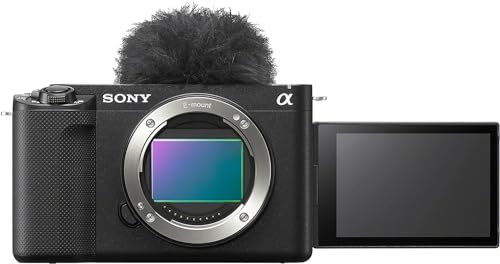
The ZV-E1 is a vlogging camera built on a full-frame sensor, and it is the most creator-friendly camera here. Its 12.1MP sensor is the same class as the FX3’s, so low-light performance and dynamic range are excellent, and it records 4K60 in 10-bit with S-Log3 and S-Cinetone for ready-to-share color. The autofocus tracks faces and eyes, and a dedicated AI unit handles framing, keeping you centered as you move.
The body is small and light, the screen flips forward, and the camera has a built-in three-capsule microphone with wind reduction, though an external mic is still better for serious work. The ZV-E1 is the camera for solo creators who want full-frame quality in a body they can hold at arm’s length.
Specs: Sensor: 12.1MP full-frame CMOS; Mount: Sony E; Video: 4K60 10-bit, S-Log3, S-Cinetone; Autofocus: AI-based Real-time Tracking; Stabilization: 5-axis in-body with Active mode; Screen: 3.0-inch vari-angle touchscreen; Audio: 3-capsule mic, 3.5mm input; Battery: NP-FZ100.
3. Panasonic GH6 Body
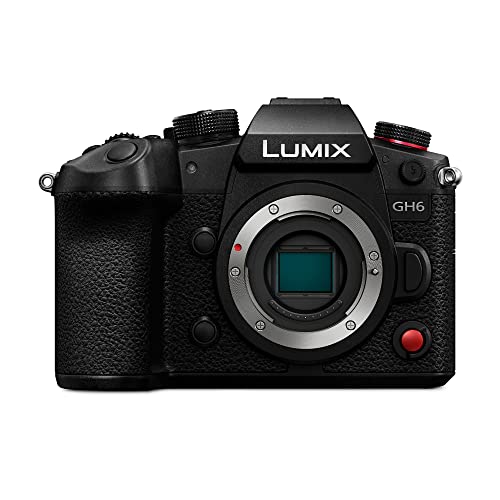
The GH6 is the Micro Four Thirds video specialist, and it is the most feature-rich camera in this guide for its size. Its 25.2MP sensor records 5.7K60 in 10-bit, 4K120 in 10-bit, and 5.8K open-gate video, which gives you room to reframe for different aspect ratios. V-Log is included, and the camera records ProRes internally, which is a professional codec that edits smoothly.
The Micro Four Thirds sensor gives deeper depth of field, which is an advantage when you need a whole scene sharp, and the in-body stabilization is among the best available. Dual card slots, a fan for cooling, and no practical recording limit make the GH6 a working tool for long sessions. It is the camera for videographers who want maximum codec flexibility and high frame rates in a compact system.
Specs: Sensor: 25.2MP Micro Four Thirds Live MOS; Mount: Micro Four Thirds; Video: 5.7K60 10-bit, 4K120, ProRes internal; Autofocus: Contrast-detect with DFD; Stabilization: 5-axis in-body, up to 7.5 stops; Cooling: Active fan; Audio: 3.5mm input, XLR via adapter; Battery: DMW-BLK22.
4. Canon EOS R50 Kit with RF-S 18-45mm Lens
The R50 kit is the beginner-friendly camera in this guide, and it is the easiest way to learn video properly. Its 24.2MP APS-C sensor records 4K30 oversampled from 6K, which looks sharp and detailed, and Dual Pixel CMOS AF II tracks subjects with confidence. The vari-angle screen flips forward, the body is small and light, and the RF-S 18-45mm kit lens covers wide to short telephoto in a compact barrel.
The R50 has no in-body stabilization, so it relies on lens stabilization and digital correction, and its 4K60 is cropped, but for learning and for social video it is more than capable. Canon’s color science is pleasant straight out of camera, which means less grading, and the RF mount gives a clear upgrade path to better lenses and bodies. It is the camera to buy when you are learning video and want a tool that grows with you.
Specs: Sensor: 24.2MP APS-C CMOS; Mount: Canon RF; Video: 4K30 oversampled, 4K60 cropped; Autofocus: Dual Pixel CMOS AF II; Stabilization: Lens-based and digital; Screen: 3.0-inch vari-angle touchscreen; Kit lens: RF-S 18-45mm f/4.5-6.3 IS STM; Battery: LP-E17.
5. GoPro HERO13 Black
The HERO13 Black is the action camera in this guide, and it goes where the other cameras cannot. It records 5.3K60 and 4K120 in 10-bit, with HyperSmooth stabilization that keeps footage steady through running, riding, and rough water. The camera is waterproof to 10 m without a case, and the new HB-series lenses, including an ultra-wide mod and a macro mod, extend what it can do.
The HERO13 is not a replacement for a mirrorless camera: its small sensor struggles in low light, and its fixed lens cannot match a fast prime for shallow depth of field. But for action, adventure, and any shot where the camera might get wet, dropped, or mounted to something moving, it is the right tool. It is also the simplest camera here to use, which matters when you are busy doing the activity you are filming.
Specs: Sensor: 1/1.9-inch CMOS; Lens: Fixed 12mm equivalent, f/2.5; Video: 5.3K60, 4K120, 10-bit; Stabilization: HyperSmooth 6.0; Waterproof: 10 m without a case; Screen: Dual screens, front and rear; Battery: 1,900 mAh Enduro.
Putting It Together: A Buying Checklist
Before you buy, answer five questions. What will you film most: people, products, action, or events? How long are your takes, and does the camera record without limits or overheating? Will you grade your footage, which calls for 10-bit and log, or deliver quickly, which calls for good standard color? Do you need shallow depth of field, which favors full-frame, or deep focus, which favors smaller sensors? And what is your audio plan, because a microphone input and a decent mic matter more than a megapixel count?
Then match the answer to a camera. The FX3 is for filmmakers, the ZV-E1 for solo creators, the GH6 for codec-hungry videographers, the R50 for learners, and the HERO13 for action. Each one is a good camera, and the wrong choice is not a bad camera but a good camera bought for the wrong job.
Frequently Asked Questions
Do I need a full-frame camera for good video?
No. Full-frame gives shallow depth of field and clean low-light files, but APS-C and Micro Four Thirds cameras produce excellent video, and the GH6 in this guide is a professional video tool with a smaller sensor. What matters more is the codec, the autofocus, the stabilization, and the lens. A smaller sensor with a fast lens and good stabilization will beat a full-frame camera with a slow kit lens in most real situations.
What is 10-bit video and do I need it?
10-bit video records 1,024 brightness levels per color channel instead of 256, which gives you far more room to adjust exposure and color in editing without banding or artifacts. You need it if you grade footage, shoot log profiles, or push color hard. You do not need it if you deliver footage as shot with minimal editing. All five cameras here except the HERO13 in some modes offer 10-bit recording, and the FX3, ZV-E1, and GH6 make it a core feature.
How important is in-body stabilization for video?
Very important for handheld work. In-body stabilization steadies any lens, including vintage and unstabilized primes, and it smooths the small shakes that make handheld footage look amateur. The FX3, ZV-E1, and GH6 all have it. Cameras without it, like the R50, rely on lens stabilization and digital correction, which work but crop the frame. For moving shots a gimbal is still the best solution, but stabilization is the next best thing.
Why do some cameras overheat in video and others do not?
Video generates heat, and small bodies with no fan struggle to shed it, especially in 4K60 and higher. Cameras with active cooling, like the FX3 and GH6, keep recording far longer, while compact bodies may stop after 30 minutes in demanding modes. If you film long interviews or events, choose a camera with a fan or a generous recording limit, and keep it out of direct sun when possible.
Conclusion
Choosing a camera for video comes down to five things: sensor size, codec and bit depth, autofocus, audio, and stabilization, plus the practical questions of recording limits and heat. The five cameras here show the range of good answers, from the FX3’s cinema quality to the HERO13’s go-anywhere toughness, with the ZV-E1, GH6, and R50 filling the space between. Work through the checklist, match the camera to the job you actually do, and spend what you save on light and audio.
More from Amazon
Programs that pair well with the guide above. Offers and eligibility are set by Amazon and may change.
Free shipping on eligible items, Prime Video and more. Eligible new members can start with a free trial.
Start a Prime free trialAudiobooks and podcasts to listen to on the go. Eligible new members can start with a free trial.
Try Audible freeAd-free music streaming. Eligible new subscribers can start with a free trial.
Try Music Unlimited freeA free business account with business pricing and bulk-buying tools for work, shop or home office.
Create a business accountAs an Amazon Associate we earn from qualifying purchases.