
Key takeaways
- Follow the manual: Use only the ribbons and cards the maker specifies. Wrong supplies can jam or damage the print head.
- Cleaning: Card printers use cleaning cards or rollers at intervals specified by the maker. Clean the print head only with the maker’s approved method.
- Power and placement: Place printers on a flat surface with ventilation, and use the supplied power adapter. If you notice a burning smell or damaged cable, unplug and contact the maker or a qualified technician.
- Data protection: Cards contain personal information. Store blanks and spoiled cards securely, and shred misprints.
- Printer location: Keep away from dust and humidity, which can cause misfeeds.
For offices, schools and events that need professional ID cards, a dedicated card printer such as the Zebra ZC300, Evolis Primacy 2 or HID Fargo DTC1250e is the right category; for conferences and one-off visitor badges, a label printer like the Brother QL-820NWB or a DYMO LabelWriter is usually cheaper, faster and simpler. Which is best depends on card volume, whether you need plastic PVC cards or paper labels, one-sided or two-sided printing, and security features such as encoding.
Details below come from the makers’ published specifications, with reviewer observations attributed. Models and ribbon part numbers change, so match ribbons and supplies to your printer’s manual.
Our top picks



As an Amazon Associate we earn from qualifying purchases at no extra cost to you.
At a Glance: Badge Printers Compared
| Printer | Type | Best for | Key stated traits | Limits |
|---|---|---|---|---|
| Zebra ZC300 | Dye-sublimation card printer | Small and mid-size organisations issuing PVC ID cards | Single or dual-sided options, ribbon cartridges with smart-chip, optional encoders, Zebra software | Requires ribbons and cards; slower than label printers per badge |
| Zebra ZC100 | Entry card printer | Low-volume single-sided cards | Compact, simple ribbon cartridges | Single-sided only, no upgrade path in some cases |
| Evolis Primacy 2 | Card printer | Offices and schools wanting modern features | Single or dual-sided options, optional encoders, touch of display, software included | Supplies tied to Evolis ribbons |
| HID Fargo DTC1250e | Card printer | Entry-level ID programmes | Single or dual-sided versions, ribbon cartridges, security options listed by maker | Throughput modest versus higher-volume printers |
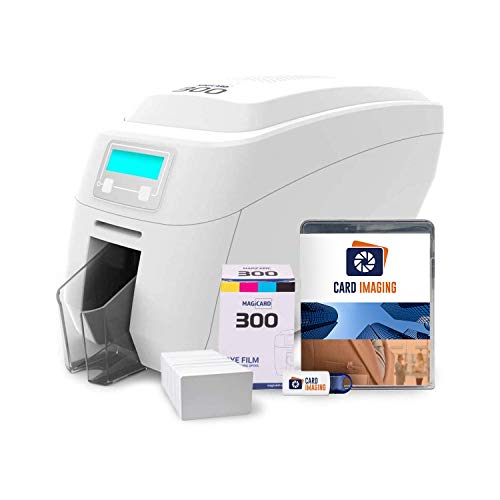
| Magicard 300 or Enduro series | Card printer | Offices wanting simple operation | Single or dual-sided options, optional ribbons with security features | Software less widely adopted than larger vendors |
| Brother QL-820NWB | Thermal label printer | Events, visitor badges, name tags | Wired and wireless connectivity, printable labels with no ink, fast printing | Paper labels, not plastic cards |
| DYMO LabelWriter 550 series | Thermal label printer | Front desks and visitor check-in | Direct thermal printing, no ink, compatible label formats | Labels fade with heat and light, limited durability |
Card Printers Versus Label Printers
Plastic ID cards
Dye-sublimation card printers transfer colour from a ribbon onto PVC cards, producing photo-quality ID badges that last for years. They are used for employee IDs, student cards, membership and access control. Most can be fitted with magnetic stripe, smart-card or contactless encoders if the maker offers them. Running costs include ribbons and blank cards.
Paper and sticker badges
Thermal label printers print adhesive labels or badge stock, with no ink or ribbon needed. They are ideal for conferences, visitor management and one-day events where badges are thrown away. Direct thermal prints can fade in sunlight or heat, which is acceptable for short-term use.
What about full-colour inkjet badge printers?
Some inkjet label printers also print colour badges for events, offering vivid logos but requiring ink cartridges. They suit marketing-heavy events where branding matters more than durability.
What to Look For
Single-sided or dual-sided
Dual-sided printing lets you put a photo and name on the front and rules, barcodes or emergency information on the back. If you do not need both sides, a single-sided printer is cheaper and simpler. Some models can be upgraded later with a module, so check the maker’s spec for your model.
Printing speed and volume
Card printers produce a card in tens of seconds, while label printers can finish a badge in a few seconds. For a hundred conference attendees arriving at once, label printers win; for a monthly batch of staff cards, a card printer is fine.
Encoding and security
If cards must open doors or record attendance, you need an encoder for magnetic stripe, contactless or smart-chip technology. Some ribbons add overlay patterns or holographic effects for tamper evidence. Discuss requirements with your access-control provider, because compatibility matters.
Software and connectivity
Most card printers include design software and connect by USB, with some offering Ethernet or Wi-Fi. Label printers like the Brother QL-820NWB support wired, wireless and Bluetooth connections, and apps for mobile check-in. Confirm operating system support if you use Mac or Chromebook devices.
Running costs and supplies
Compare the per-badge cost of ribbons and cards or labels, not just the printer. Maker-specific supplies are standard, so lock-in is a consideration. Using non-recommended supplies can void warranties or cause jams.
Best by Use Case
Best for small organisations: Zebra ZC300
The ZC300 is a long-running workhorse. Zebra offers single and dual-sided configurations, optional encoders and lamination in higher variants. Reviewers commonly highlight its reliable ribbon cartridges and software. It suits offices, schools and clubs issuing a modest number of cards.
Best modern feature set: Evolis Primacy 2
The Primacy 2 is Evolis’s current compact range. The maker lists single or dual-sided versions, optional encoding and a focus on simplicity and security. It makes sense for offices that want a clear interface and good remote-management options.
Best entry-level ID programme: HID Fargo DTC1250e
HID’s DTC1250e is positioned as an easy entry into card printing, with single or dual-sided options. It suits small organisations that want reliable cards without large throughput. Check that your chosen encoders and software are supported.
Best for events and visitors: Brother QL-820NWB
This label printer uses thermal printing, so there is no ink or toner. Brother lists wired, wireless and Bluetooth connectivity and an automatic cutter. With name-badge label rolls, it can print badges quickly for conferences and front desks. The downside is that labels are not as durable as plastic cards.
Best for simple front desks: DYMO LabelWriter 550 series
The LabelWriter 550 line is widely used for visitor badges. DYMO lists direct thermal printing and label recognition on certain models. As with all thermal labels, expect fade over time and avoid leaving printed badges in sunlight.
Budget Tiers
| Tier | Options | Trade-off |
|---|---|---|
| Budget | Thermal label printers, entry card printers like the Zebra ZC100 | Paper badges or single-sided only |
| Mid-range | Zebra ZC300, Evolis Primacy 2, Fargo DTC1250e, Magicard | Ribbon and card running costs |
| Premium | Dual-sided with lamination and encoders, higher-volume models | Larger size, higher upfront and supply costs |
Setup, Safety and Care Notes
- Follow the manual: Use only the ribbons and cards the maker specifies. Wrong supplies can jam or damage the print head.
- Cleaning: Card printers use cleaning cards or rollers at intervals specified by the maker. Clean the print head only with the maker’s approved method.
- Power and placement: Place printers on a flat surface with ventilation, and use the supplied power adapter. If you notice a burning smell or damaged cable, unplug and contact the maker or a qualified technician.
- Data protection: Cards contain personal information. Store blanks and spoiled cards securely, and shred misprints.
- Printer location: Keep away from dust and humidity, which can cause misfeeds.
Before buying, estimate how many badges you print per month and for how long each must last. A school issuing a few hundred cards a year has very different needs from a conference producing a thousand paper badges in a morning. Also consider who will operate the printer: a front-desk volunteer benefits from simple software and snap-in supplies, while an IT team may prefer network management and encoders. Matching the printer type to that workflow usually saves more money than choosing on printer price alone, because supplies make up most of the long-term cost.
Pick X If… Decision Table
| Pick this | If you |
|---|---|
| Zebra ZC300 | Issue regular staff or student cards and want a proven printer |
| Evolis Primacy 2 | Want a modern card printer with straightforward operation and encoder options |
| HID Fargo DTC1250e | Are starting an ID programme with modest volume |
| Brother QL-820NWB | Run events and need fast paper name badges |
| DYMO LabelWriter 550 | Run a front desk with visitor stickers |
Alternatives Worth Considering
- Entrust Sigma DS series: Card printers aimed at businesses wanting ID issuance with security options.
- Pre-printed lanyards and badge holders: For small events, printing on standard paper and using badge holders can suffice.
- Print service bureaus: For one-off batches of cards, outsourcing avoids owning a printer.
- Zebra ZD-series label printers: Desktop thermal printers for wristbands and labels at events.
Frequently Asked Questions
What is the difference between a badge printer and a label printer?
A badge printer in the card sense prints on plastic PVC cards using ribbons. A label printer prints on adhesive labels or badge stock. Choose cards for durable IDs and labels for short-term events.
Do I need a dual-sided printer?
Only if you want to print on both sides in one pass. For many staff cards, single-sided with a pre-printed back is enough. Dual-sided is useful for barcodes, emergency details or legal text.
Can I print photo IDs on a thermal label printer?
Thermal label printers print in black or limited colour, so photos are less detailed. For crisp photo IDs, a dye-sublimation card printer is the better choice.
How many cards can one ribbon print?
It varies by ribbon type and whether you print on one or both sides. The maker lists the card count per ribbon, which is the best guide for budgeting.
Are these printers hard to set up?
Most install through USB and guided software, with ribbon cartridges that snap in. Follow the maker’s manual and keep drivers updated. For access-control encoding, involve your system supplier.
How do I keep printed badges from fading?
Plastic cards printed by dye-sublimation resist fading better than thermal labels. For labels, keep them away from direct sunlight and heat, and replace them when they dim.





