Key takeaways
- Cards and SSDs: match the card type and speed class listed by the maker. Using slower cards can cause dropped frames or disabled modes.
- Computer: ProRes plays well on modern computers, but older machines may need proxies for smooth editing.
- Lenses: choose lenses with smooth focus and low breathing for video; cinema-style or video-friendly primes help.
- Cooling and power: use approved power and keep vents clear. Do not cover or modify cooling parts.
- Firmware: some ProRes options arrived through firmware updates, so keep firmware current per the maker’s instructions.
For most hybrid shooters, the Panasonic Lumix GH7 or Nikon Z6III gives the broadest ProRes toolset in a compact body, the Fujifilm X-H2S suits stills-and-video shooters who like a smaller APS-C package, and the Blackmagic Pocket Cinema Camera 6K Pro suits filmmakers who want a cinema-style workflow with ProRes and Blackmagic RAW. If you only need ProRes occasionally, a flagship such as the Nikon Z8 is overkill, while a phone with ProRes may suffice for casual work.
Apple ProRes is an editing-friendly codec that keeps more image data than typical camera H.264 or H.265 files, so it holds up better in color grading and heavy editing. The trade-off is file size: ProRes files are large, so storage speed and capacity become the real buying constraints. The models below are ones where the makers list ProRes recording; the exact flavors (for example ProRes 422 HQ or ProRes RAW) and storage options differ by camera, so read each maker’s specification page before buying.
Our top picks



As an Amazon Associate we earn from qualifying purchases at no extra cost to you.
ProRes Cameras at a Glance
| Model | Best for | Key stated specs (per the maker) | Limits |
|---|---|---|---|
| Panasonic Lumix GH7 | Hybrid video-first shooters using Micro Four Thirds | Micro Four Thirds sensor, internal ProRes recording including ProRes RAW options, active cooling not required per the maker’s positioning | Smaller sensor; low-light and depth-of-field limits |
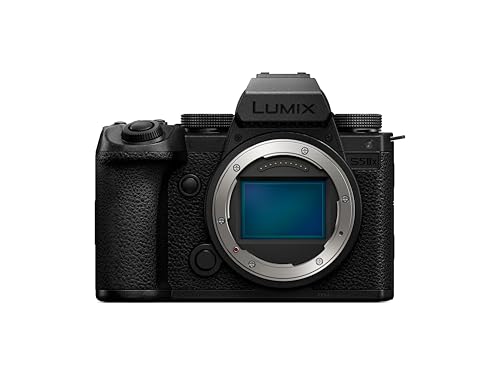
| Panasonic Lumix S5IIX | Full-frame video with ProRes to external SSD | Full-frame sensor, ProRes recording to an SSD via USB-C, per the maker | SSD needed for the highest-bitrate modes |
| Nikon Z6III | Full-frame hybrid with ProRes and N-RAW | Full-frame sensor, ProRes 422 HQ and other formats per Nikon, in-body stabilization | Large files; check card speed requirements in the manual |
| Fujifilm X-H2S | APS-C hybrid with fast readout | APS-C stacked sensor, ProRes 422 HQ and other ProRes options, high-speed video modes | Heat management guidance and card choices matter |
| Blackmagic Pocket Cinema Camera 6K Pro | Cinema-style production | Super 35-class sensor, Blackmagic RAW and ProRes, built-in ND filters | Not a stills camera; battery life and rig needs |
| Nikon Z8 | High-end hybrid with ProRes at the upper tier | Full-frame stacked sensor, ProRes options per Nikon | Large and costly relative to others |
What to Know About ProRes Recording
ProRes flavors
ProRes comes in several levels, from lighter “Proxy” and “LT” to heavier “422 HQ” and “4444” variants, plus ProRes RAW for sensor data. Cameras do not support all of them. Read the specification for the exact formats and resolutions, because a camera that lists ProRes may only offer it at certain frame rates or resolutions.
Storage
A single hour of high-quality ProRes can fill hundreds of gigabytes, depending on resolution and frame rate. Many cameras require a fast CFexpress card or an external SSD. Budget for storage and a reliable offload workflow, including backups.
Why shoot ProRes?
Editors often prefer ProRes because it decodes smoothly in many editing applications and tolerates heavy grading. If you deliver short, simple projects, a standard codec may be enough. ProRes matters most in commercial work, color-critical projects and projects with visual effects.
Budget Tiers
Budget tier
There are few new ProRes cameras at entry-level tiers. If budget is a limit, consider an external recorder that records ProRes from a camera’s HDMI output, or a phone that supports ProRes recording, though both come with their own constraints and accessories.
Mid-range tier
The Panasonic Lumix GH7, Fujifilm X-H2S and Nikon Z6III are typical here. They combine internal ProRes recording with in-body stabilization and strong autofocus, appealing to solo filmmakers.
Premium tier
The Nikon Z8, higher-end Panasonic full-frame bodies and Blackmagic cinema cameras sit at the top. You are paying for bigger sensors, more robust cooling and cinema-oriented I/O.
Model Notes
Panasonic Lumix GH7
Panasonic positions the GH7 as a video-focused Micro Four Thirds camera with internal ProRes recording and ProRes RAW options. Reviewers commonly praise its autofocus improvements over earlier GH models, in-body stabilization and practical I/O such as full-size HDMI. The sensor is smaller than APS-C or full-frame, so low-light performance and shallow depth of field are the trade-offs.
Panasonic Lumix S5IIX
The S5IIX is the model in the S5 II family that adds ProRes recording to an external SSD over USB-C, according to Panasonic. It also supports other professional features such as network streaming options. Plan for SSD cost and mounting.
Nikon Z6III
Nikon lists a full-frame sensor with internal ProRes options and N-RAW. It is a hybrid body with strong stills capability and in-body stabilization. Reviewers highlight good autofocus and a bright electronic viewfinder. As with all high-bitrate modes, use cards that meet Nikon’s specified speed ratings.
Fujifilm X-H2S
Fujifilm’s X-H2S pairs an APS-C stacked sensor with ProRes recording and high frame-rate options. It suits creators who value Fujifilm color and want a compact kit. Fujifilm recommends specific cards and notes thermal limits in some modes, so consult the manual.
Blackmagic Pocket Cinema Camera 6K Pro
Aimed at filmmakers, it records Blackmagic RAW and ProRes, includes built-in ND filters and a tilting screen, according to the maker. It uses an EF-style lens mount, so lens choice includes a wide range of legacy and cinema glass. It is not intended for stills or run-and-gun snapshots, and battery life is a common concern that rigs address with external power.
Nikon Z8
A compact flagship with a stacked full-frame sensor, widely discussed for its video options. It is overbuilt for casual ProRes use, but fits professionals who need a robust body for both stills and video.
Compatibility and Workflow Notes
- Cards and SSDs: match the card type and speed class listed by the maker. Using slower cards can cause dropped frames or disabled modes.
- Computer: ProRes plays well on modern computers, but older machines may need proxies for smooth editing.
- Lenses: choose lenses with smooth focus and low breathing for video; cinema-style or video-friendly primes help.
- Cooling and power: use approved power and keep vents clear. Do not cover or modify cooling parts.
- Firmware: some ProRes options arrived through firmware updates, so keep firmware current per the maker’s instructions.
Choosing by Workflow
Solo creator and small crews
A compact hybrid with internal recording keeps the rig light. The main consideration is cards: many ProRes modes require fast CFexpress or SD cards with specific speed ratings, and buying the wrong card can disable a mode. Make a short list of the cards the maker approves and budget for at least two so one can be offloaded while you keep shooting.
Commercial and client work
Agencies and editors often request ProRes deliverables because the files are predictable in post. If clients specify a flavor, such as ProRes 422 HQ, confirm that the camera records that exact flavor at the resolution and frame rate required. A camera that lists ProRes only at lower resolutions may not meet a 4K delivery brief.
Multi-camera shoots
Matching color between different brands is a common headache. Where possible, standardize on one brand per shoot or shoot in a flat profile and match in grading. ProRes helps because it holds up well to the corrections that matching needs.
Lens, Audio and Accessories
A ProRes camera is only as useful as the rest of the kit. Video-friendly lenses with smooth focus and limited focus breathing make footage easier to use, and stabilization in the body or lens reduces the need for a gimbal. Audio is another weak spot on many hybrid bodies: if you record sound in camera, consider the audio interface or XLR adapter the maker offers. Rigs, cages and external monitors add weight and power demands, so plan for batteries or external power that the maker lists as compatible. Heat is also a consideration: follow the maker’s guidance about recording time, vents and ambient temperature rather than modifying cooling parts.
Pick X If…
| Pick this | If you want |
|---|---|
| Lumix GH7 | A compact, video-first body with broad internal formats |
| Lumix S5IIX | Full-frame video with a ProRes-to-SSD workflow |
| Nikon Z6III | A full-frame hybrid for both photos and ProRes video |
| Fujifilm X-H2S | A fast APS-C body and Fujifilm color |
| Blackmagic Pocket 6K Pro | Cinema-style workflow and built-in ND |
| Nikon Z8 | A high-end hybrid with robust build |
Alternatives to Consider
- External recorders: record ProRes from cameras that output clean HDMI, at the cost of extra gear.
- Cameras with other high-quality codecs: some cinema cameras use their own codecs that grade well and may be lighter than ProRes.
- Smartphones with ProRes: suitable for lightweight shoots with limited lens and audio options.
Frequently Asked Questions
Is ProRes better than H.265?
They serve different goals. ProRes is easier on editing and holds more information, but produces large files. H.265 is smaller and efficient for delivery, but can be harder to edit and grade. Many filmmakers use ProRes for production and compressed formats for delivery.
How much storage do I need for ProRes?
It depends on the flavor, resolution and frame rate, but expect large files. A few terabytes of fast storage is a sensible starting point for regular shooters, and backups are essential. Use the camera maker’s data-rate tables to calculate for your project.
Do all ProRes cameras record internally?
No. Some record internally to cards, while others, such as certain Panasonic models, record to an external SSD. Others rely on external recorders connected via HDMI. Check each maker’s specification page for the supported method.
What is ProRes RAW?
It is a RAW video format that stores sensor data in a ProRes-based container, giving more grading flexibility than standard ProRes. It requires compatible cameras and software, and not every camera that records ProRes also records ProRes RAW.
Will my computer handle ProRes?
Most recent computers do, particularly Apple devices, but high-resolution or high-flavor ProRes files can stress older machines. If playback stutters, create proxies for editing.
Is ProRes worth it for beginners?
Often not at first. Standard codecs are fine for simple projects. ProRes becomes worthwhile when you grade heavily, collaborate with editors or need consistent quality across a lot of footage.
More from Amazon
Programs that pair well with the guide above. Offers and eligibility are set by Amazon and may change.
Free shipping on eligible items, Prime Video and more. Eligible new members can start with a free trial.
Start a Prime free trialAudiobooks and podcasts to listen to on the go. Eligible new members can start with a free trial.
Try Audible freeAd-free music streaming. Eligible new subscribers can start with a free trial.
Try Music Unlimited freeA free business account with business pricing and bulk-buying tools for work, shop or home office.
Create a business accountAs an Amazon Associate we earn from qualifying purchases.