
Key takeaways
- Budget: a used RS 2 or a base RS 3 Mini bundle for light cameras.
- Mid-range: an RS 4 or RS 5 combo with the extra tripod and handle accessories.
- Premium: an RS 4 Pro or RS 3 Pro combo for heavy rigs and professional work.
For most mirrorless shooters, the DJI RS 4 or RS 5 class of gimbal is the sensible middle, the RS 3 Mini suits compact cameras and travel kits, and the RS 4 Pro or RS 3 Pro suits heavy cinema-style rigs with larger lenses. The right choice depends mainly on how much your camera, lens and accessories weigh together, because a gimbal that is under-sized will struggle to balance and may overheat its motors.
Our top picks


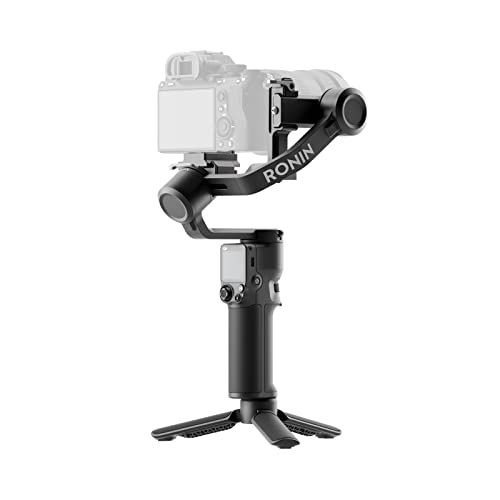

As an Amazon Associate we earn from qualifying purchases at no extra cost to you.
DJI RS Gimbals at a Glance
| Model class | Best for | What the maker emphasises | Limits |
|---|---|---|---|
| RS 3 Mini | Light mirrorless cameras, travel, vlogging | Compact, light body aimed at smaller camera and lens combinations | Lower payload; not suited to heavy zooms or cinema lenses |
| RS 4 / RS 5 | Mainstream mirrorless and hybrid shooters | Faster setup, balancing aids and improved stabilisation over earlier RS models, according to the maker | Larger than the Mini; check your camera and lens weight against the listed payload |
| RS 4 Pro / RS 3 Pro | Heavier cinema-style rigs | Higher listed payload, more robust build, support for accessories such as follow-focus systems | Heavier and bulkier; higher budget tier |
| RS 2 (previous generation) | Used-market buyers | Earlier design that many shooters still use | Older firmware features and accessories; availability varies |
How to Choose by Payload
Payload is the first filter. Each DJI RS gimbal lists a tested payload in kilograms, and that figure is for a balanced setup. Add the camera body, lens, battery, cage, microphone and any filter or monitor, then compare the total with the listed payload. Many shooters leave a margin of at least ten to twenty percent below the maximum, because a gimbal running at its limit has less headroom for fast moves and drains its battery faster. If you are close to the limit between two models, step up to the larger one.
Always consult DJI’s compatibility list for your exact camera and lens. A camera may be within the weight limit but still cause problems if the lens is long, the camera is deep from front to back, or the body is too tall for the mounting plate. The compatibility list covers balancing and control support, including whether the gimbal can trigger recording from its own buttons.
RS 3 Mini
The RS 3 Mini is the smallest gimbal in the series. It is designed for lighter mirrorless cameras paired with compact lenses, and reviewers describe it as a good fit for travel, vlogging and run-and-gun work where a full-size gimbal would be tiring. It folds down into a bag easily, and its quick-release and balancing features suit shooters who switch between handheld and gimbal use. The main limitation is payload. Pair it with a large zoom lens or a cinema camera and it will not hold balance.
RS 4 and RS 5
These mid-range models are aimed at the largest group of buyers: hybrid photographers and videographers using full-frame or APS-C mirrorless bodies with mid-sized lenses. DJI states that newer RS models improve on earlier generations in stabilisation, setup speed and battery life, and that they include features like automatic locking and balance-assist functions. For a first serious gimbal, this tier usually gives the best mix of payload, weight and price tier. Check which exact model names DJI currently sells in your region, because names, accessory bundles and release dates differ.
RS 4 Pro and RS 3 Pro
The Pro models are built for heavier setups, including cameras with large lenses, cinema bodies, matte boxes and external recorders. They list a higher payload and support extra accessories, such as focus control and transmission systems. This extra capability matters for professional crews. For solo creators, it can feel like overkill, because the gimbal itself is bigger and heavier, which becomes tiring over a long day.
RS 2 and Older Generations
Earlier RS 2 gimbals still turn up on the used market. They can be good value for shooters with moderate camera weights, but you should check firmware support, battery condition and compatibility with your current camera. Older models may lack newer features such as improved balancing aids or updated app functions.
Features That Matter
Balancing and setup
A properly balanced gimbal uses less motor power, lasts longer and gives smoother footage. Look for locks on each axis, a clear scale for lens position and a quick-release plate that matches your camera. Practice balancing before an important shoot.
Control and camera support
Some gimbals connect to cameras by cable or Bluetooth to start and stop recording or adjust settings. Support varies by camera model, so look up your camera in the maker’s list.
Modes and stabilisation
Typical modes include follow, lock, tilt-lock and roll-axis rotation for portrait orientation. Portrait mode is useful for vertical video. Test each mode with your own lens, since long lenses behave differently from short ones.
Battery and charging
Battery life is stated by the maker under test conditions and shortens with heavy payloads, cold weather and fast tracking. Carry a spare battery or a power bank that supports the charging method listed in the manual.
Accessories
Useful extras include a tripod base, a briefcase handle, a phone holder, a mounting plate for your camera and an extended grip. Consider these costs when comparing budget tiers.
Budget Tiers
- Budget: a used RS 2 or a base RS 3 Mini bundle for light cameras.
- Mid-range: an RS 4 or RS 5 combo with the extra tripod and handle accessories.
- Premium: an RS 4 Pro or RS 3 Pro combo for heavy rigs and professional work.
Pick X If… Decision Table
| If your setup is… | Pick | Reason |
|---|---|---|
| Small mirrorless with compact lens, travel use | RS 3 Mini | Light and compact |
| Full-frame hybrid body with a standard zoom | RS 4 or RS 5 | Balanced payload and size |
| Cinema camera, large lens, accessories | RS 4 Pro or RS 3 Pro | Higher listed payload |
| Phone video only | A phone gimbal from a smartphone range | Right-sized and cheaper |
| Tight budget, light camera | Used RS 2 | Older but capable |
Alternatives
- Other gimbal makers: several brands sell handheld camera gimbals with similar payloads, sometimes with different balancing systems and app ecosystems.
- In-camera stabilisation: many modern cameras and lenses stabilise well enough for walking shots, especially with electronic stabilisation, although cropping is usually involved.
- Shoulder rigs and monopods: these give a steadier, more traditional look at a lower cost, though they do not remove all movement.
Care and Safety Notes
Power the gimbal off before mounting or removing the camera, and never force an axis lock. Keep motors away from sand and water unless the manual states otherwise. Store lithium batteries according to the manual and do not use damaged batteries. When flying with a gimbal, check airline rules for lithium battery capacity limits.
Setting Up and Balancing Step by Step
Good balance is the difference between smooth footage and motor strain. Start with the gimbal powered off and the axis locks engaged. Mount the camera on the quick-release plate, then slide it forward or back until it sits level without tipping. Adjust the tilt axis first, then the roll axis, and finish with the pan axis, following the maker’s diagram. Add accessories such as a microphone or monitor before balancing, not after, because a small added weight changes the whole setup. Once balanced, power on the gimbal and run any automatic tuning the app offers.
When changing lenses, rebalance. Zoom lenses that extend as they zoom can shift the centre of gravity, so many shooters lock the zoom position or choose prime lenses for gimbal days. If a lens extends during focusing, read the maker’s compatibility notes. Practise walking techniques such as bent knees and smooth steps, because even the best gimbal cannot remove all body motion. Carry a small tool kit and the original case so the gimbal stays protected in transit.
Frequently Asked Questions
How do I know if my camera works with a DJI RS gimbal?
Use the compatibility list on the maker’s site. It names tested cameras and lens combinations, and it notes which control features, like start and stop recording, work with each body.
Is the RS 3 Mini enough for a full-frame camera?
It depends on the lens. Some full-frame bodies with a light prime lens fit within the listed payload, but a large zoom may not. Add up the total weight and compare it with the maker’s figure.
Can I use a DJI RS gimbal for photos?
Yes. A gimbal can help with long exposures and panoramas, and it can hold a camera at unusual angles. It is mostly bought for video, though.
Do I need the Pro models for professional work?
Not always. Many working videographers use the mid-range models with mirrorless cameras. The Pro tier is more important when you carry cinema lenses, matte boxes or other heavy accessories.
Why does my gimbal drift or shake?
Poor balance is the most common cause. Rebalance on all axes, check the lens position and ensure the payload is within the listed range. Update firmware and consult the manual if problems continue.
How long does the battery last?
The maker publishes figures measured under ideal conditions. Real use with heavier cameras, cold weather and active modes usually gives less, so carry a spare power source for long shoots.





